

Partner management automation is the use of software to handle repetitive partnership workflows — deal registration, partner communication, onboarding, and reporting — without manual intervention. In 2026, the teams that scale partner revenue the fastest aren’t the ones with the most portal features. They’re the ones that remove friction for partners while keeping everything measurable for the revenue team.
The most effective approach is CRM-first: automation that enhances your existing HubSpot or Salesforce instead of creating a separate system that hides partner activity.
Manual partner management works fine with a handful of partners. It breaks down fast when you’re chasing updates across fifty partners, copying data between systems, and watching engagement drop because nobody wants to log into another portal.
This guide covers what you can automate, how to implement it step by step, and how to choose partner management software that keeps everything visible inside your CRM.
What is partner management automation?
Partner management automation refers to using software to handle repetitive partnership tasks without manual intervention. Instead of chasing partners for updates, tracking deals in spreadsheets, or manually routing approvals, automation runs the workflow inside your existing systems — with clear ownership, timestamps, and reporting.
In practice, partner management automation typically covers four areas:
- Deal and lead registration: Partners submit opportunities through forms or email, and the system auto-routes for approval, timestamps decisions, and syncs everything to your CRM.
- Partner communication: Triggered emails, Slack notifications, and announcements go out automatically when deals change status, policies update, or registrations expire.
- Pipeline visibility: Dashboards update in real time from CRM data, so sales, partnerships, and RevOps see the same reality.
- Onboarding workflows: Welcome sequences, task checklists, and document collection happen without manual coordination.
The key distinction is where automation lives. Traditional PRMs often create a separate system that hides partner activity from your CRM. CRM-first automation keeps everything visible inside HubSpot or Salesforce, so partner-sourced revenue is trackable and forecastable alongside direct sales.
Why automate partner management?
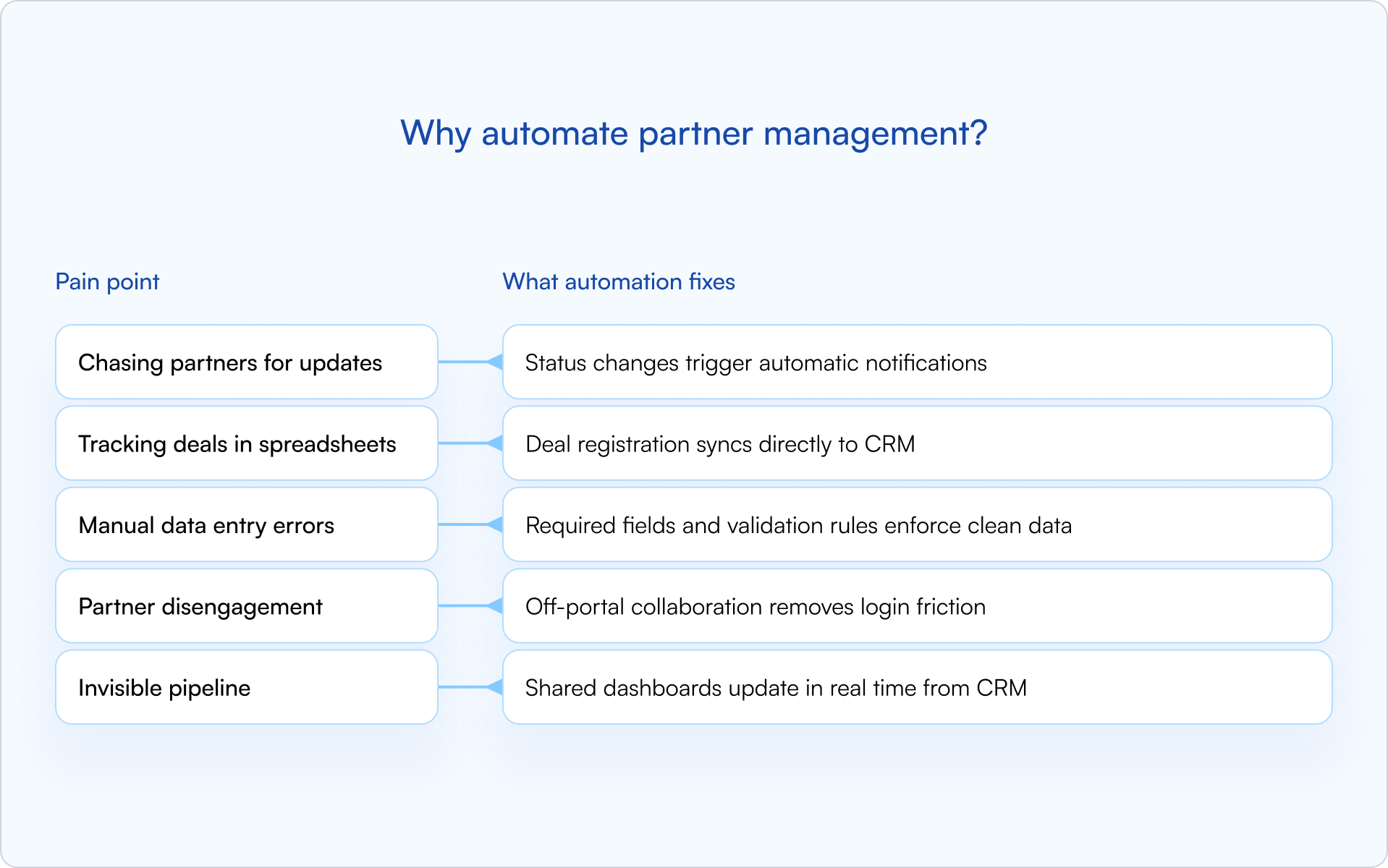
Manual partner management works fine with five partners. It breaks down quickly at fifty — especially once you’re dealing with approvals, attribution questions, and a pipeline that leadership wants to forecast.
The pain points are predictable: chasing partners for deal updates, copying data between systems, correcting duplicate records, and watching engagement drop because partners don’t want to log into another portal. Meanwhile, leadership can’t forecast partner revenue because the pipeline is invisible.
The outcome is simple: automation removes the friction that slows everything down. You can grow from twenty partners to three hundred without proportionally scaling headcount, because repetitive work is handled automatically and consistently.
Partner management tasks you can automate
Not every task benefits equally from automation. The highest-impact workflows are the ones that are high-volume, repetitive, and prone to human error — the exact places where a founder-led partnerships function starts to crack as you scale.
Deal and lead registration
This is where most teams start, and for good reason. Manual deal registration creates delays, disputes, and dirty data.
With automation, partners submit deals through a form or email. The system auto-routes the submission for approval, timestamps the decision, and syncs the deal to your CRM. Protection windows are enforced automatically, and expiring registrations trigger reminders before they lapse.
Deal registration is also your primary defense against channel conflict. When ownership is established early and visible to everyone, disputes become rare.
Partner communication and announcements
Partners miss updates when communication depends on someone remembering to send an email. Automation makes “the right update at the right time” the default.
Trigger notifications for the moments that matter: deal status changes, policy updates, expiring registrations, and approval decisions. Notifications can go out via email, Slack, or in-portal announcements — whichever channel your partners actually check.
Off-portal collaboration is a major lever here: partners can reply to notifications via email, and responses sync back to the CRM timeline. No login required.
Pipeline visibility and reporting
Shared pipeline views give partners visibility into their deals without exposing sensitive pricing or internal notes.
Property-level controls let you decide exactly what partners see (stage, next step, protection expiry) while keeping discount bands and internal comments hidden. Dashboards update automatically from CRM data, so you’re not manually pulling reports.
Partner onboarding and enrollment
Onboarding is a repeatable process — and repeatable is exactly what automation is good at. Onboarding new partners involves a predictable sequence: welcome emails, document collection, profile creation, and task assignments.
Automation runs that sequence without manual coordination. Partners receive welcome content, complete required steps, and get provisioned in your CRM, all triggered by enrollment. SSO removes password friction so partners can access the portal immediately.
Partner enablement and training
Training assignments can be automated based on partner tier, certification status, or product focus.
Content lives in the partner portal, completion is tracked automatically, and reminders go out when certifications expire. Partners stay ready to sell without requiring your team to manually assign and follow up on every course.
Payouts and commissions
For programs with referral or reseller commissions, automation can calculate payouts based on deal stage, generate reports for finance, and trigger disbursements.
Payout automation depends heavily on your partner model. Not every program needs it, but for programs that do, automation eliminates the back-and-forth between partner managers, finance, and partners.
How to implement partner management automation
Partner management automation works best when it’s introduced deliberately, not all at once. The goal is to automate what’s repetitive, protect what’s sensitive, and keep the pipeline trustworthy.
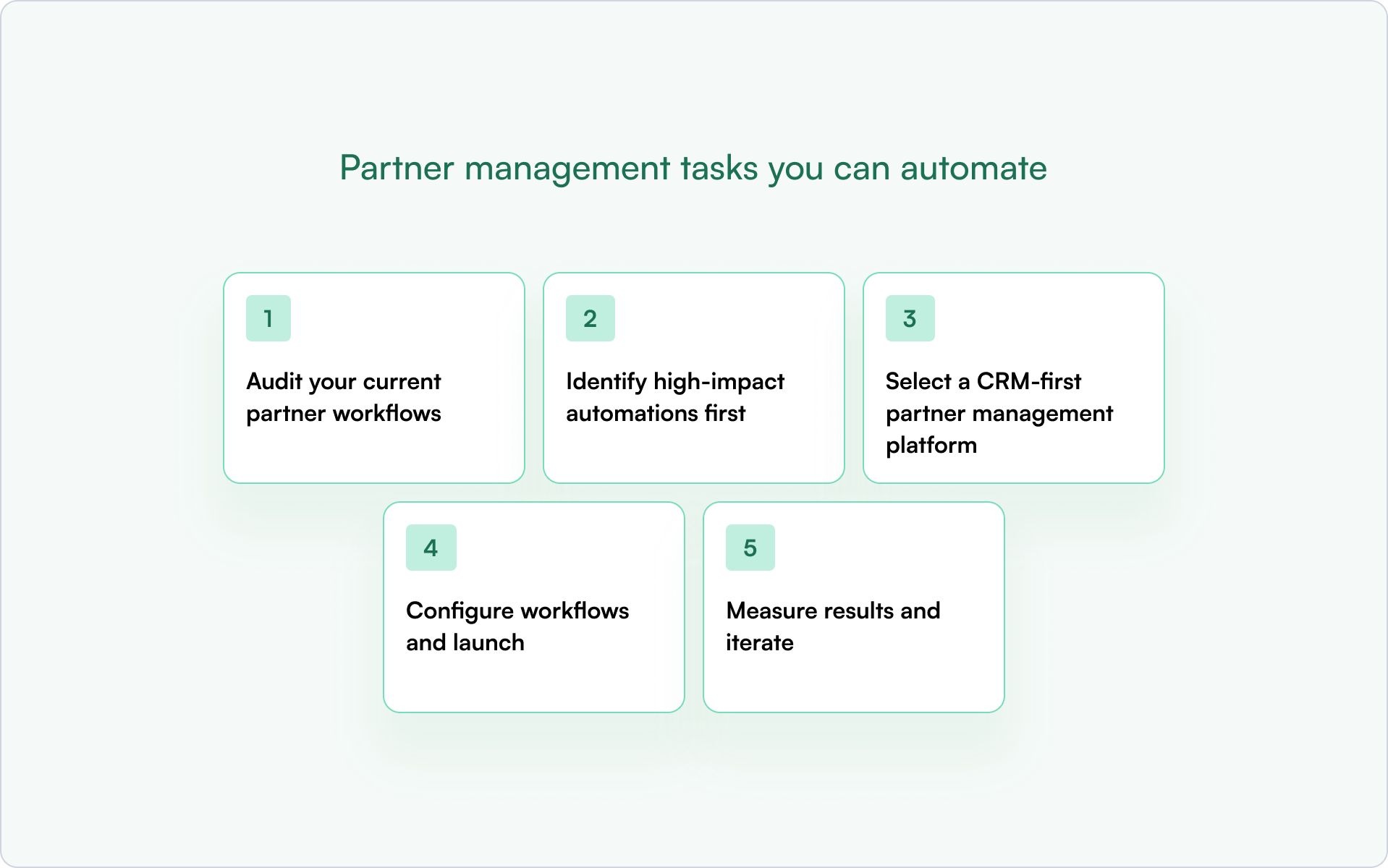
1) Audit your current partner workflows
Start by mapping where manual work lives today. Which tasks involve copying data between systems? Where do partners get stuck? What causes the most friction for your team?
Common culprits include deal registration, status updates, onboarding, and reporting. Document pain points before selecting tools or building workflows.
2) Identify high-impact automations first
Not everything deserves automation on day one. Focus on workflows that are high-volume, repetitive, and error-prone.
Deal registration and status notifications are usually the best starting points. Both are frequent, both directly impact partner engagement, and both create clean CRM data that benefits everyone downstream.
3) Select a CRM-first partner management platform
The platform you choose determines whether automation enhances your CRM or creates a parallel system you’ll be reconciling forever.
Look for:
- Native HubSpot or Salesforce integration: Real-time sync, not batch imports.
- Off-portal collaboration: Partners can take action via email without logging in.
- Property-level sharing: Control exactly what partners see in shared pipeline views.
- Fast implementation: Days to weeks, not months.
A CRM-first approach keeps partner activity visible where revenue teams already work — which is what makes attribution and forecasting realistic instead of aspirational.
4) Configure workflows and launch
Set up deal registration forms, approval routing, notification triggers, and shared pipeline views. Then test with a small partner cohort before rolling out broadly.
Start simple. You can add complexity later once the foundation is working and your team trusts the data.
5) Measure results and iterate
Track partner engagement, registration volume, approval times, and pipeline accuracy. Metrics tell you whether automation is working and where to refine.
The goal isn’t perfect automation on day one. It’s continuous improvement based on what you learn.
Best practices for partner management automation
Automation can backfire if it creates friction instead of removing it. These principles help keep your partner program scalable without making it feel robotic.

Keep the partner experience frictionless
Portal login walls kill engagement. The moment partners hit a login screen, many stop — especially when registering a deal is “nice to have” compared to running their own pipeline.
- Let partners submit deals via email or lightweight forms.
- Push notifications through channels they already check.
- Enable off-portal collaboration so partners can respond without logging in.
The fewer clicks required, the higher the engagement.
Start with quick wins before scaling
Prove the value of partner management automation with one or two workflows before expanding. Early wins build internal trust and help partners see the system as a benefit, not bureaucracy.
Deal registration is usually the best starting point. It’s visible, it’s frequent, and it creates immediate value for partners and your team. Once deal registration is working, expand to training, payouts, or complex routing.
Maintain human touchpoints where they matter
Automation handles repetitive work. Strategic relationships still require personal attention.
Use automation to free up time for high-value conversations like QBRs, conflict resolution, and partner development. The goal is to spend less time on data entry and more time on relationships.
Keep CRM data clean and actionable
Automation is only as good as the data it runs on.
Set up validation rules, duplicate detection, and required fields to maintain a single source of truth. When partner data is clean, reporting is accurate, attribution is clear, and forecasting becomes possible.
Partner management software for automation
The partner management software landscape includes several categories, each with different trade-offs. If you’re a founder choosing a direction, the real question is: “Will this make partner revenue more visible in our CRM — or less?”
CRM-native partner management platforms
CRM-native platforms are built directly on HubSpot or Salesforce. Partner activity syncs in real time, attribution lives in the same system as direct sales, and forecasting doesn’t require exporting data from a separate portal.
Introw is an example of a CRM-first approach. The partner portal, deal registration, and shared pipeline all live on top of your existing CRM, with no separate database and no data silos.
Standalone PRM platforms
Traditional PRMs like PartnerStack, Impartner, Allbound, Zift Solutions, and Kiflo operate as separate systems.
Standalone platforms are often feature-rich, but they create a parallel database that requires integration to sync with your CRM. Partner activity can become invisible to sales and RevOps unless you invest in maintaining the integration.
HubSpot PRM and Salesforce PRM options
When evaluating HubSpot PRM or Salesforce PRM options, the key question is whether the platform enhances your CRM or sits alongside it.
Native CRM tools offer basic partner tracking, but they often lack deal registration, shared pipeline views, and off-portal collaboration. Third-party integrations vary widely in sync quality and implementation complexity. CRM-first platforms like Introw offer tighter integration than standalone solutions, with real-time sync, property-level visibility controls, and partner collaboration without requiring logins.
Build a partner program that runs (almost) on autopilot
Partner management automation delivers on a straightforward promise: less manual work, cleaner data, engaged partners, and scalable growth.
The teams that get it right don’t automate everything at once. They start with high-impact workflows, choose CRM-first tools, and iterate based on what they learn. A CRM-first approach keeps partner activity visible where revenue teams already work — which means accurate attribution, reliable forecasting, and a partner program that scales without proportionally scaling headcount.
If you’re evaluating what “CRM-first” looks like in practice, you can get a demo and see how Introw automates partner management inside your CRM.
Still curious? Here are some quick answers to help clear things up
Partner management automation is the use of software to run repeatable partner workflows — like deal registration, approvals, onboarding, partner updates, and reporting — with minimal manual effort. The best implementations keep partner activity logged and measurable in your CRM so revenue teams can forecast and attribute partner-sourced pipeline.
PRM (Partner Relationship Management) is the category of software. Partner management automation refers to the specific workflows you automate within PRM software, such as deal registration, onboarding, and communication. You can have PRM software without much automation, or you can have highly automated workflows inside a CRM-first platform.
Yes. CRM-first platforms allow partners to register deals, receive updates, and collaborate via email or forms without requiring a portal login. Off-portal collaboration often increases engagement because it removes friction.
Implementation time varies by platform. CRM-native solutions can launch in days to weeks. Standalone PRMs with complex integrations may take weeks to months, especially if custom development is required.
Strategic relationship building, conflict resolution, and high-value partner negotiations benefit from human involvement. Automation should handle repetitive coordination so you have more time for conversations that require judgment and nuance.






Are you already an active Introw partner?
Book a demo with one of our partner program experts, or explore Introw on your own time.