

.svg)


.svg)
.svg)







Blog

SPIFF Programs: What They Are, How to Design Them, and Examples That Drive Partner Sales
A well-designed SPIFF program can turn a slow quarter, product launch, or stalled partner pipeline into a surge of sales activity. Used well, SPIFFs can change behavior fast. Used poorly, they can create expensive distractions. If you’ve heard the term before but never really knew what it meant, you’re not alone.
What is a SPIFF program?
A SPIFF program is a short-term sales incentive used to reward a specific action. SPIFF stands for sales performance incentive fund, though you may also see it written as “spiff” or “spiv.”
The SPIFF program's meaning is simple: you offer an extra reward when someone does the thing you want more of.
.png)
That could mean a direct cash bonus for closing deals above a set value, selling a new product, registering qualified leads, or reaching specific sales targets during a promotion period.
Unlike standard sales commissions, a sales SPIFF is temporary and focused. Commission usually runs in the background as part of your long-term compensation plans. A SPIFF is used when you want immediate motivation around one goal.
A well-structured SPIFF program usually has five traits:
- Short-term: It runs for a month, a quarter, or a campaign window.
- Targeted: It focuses on one product, region, deal size, or behavior.
- Simple: The program rules are easy to understand.
- Stackable: It can run alongside regular commission.
- Trackable: Every qualifying sale is tied to clear eligibility criteria.
.png)
SPIFFs can motivate sales teams, individual salesperson performance, and external channel partners. This guide focuses on partner SPIFFs because they’re harder to manage. Your channel partners don’t live in your CRM, and they can’t always see what they’ve earned.
That’s why a strong channel partner incentive program needs more than a good reward. It also requires clear tracking, fast communication, and a simple way for partners to see progress.
If your goal is to improve partner sales, a SPIFF can help. But only when the reward, rules, and payout process are easy to trust.
Why companies run SPIFF programs
The best SPIFF programs don’t just offer extra money. They encourage specific sales behaviors when they matter most.
Here’s why they work.
.png)
#1 Urgency creates action
Most sales commissions become part of the background. Sales reps and channel partners expect them, so they rarely change behavior on their own.
A short-term incentive creates a reason to act now.
For example, a channel SPIFF program might offer:
- $500 for every new logo deal closed this quarter
- A bonus for selling a newly launched product
- Extra rewards for deals above a specific value
The deadline matters as much as the reward. When partners know the opportunity disappears after a promotion period, they’re more likely to prioritize that deal over competing opportunities.
This is why SPIFFs are often used during product launches, pipeline pushes, and other strategic initiatives where timing matters. Teams running incentives alongside their existing HubSpot integration can track participation and revenue generated without creating separate workflows.
#2 Clarity drives participation
A successful SPIFF program should be easy to explain.
If partners need a spreadsheet and three meetings to understand the reward, participation drops. If the rules fit in one sentence, participation rises.
For example:
“Close a new logo deal above $10,000 this quarter and earn $500.”
That’s clear. Partners know the sales goals, the reward, and the eligibility criteria immediately.
The most effective SPIFF program ideas focus on simplicity. Partners should spend time selling, not interpreting program rules.
#3 Visibility keeps partners engaged
A sales SPIFF only works when people can see it.
Many sales SPIFF programs fail because the incentive is announced once and then forgotten. The reward lives in an email or PDF while partners focus on daily sales activity.
Visibility creates immediate motivation.
For example, when incentives appear directly inside a partner portal, partners can see pending and confirmed SPIFF rewards alongside active deals. Seeing the reward attached to a live opportunity keeps the incentive top of mind.
This is especially important for channel partners who may be managing opportunities across multiple sales channels at the same time.
#4 Low friction means more claims
Even strong cash SPIFFs lose impact when the payout process is complicated.
If partners have to chase approvals, fill out forms, or wait months for reward distribution, participation drops. Friction creates doubt, and doubt reduces engagement.
The best incentive program experiences make claiming rewards almost automatic.
With tools such as deal and lead registration, partner activity can be tracked from the original opportunity through payout. Add automation, notifications, and approval workflows, and salespeople spend less time on admin and more time closing deals.
When earning a reward feels easy, more partners participate. When rewards are visible, simple, and easy to claim, SPIFFs consistently boost sales and increase sales activity.
How to design a SPIFF program that actually changes behavior
A successful SPIFF program starts with a clear goal. The reward matters, but the behavior matters more.
.png)
Step 1: Define the behavior you want to change
Start with the outcome, not the incentive.
Ask yourself:
- Do you want more deals registered?
- Do you want to shorten the sales cycle?
- Do you want bigger deals?
- Do you want more certified partners?
- Do you want to increase sales in a specific market?
Pick one.
The best sales incentive programs focus on a single objective. If you try to change too many sales behaviors at once, partners won’t know what matters most.
Step 2: Set clear, simple rules
Partners should understand the SPIFF in seconds.
Every SPIFF program should answer four questions:
- What triggers the bonus?
- How much is the reward?
- Who is eligible?
- When does it expire?
For example:
“Register and close a new logo deal above $10,000 before September 30 and earn a $500 bonus.”
Simple rules lead to more participation. Complex rules lead to salespeople guessing.
Step 3: Make the incentive meaningful
A bigger reward isn’t always a better reward.
The goal is to offer meaningful rewards that justify the extra effort. For many SaaS programs, cash bonuses between $250 and $1,000 are enough to change behavior. Enterprise-focused SPIFF campaigns may require larger payouts.
You can also experiment with:
- Cash SPIFFs
- Non-cash rewards
- Non-cash SPIFFs
- Tech gadgets
- Prepaid debit cards
The best reward is the one that motivates channel partners to take action.
Step 4: Use CRM-based conditions
Manual tracking breaks quickly.
The most effective SPIFF programs use CRM data as the source of truth.
For example:
- Deal stage = Closed Won
- Deal value > $10,000
- Close date falls within Q3
When all conditions are met, the reward is triggered automatically.
In Introw, SPIFFs are configured using CRM filters, so qualifying deals are identified automatically based on your existing CRM data.
Here's an example of Introw’s commission plan builder showing CRM-based SPIFF conditions and a live preview of qualifying deals:
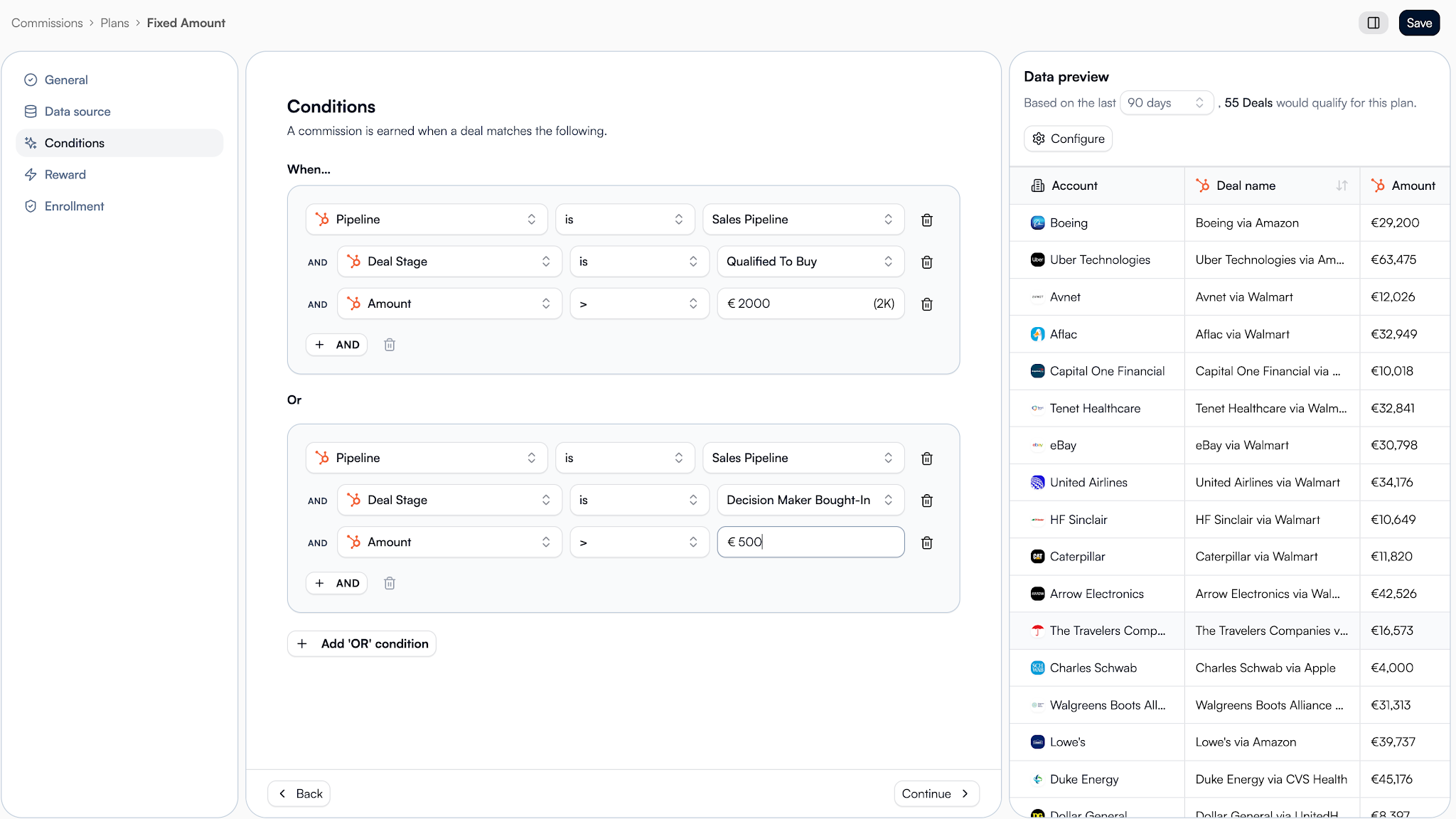
Good SPIFF program management starts with reliable data.
Step 5: Make the reward visible
Partners shouldn’t have to remember a SPIFF.
They should see it where they already work.
For example, Introw displays expected earnings directly on deal cards and inside the partner experience. Partners can see whether rewards are pending or confirmed without digging through old emails.
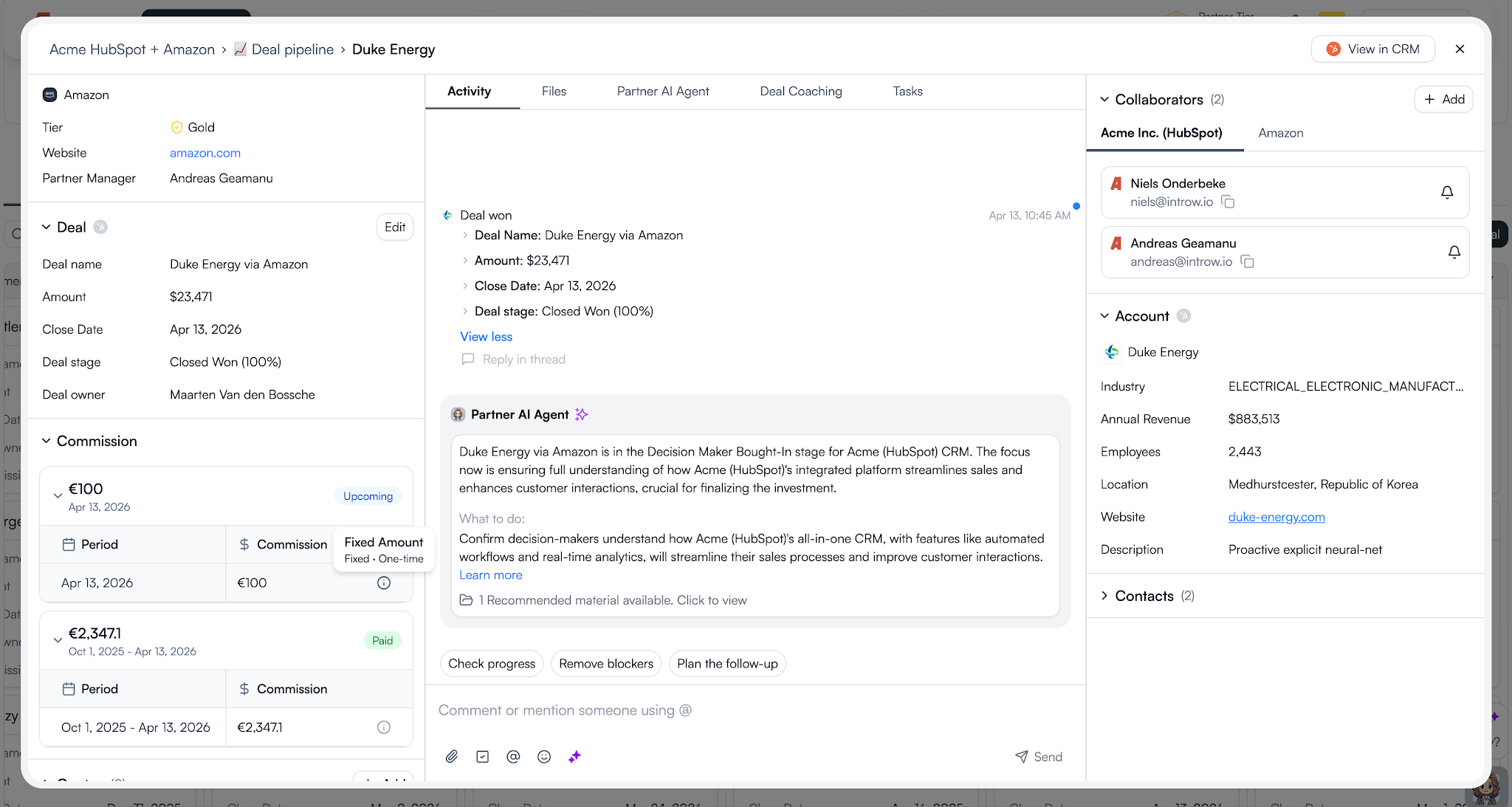
Visibility keeps sales teams driven and helps motivate channel partners throughout the entire campaign.
Step 6: Automate the payout process
A reward loses power when the payout process becomes a project.
A simple flow looks like this:
- The deal closes.
- The SPIFF calculates automatically.
- Eligible rewards are added to a statement.
- The partner uploads an invoice.
- Finance approves the payment.
- The reward is marked as paid.
Introw’s AI Agent can also help surface information and reduce admin work, making it easier to manage larger incentive programs without creating extra overhead.
The easier the process, the more likely partners are to participate.
Here's what this all looks like in action:
Step 7: Review and improve
Every SPIFF should teach you something.
After the campaign ends, review:
- How many partners earned the reward?
- How much sales revenue was generated?
- Which partner segments responded best?
- Did sales activity increase?
- Did you achieve the original sales goals?
Use those insights to improve future iterations.
The best partner programs don’t rely on one successful SPIFF. They run targeted incentives throughout the year as part of a broader incentive strategy.
A few well-designed SPIFFs will usually outperform one giant annual campaign.
The best way to see these principles in action is through real SPIFF program examples.
7 SPIFF program examples you can steal
Not every SPIFF needs to be complicated. Here are seven proven SPIFF program examples you can adapt for your partner program.
1. The activation accelerator
Use this SPIFF when you want new partners to take action quickly instead of waiting months to engage.
Rule: Earn $750 on your first closed-won deal as a new partner.
Trigger: First deal where deal stage = Closed Won.
Bonus: $750 flat fee.
Best for: New partners in their first 90 days.
Why it works: Early sales success builds confidence. Partners who close their first deal quickly are more likely to stay active and become a team motivated by results.
2. The Q3 pipeline push
This is one of the simplest sales SPIFF programs for accelerating pipeline movement before a deadline.
Rule: Earn $500 for every deal above $25,000 closed this quarter.
Trigger: Deal amount > $25K AND deal stage = Closed Won.
Bonus: $500 flat fee.
Best for: Active reseller partners.
Why it works: Short-term incentives and cash SPIFFs create urgency. Partners focus on closing deals before the deadline instead of letting opportunities sit in the pipeline.
3. The EMEA expansion bonus
Geographic incentives work well when you’re trying to grow partner activity in a specific market.
Rule: Earn an extra 5% on every DACH deal closed this quarter.
Trigger: Deal country = Germany, Austria, or Switzerland AND deal stage = Closed Won.
Bonus: 5% of deal value.
Best for: Reseller and referral partners expanding into new markets.
Why it works: Supports broader sales strategies without changing existing sales compensation plans. The bonus stacks on top of normal sales commissions.
4. The product launch SPIFF
When product launches need momentum, a targeted SPIFF can help direct attention where you want it.
Rule: Earn $300 for every deal that includes the new product.
Trigger: Deal contains the new product SKU AND deal stage = Closed Won.
Bonus: $300 flat fee.
Best for: New product launches.
Why it works: Partners sell what they’re rewarded to sell. This type of sales incentive helps boost sales of new offerings and improves product adoption.
5. The speed-to-close SPIFF
If deals are moving slowly through the pipeline, this type of SPIFF encourages faster action.
Rule: Earn $400 for any deal closed within 45 days of registration.
Trigger: Deal registration date to close date < 45 days.
Bonus: $400 flat fee.
Best for: Programs with a slow sales cycle.
Why it works: It encourages faster sales activity and helps prevent deals from becoming stale. The goal is to stop partners from letting opportunities delay closing deals.
6. The certification reward
Not every incentive program needs to be tied directly to revenue.
Rule: Earn $200 for completing an advanced certification.
Trigger: Certification completed with a passing score.
Bonus: $200 flat fee.
Best for: Individual salesperson development.
Why it works: Better-trained sales professionals often deliver stronger sales performance. It can also boost morale, improve job satisfaction, and increase long-term sales performance.
7. The stacked deal bonus
This example shows how SPIFFs and recurring commissions can work together.
Rule: Earn your standard commission plus a $1,000 bonus on deals above $100,000.
Trigger: Deal amount > $100K AND deal stage = Closed Won.
Bonus: $1,000 flat fee plus existing commission.
Best for: Gold and Platinum partners.
Why it works: SPIFFs don’t replace long-term compensation plans. They complement them. In Introw, partners can be enrolled in multiple plans at the same time, including recurring commissions, tiered SPIFFs, and one-time bonuses. Both rewards are calculated independently and rolled into the same statement.
Notice the pattern
Every example focuses on one behavior, one reward, and one clear trigger. That’s usually all you need to create a successful sales performance incentive fund that partners actually remember and act on.
So, what are things you should watch out for to make things go smoothly?
Common SPIFF mistakes to avoid
Even a good SPIFF program can fail if the execution is poor. Here are the most common mistakes to avoid.
.png)
Making the rules too complicated
If sales reps, channel partners, or an individual salesperson need a guide to understand the reward, participation drops.
Keep the program rules simple. A well structured SPIFF program should be easy to explain in one sentence.
Trying to reward too many behaviors
Some sales SPIFF programs try to influence multiple sales behaviors at once.
For example:
- Sell a new product
- Increase deal size
- Enter a new market
- Complete training
Pick one goal per campaign. The most effective SPIFF programs focus on a single outcome.
Offering rewards that don’t motivate action
A $25 reward on a six-month deal won’t motivate salespeople.
The reward should match the effort required. Whether you use cash SPIFFs, non cash rewards, prepaid debit cards, annual bonuses, or instant rewards, the incentive needs to feel worthwhile.
Making rewards hard to track
Partners should never wonder whether they’ve earned a reward.
Poor visibility hurts a program’s effectiveness and can damage team morale. Clear tracking helps motivate channel partners and supports healthy competition.
Ignoring payouts and compliance
Rewarding participants is only half the process.
You also need clear reward distribution, payment records, and tax compliance processes. This becomes even more important when managing channel partners across different regions.
Forgetting to measure results
After every SPIFF campaign, ask:
- Did sales targets improve?
- Was more sales activity generated?
- Did revenue increase?
- Did the SPIFF help move old inventory?
- Was the behavior change worth the cost?
The answers will help improve future SPIFF campaigns and strengthen your overall sales performance management approach.
Here is how partner teams run SPIFFs with Introw
Designing a SPIFF is only half the job. You also need a reliable way to track earnings, manage payouts, and keep channel partners informed.
Here’s what that looks like in Introw.
.png)
1. Create a SPIFF plan from CRM conditions
SPIFFs are created as commission plans using CRM data.
Set your date range, define the qualifying conditions, and choose the reward amount. Introw supports flat-fee and percentage-based rewards, and you can preview matching deals before the plan goes live.
2. Assign the plan to partners
Assign the SPIFF to individual partners or entire partner groups.
Partners can participate in multiple plans at the same time, including recurring commissions, certification rewards, and short-term incentive programs.
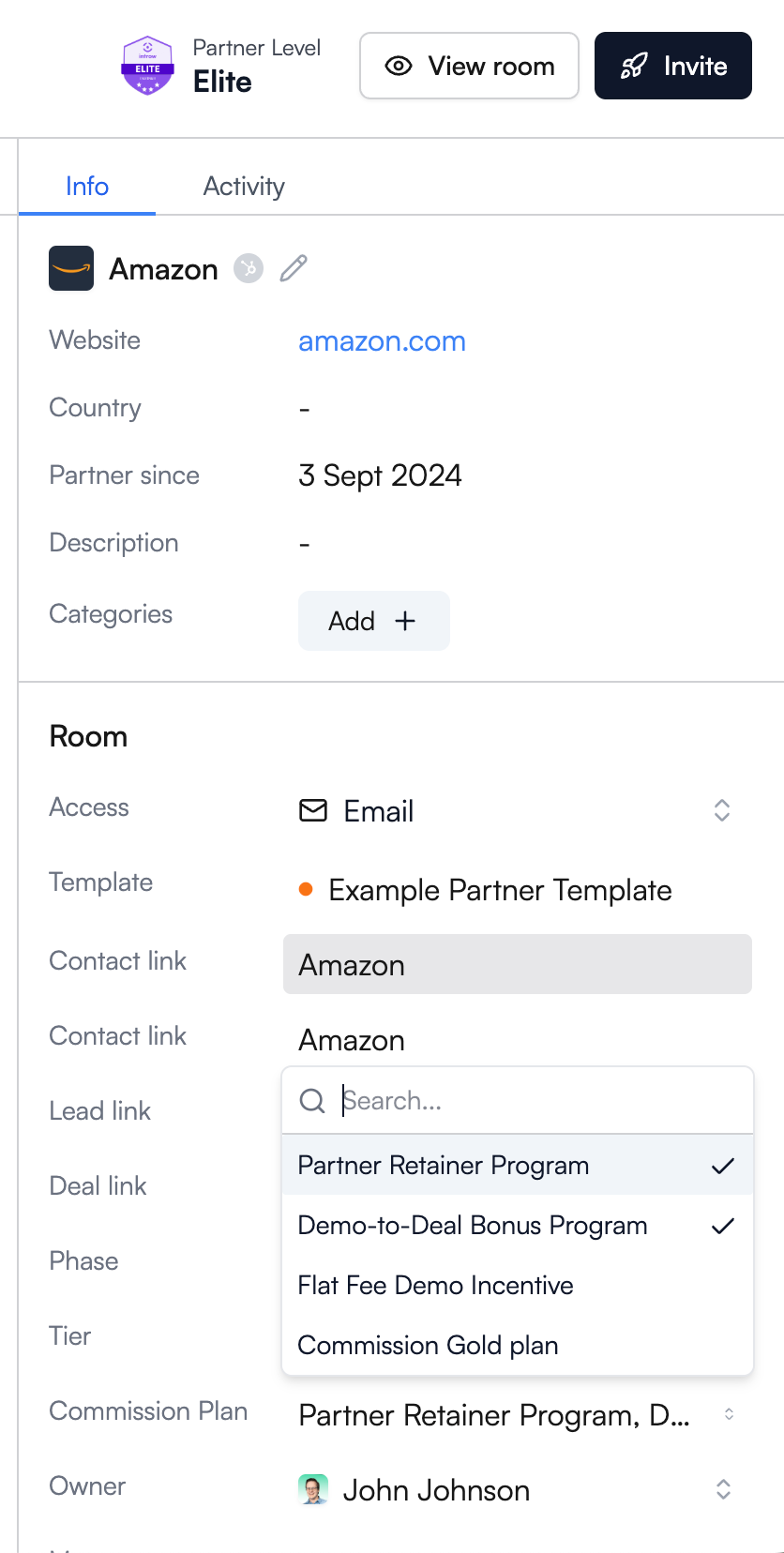
3. Partners see earnings in real time
Once the plan is active, partners can see expected earnings directly inside Introw.
Pending and confirmed rewards appear alongside deal information, helping partners stay focused on the opportunities that matter most.
4. Generate statements and collect invoices
When it’s time to pay, generate a statement with a few clicks.
Introw bundles eligible SPIFF rewards, sales commissions, and other payouts into a single statement. Partners can then upload invoices through the portal or simply reply to the notification email.
5. Approve payments and track everything
Every action is logged.
Partner managers and finance teams can review invoices, approve payments, and trace every reward back to the original CRM record. This creates a clear audit trail and simplifies reward distribution.
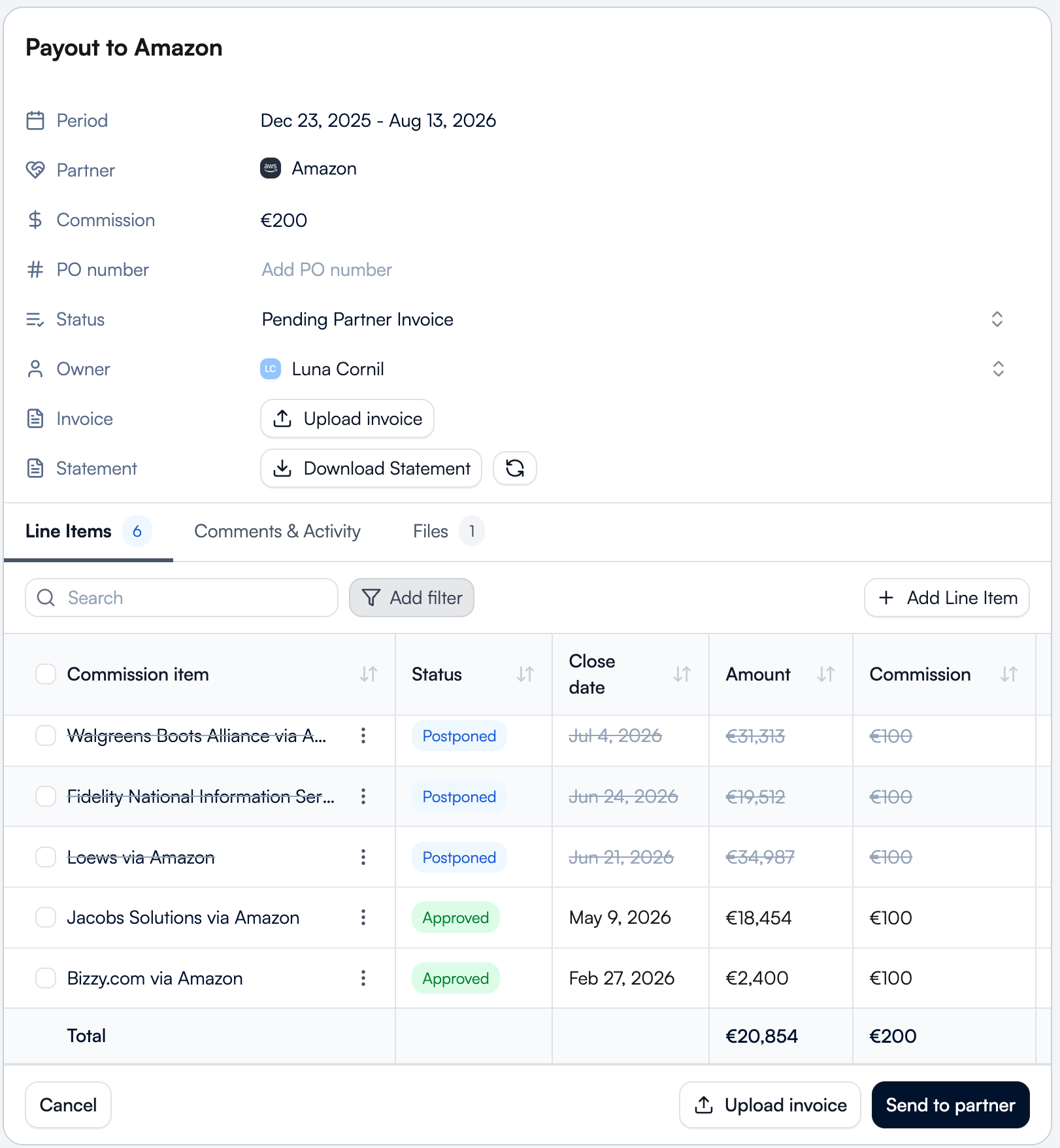
The commission overview ties it all together
The commission overview gives you one place to track SPIFF rewards, upcoming payments, and payout history.
Instead of managing spreadsheets, email chains, and separate systems, partner teams get a single source of truth for commissions, incentives, and partner earnings.
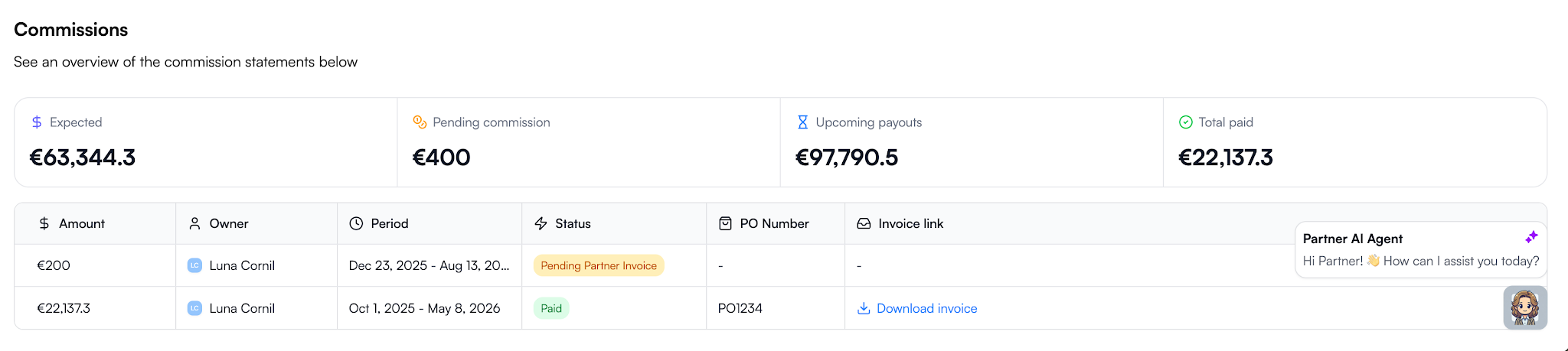
The result is a SPIFF program that’s visible to partners, tied directly to CRM data, and easy for finance teams to manage. Instead of tracking rewards across spreadsheets, email threads, and disconnected systems, everything lives in one workflow from deal registration to payout.
Ready to stop managing SPIFFs in spreadsheets? Request a demo and see how Introw automates partner incentives, commission tracking, invoicing, approvals, and payouts in one place.
15 MDF Best Practices for High-Impact Partner Programs
Why most MDF programs underperform
Most MDF programs don’t fail because the strategy is wrong. They fail because the operations around them are unclear, slow, or invisible to partners. Aligning early on expectations, ownership, and even the definition of MDF helps teams avoid the most common execution gaps.
The budget exists, but partners often don’t use it. In fact, roughly 60% of market development funds go unclaimed each year, not because partners aren’t interested, but because the process makes participation difficult.
.png)
Across many partner ecosystems, the same issues show up repeatedly:
- Channel partners don’t know funds are available
- The approval process takes too long
- Requests get lost in email or spreadsheets
- Marketing activities run without measurable outcomes
- Finance teams can’t track how marketing dollars were used
- Partner marketing teams can’t connect MDF investments to pipeline
Without structure, market development funds rarely support partner engagement or revenue growth. When MDF programs are tied to clear execution plans and measurable partner marketing campaigns, they become a predictable lever for demand generation instead of unused budget.
15 MDF best practices for SaaS partner programs
If you want market development funds to drive pipeline instead of sitting unused, you need a repeatable system. The following market development funds best practices are the framework strong SaaS teams use to make MDF programs predictable, measurable, and aligned with revenue.
.png)
1. Design your fund structure before you launch
Start with the question most teams skip: how should we allocate MDF in the first place?
Decide early whether MDF allocation is:
- Fixed per partner tier
- Performance-based
- Motion-based across reseller, referral, or integration channel partners
Also define:
- Eligible marketing activities
- Fiscal period (quarterly vs. annual)
- Whether unused MDF funds expire or roll over
Without this structure, approvals become inconsistent, and partners lose confidence in the program.
This is the foundation of strong MDF program management and best practices.
2. Make budget visibility self-service
Ask yourself this: can partners see their available budget without emailing you?
If not, adoption drops immediately.
Partners should always see:
- Total MDF allocation
- Pending requests
- Approved spend
- Remaining marketing budget
Real-time visibility improves partner engagement and increases participation in MDF campaigns faster than almost any other change you can make.
3. Build a standardized request form, not email
Inbox-driven requests slow everything down.
Instead, create a structured marketing development funds template partners complete before submitting requests. At minimum, capture:
- Campaign type
- Target audience
- Expected pipeline or qualified leads
- Timeline
- Budget requested
- Success metrics
When requests attach directly to CRM records, your MDF process becomes measurable from day one. Platforms designed for managing marketing development funds handle this automatically.
4. Set approval SLAs and default statuses
Partners don’t stop submitting requests because budgets are small. They stop because responses are slow.
Set a clear approval process, such as:
Submitted → Under review → Approved or declined
Then define an internal SLA, for example, five business days.
Predictability increases participation and improves demand generation activities across your partner ecosystem. It is one of the simplest MDF program best practices to implement.
5. Require a campaign brief, not just a budget ask
If a partner asks for marketing budget without a plan, pause.
Strong MDF programs require a short campaign brief that explains:
- What they want to run
- Who they want to reach
- What results they expect
- How the activity supports your strategic objectives
This improves strategic alignment and makes it easier to compare performance across MDF campaigns later.
6. Enable collaboration, not just approval
Approval is not execution.
After funding is approved, partners still need shared visibility into assets, timelines, and next steps. Otherwise, marketing initiatives disappear into email threads.
A structured collaboration environment improves partner marketing outcomes and keeps joint marketing initiatives visible across teams. It also strengthens ongoing partner engagement during campaign execution.
7. Link campaigns to deals and leads
Here’s the question leadership eventually asks: what did this spend actually generate?
If MDF campaigns are not connected to deals or sales leads, you cannot answer it.
Linking MDF-funded activities directly to pipeline turns market development funds into a measurable growth lever. It also helps channel managers understand which partners consistently generate qualified leads.
This is where many MDF programs break, and where the biggest gains usually happen. Make sure to use modern PRM that links all these activities directly in you CRM.
8. Track ROI automatically, not manually
If ROI lives in spreadsheets, you’re always reacting too late.
Modern MDF programs are being tracked directly in your CRM where you can connect spend directly to pipeline contribution so you can see which partners, campaigns, and marketing efforts drive revenue growth in real time.
That visibility helps you shift marketing investment toward activities that expand market reach and improve sales performance.
9. Gate future funds on proof of performance
A simple rule improves accountability quickly: show results before requesting more budget.
Ask partners to demonstrate:
- Campaign reach
- Lead generation
- Pipeline contribution
before approving additional MDF funds.
This ensures MDF investments support partners who execute and helps drive partner success across co-op programs and co-op funds.
10. Review and iterate quarterly
Treat MDF like a planning lever, not a reimbursement process.
Each quarter, review:
- Which partners used their allocation
- Which MDF campaigns generated pipeline
- Which marketing activities underperformed
These reviews strengthen your channel partner marketing strategy and make future MDF allocation easier to justify.
11. Segment MDF by partner motion, not just partner tier
Many teams allocate development funds by partner tier alone. That’s rarely enough.
Referral partners, resellers, and integration partners contribute differently to market development. Segmenting MDF allocation by motion improves market presence and ensures shared marketing resources support the right expected outcomes.
This is one of the most overlooked market development fund best practices.
12. Pre-approve high-performing campaign templates
Instead of reviewing every request from scratch, give partners a shortlist of proven campaign options.
Examples include:
- Co-branded campaigns
- Digital ads
- Local events
- Vertical webinars
Pre-approved templates reduce approval time and increase the likelihood of generating qualified leads.
They also help partners understand how to obtain marketing development funds faster because expectations are clear.
13. Tie MDF allocation to pipeline coverage targets
Not every region needs the same level of funding.
If pipeline coverage is weak in a segment or geography, allocate MDF funds there first. If another area already performs well, shift marketing investment elsewhere.
This ensures MDF allocation supports strategic priorities instead of spreading budget evenly across the partner program.
14. Combine MDF with incentive programs to change partner behavior
Funding alone doesn’t change behavior. Incentives do.
Pair MDF campaigns with structured channel partner incentive programs to encourage participation in demand generation campaigns and improve execution quality across channel partners.
This combination helps generate leads faster and strengthens overall partner performance.
15. Reserve budget for strategic initiatives, not reactive requests
Leave part of your development funds unallocated at the start of the quarter.
Use that reserve to support:
- New product launches
- Expansion into new regions
- Demand generation for priority segments
- Initiatives that increase brand visibility
This ensures MDF investments stay aligned with long-term strategic priorities instead of being consumed by opportunistic requests.
MDF request form template and checklist
A strong MDF request form does two things at once.
It makes approvals faster for your team, and it makes it easier for partners to submit campaigns that actually generate pipeline.
Without a structured request format, MDF campaigns become hard to evaluate, hard to compare, and almost impossible to attribute later.
A standardized marketing development funds template fixes that by ensuring every request captures the information needed to support demand generation, track sales performance metrics, and align spend with strategic objectives.
Use the template below as a default structure inside your partner program.
.png)
MDF request form checklist
Use this checklist to confirm your MDF process captures everything required for attribution and execution:
.png)
In a CRM-connected workflow, this structure also gives both you and your partners real-time visibility into MDF campaigns from request through execution and attribution, which is what makes modern MDF programs scalable.
Where Introw comes in
If you follow the framework above, your MDF program becomes structured. What most teams still struggle with is proving what that structure actually produces.
Introw closes that gap by connecting MDF requests directly to the partners, campaigns, and deals they are meant to influence inside your CRM. Instead of tracking approvals separately from pipeline, everything lives in one workflow.
That changes how MDF programs operate day to day:
- Partners submit structured requests without email back-and-forth
- Every request attaches automatically to the right partner and campaign
- Approvals follow a consistent approval process instead of ad-hoc routing
- Both you and your channel partners see available MDF funds in real time
- Marketing campaigns link directly to qualified leads and influenced deals
- ROI updates automatically as pipeline moves
This is what makes market development funds (MDF) measurable.
When a deal is generated or closed, you can see whether MDF supported it. When planning next quarter’s MDF allocation, you can see which partners generated pipeline and which marketing initiatives did not.
It also changes adoption. Because partners can see their allocation, submit requests quickly, and stay aligned on campaign execution, MDF funds get used instead of sitting unused across the partner ecosystem.
For a partner marketing manager managing Market Development Funds, that means fewer spreadsheets, clearer attribution, and better conversations with leadership about where marketing investment should go next.
If you want to see how structured MDF programs work when requests, approvals, campaigns, and pipeline all stay connected in one place, request a demo today.
Latest articles
How to Build a Partner Course Portal: Step-by-Step Guide
What is a partner course portal?
A partner course portal is a secure place where partners sign in, access training, and complete structured courses at their own pace.
Instead of sharing files by email or running one-off webinars, your team keeps education in one portal with clear progress tracking and visibility aligned to each partner’s role.
Built for partners, not employees
Most learning systems support internal teams. A partner course portal is designed for external members like resellers, referral partners, and technical partners who need the right knowledge before working with customers.
Many teams set this up inside a dedicated partner LMS to manage course visibility, access rights, and member progress in one place while showing different learning paths to different partner personas.
More than a content library
A basic portal stores documents. A partner course portal guides partners through a learning journey that supports real partner activity over time.
That usually includes:
- onboarding courses
- product education
- technical training
- certifications
- webinars and support material
With structured learning in place, it becomes much easier to track adoption and understand how to measure channel partner training ROI across your partner ecosystem.
A clear structure like this turns scattered education into something partners can actually follow without searching across multiple systems. Once that foundation is clear, it’s easier to see what your portal needs before you start building it.
What a good partner course portal needs
A partner course portal only works if partners can enter easily, find the right course fast, and know what to do next. When those pieces are missing, even strong education gets ignored.
Here are the core building blocks your portal should include from day one.
Secure partner access
Partners need a simple way to sign in without friction. If login feels complicated, members stop using the portal.
Most teams support access through:
- email-based sign-in
- password or passwordless login
- SSO for larger partner organizations
This keeps training protected while making it easy for the right people to enter the portal when they need support or guidance.
Structured courses and learning paths
A strong partner course portal shouldn’t feel like file storage. It should guide partners toward their first meaningful activity.
That usually means organizing courses by:
- partner role
- onboarding phase
- certification track
- product knowledge level
When partners can see what to learn first and what comes next, they move faster toward readiness. Many teams use dedicated partner LMS software to keep course structure clear as their ecosystem grows.
Certifications that show readiness
Certifications give partners a clear signal that they’re prepared to support customers. They also help your team set expectations for selling rights, onboarding milestones, or solution delivery readiness.
Simple certification paths often work best when introduced gradually and tied to real partner activity. Partner certification strategies can help you design milestones that support adoption without slowing partners down early.
Segmented visibility by partner type
Not every partner should see the same education. A good portal lets you control course access based on:
- partner tier
- role
- region
- language
- lifecycle phase
This keeps training relevant and reduces noise, so partners see what matters for their role and stage. It also supports different experiences across referral, reseller, and technical partner journeys.
Progress tracking and reminders
Partners should always know where they are in their learning journey.
Your team should be able to check:
- who enrolled
- who completed courses
- who earned certifications
- where members dropped off
That visibility makes it much easier to improve adoption and understand what’s working across your partner ecosystem.
Once these pieces are in place, building the portal becomes much more straightforward.
So before you create your first course, who exactly are you building the portal for, and what do you want them to achieve first?
Step 1: Define the audience and training goal
Before you build anything inside your partner course portal, take a step back and decide who the training is for and what they should be able to do after finishing it. This sounds simple, but it’s the step most teams skip.
When the audience isn’t clear, the portal turns into a mix of courses that nobody follows from start to finish.
Start with partner type
Different partners need different education. A reseller doesn’t need the same course as a referral partner. A technical partner doesn’t need the same journey as a marketing partner.
Most teams structure training around groups like:
Each group should see only the courses that help them move forward in their role.
Then define the partner role
Inside each partner type, roles matter just as much. Even within the same partner account, sales, technical, and leadership contacts should not see the same learning experience.
When role-based visibility is clear early, your portal stays simple as it grows and supports different experiences across partner personas.
Connect training to a real milestone
Every course should move partners toward something specific. Otherwise, completion rates stay low.
Common milestones include:
- finishing onboarding
- submitting the first deal
- joining co-selling activity
- earning certification
- preparing to support customers
Structured learning improves adoption and makes certification progress easier to track across your ecosystem.
Aligning courses with a broader partner training journey also helps partners know what to do first and what comes next.
With the audience and goal defined, you can start shaping the learning experience partners see when they enter your portal.
Step 2: Design the portal structure around the partner journey
Once you know who your partners are and what they need to achieve, the next step is shaping what they see when they enter your partner course portal. A clear structure helps members find the right course quickly and keep moving forward.
Think of the portal like a guided path, not a storage space.
Start with the entry experience
The first screen partners see should answer one question right away: what should I do first? It should also answer what’s in it for them, so partners can enter the portal and immediately see the next step, the value of completing it, and what unlocks after that.
Most teams organize their homepage around:
- onboarding courses
- certification paths
- product education
- technical training
- recorded webinars
This makes it easy for members to log in, check their next step, and continue learning without searching through folders. Many teams also organize technical docs, marketing assets, and battle cards into persona-specific asset hubs so partners can quickly find what they need without extra navigation.
Companies also manage this structure inside a dedicated partner LMS, where courses stay aligned with partner roles, personas, and lifecycle stages.
Organize training by journey stage
Partners don’t all start in the same place. Some are brand new. Others are ready to sell. Some are already supporting customers.
A simple structure usually follows stages like:
This helps partners move forward step by step instead of guessing what comes next.
Keep training connected to real partner activity
Training works best when it sits close to the actions partners already take.
For example:
- onboarding courses before submitting the first deal
- certification before co-selling access
- technical training before implementation work
- product updates shared through webinars inside the portal
Some teams also structure their portal so course visibility adjusts automatically based on role, region, persona, or lifecycle stage using systems connected through a HubSpot integration. This keeps access simple as your partner ecosystem grows.
When the structure reflects how partners actually work, the portal feels easier to follow from the first login. With that foundation in place, it’s much simpler to decide which courses should come first.
Step 3: Build the first courses
Once your structure is clear, it’s time to add your first courses. Start small. A partner course portal works best when members can move through a few focused lessons instead of working through too much education at once.
Most teams begin with a simple core set.
Start with the essentials
Your first courses should help partners understand how to work with your team and start engaging in real opportunities quickly.
A strong starting set usually includes:
- partner program overview
- product basics
- sales positioning
- deal registration steps
- certification path introduction
These courses give members the knowledge they need before moving into active deal collaboration.
Keep lessons short and modular
Short lessons are easier to complete and easier to update later. Instead of building one long course, break content into smaller modules partners can finish quickly.
For example:
This makes it easier for partners to check progress, return later, and continue learning without friction.
Use quizzes where readiness matters
Quizzes help confirm that partners understand important steps before moving forward. They’re especially useful before certification milestones or selling access.
Many teams also connect quizzes to broader certification paths using structured approaches like these partner certification strategies, which help reinforce learning across the partner journey.
Starting with a small set of practical courses keeps your portal clear and usable from day one. Once those courses are in place, the next step is deciding which ones should lead to certification.
Step 4: Add certifications and completion logic
Certifications turn a partner course portal from simple education into something partners take seriously. When members know they’ll earn proof of completion, they’re more likely to log in, finish lessons, and move forward.
They also help your team confirm who’s ready to work with customers and participate in real partner activity.
Choose which courses should lead to certification
Not every course needs a certificate. Focus on the ones tied to real partner responsibilities.
Common examples include:
- onboarding completion
- product readiness
- sales positioning
- technical setup training
These checkpoints make it easier to see which members are prepared before they enter customer conversations or support projects.
Use certifications to control access and rights
Certifications aren’t just recognition. They help define what partners can do next.
For example, your team can connect completion to:
- permission to register deals
- access to advanced education tracks
- eligibility for co-selling
- expanded partner program rights
Many teams introduce certifications gradually so partners can move into real opportunities early and continue learning as they progress.
If you’re planning a structured rollout, tools with a built-in Salesforce integration make it easier to track completion across partner contacts without managing updates manually.
Make completion visible and easy to track
Partners should always know what they’ve finished and what comes next. A simple dashboard inside the portal helps members check progress after they sign in with their email, reset a password if needed, and return to continue learning.
Your team should also be able to see:
- who enrolled
- who completed courses
- who still needs support
- who is ready for the next stage
This keeps education aligned with real partner activity instead of guessing who’s prepared.
Once certifications are in place, the next step is deciding which partners should see which courses in the first place.
Step 5: Set visibility and enrollment rules
Once your courses and certifications are ready, the next step is deciding who can see what inside your partner course portal. This is what keeps education relevant instead of overwhelming.
When members log in, they should only enter the courses that match their role and responsibilities. That makes the learning journey feel clear from the start.
Control course access by partner attributes
Not every partner needs the same training. Visibility rules help your team give the right education to the right members at the right time.
Most portals segment access using:
- partner type
- partner tier
- region or language
- lifecycle phase
- certification status
This keeps advanced courses hidden until partners are ready and reduces noise when new members enter the portal for the first time.
Clear visibility rules also help maintain program structure as your ecosystem grows alongside the rest of your partner relationship management software.
Choose the right enrollment method
Enrollment decides how members get access to courses after they sign in.
Common options include:
- manual enrollment for small partner groups
- bulk enrollment during rollout
- automatic enrollment based on role or region
- certification-triggered enrollment into advanced tracks
Automatic enrollment helps partners move between program stages without extra support and keeps learning aligned with real partner activity.
In more advanced portals, courses, assets, and program steps can also unlock automatically as partners complete milestones like onboarding tasks or deal registration, creating a guided journey without manual updates.
Some teams also connect enrollment to structured certification paths using modern partner certification software, which helps education stay aligned with readiness milestones.
With visibility and enrollment rules in place, your portal stays organized as more members join. The next step is rolling it out and making sure partners start using it.
Step 6: Launch, enroll partners, and track adoption
Once your partner course portal is ready, the goal is simple. Help members enter quickly, understand what to learn first, and start engaging without confusion.
A smooth launch makes a big difference in whether partners actually log in and complete their education.
Many teams start with a minimal portal that surfaces deal visibility, reports, and a small set of core courses first, then expand education as partners begin engaging in real opportunities.
Invite members with a clear first step
When partners receive their invitation, they should immediately know how to enter the portal and what to do next.
A strong rollout usually includes:
- a welcome email with login instructions
- a simple way to set or reset a password
- one clearly recommended first course
- a short explanation of why the training matters
This removes friction and makes it easier for members to return later without needing extra support.
Roll out training in small groups if needed
If your ecosystem is large, invite partners in stages instead of all at once. This helps your team answer questions faster and improve the experience before expanding access.
Many teams begin with:
- new partners in onboarding
- active resellers preparing for certification
- technical contacts supporting customers
Structured certification rollouts like these often improve completion rates over time, especially when paired with guidance from programs designed to improve partner engagement with certification programs.
Track how members use the portal after launch
After partners enter the portal, tracking activity helps your team understand what’s working.
Start by checking:
- who logged in
- which courses members completed
- where partners stopped learning
- who earned certifications
This makes it easier to adjust course structure and strengthen adoption using proven approaches like the LMS benefits for channel partner certification.
A thoughtful rollout helps partners feel confident from their first login. Once the portal is live, it becomes much easier to avoid the common mistakes teams run into when building partner training environments.
Common mistakes when building a partner course portal
Most partner course portals don’t fail because of the platform. They fail because members can’t tell what to do first.
Here are the mistakes that slow adoption most.
Adding too much education too early
Uploading every webinar and document at once makes it harder for members to start.
Begin with:
- onboarding basics
- product overview
- sales positioning
- certification path entry points
You can expand later as partners move into real opportunities.
Building one experience for every partner
Referral partners, resellers, and technical teams need different education. Segmented visibility helps members enter the right learning path from the first login and supports different experiences across partner roles.
Skipping certifications
Without certifications, it’s harder to confirm readiness. Even simple certificates create structure and improve completion when they’re connected to real partner activity.
Treating the portal like a document library
A partner course portal should guide a journey, not store files.
That means:
- clear course order
- structured milestones
- visible progress tracking
- defined completion goals
Launching without enrollment logic
If members don’t know what to take first, they often stop early. Automatic enrollment based on role, region, or certification stage keeps learning clear without manual work.
Many teams moving away from standalone tools explore structured options like these LearnUpon LMS alternatives to simplify partner education as their ecosystem grows.
Avoiding these mistakes keeps your portal easier to manage and easier for partners to use from day one.
With the structure in place, it helps to see how teams build and manage a partner course portal faster inside a single environment.
How Introw helps teams build partner course portals faster
Many teams try to build a partner course portal by combining separate tools for courses, certifications, access control, and tracking. That setup works early on, but it gets harder to manage as partner programs expand across roles, personas, and regions.
Introw LMS brings portal structure, education, certifications, and partner access together in one place so your team can launch quickly without stitching systems together.
Instead of starting from scratch, your team can create structured learning experiences based on partner role, lifecycle stage, or persona, while keeping visibility aligned with real partner activity inside the CRM.
Many teams begin with CRM-based visibility and deal context first, then layer courses and certifications afterward so the portal can go live quickly using data they already have.
Members log in and immediately see what they should learn first, what they can access next, and when they’re ready to move forward without searching across tabs or tools.
Because courses, certificates, and visibility rules stay connected, your team can:
- assign training by partner tier, role, or persona
- enroll members automatically as they progress
- issue certificates as milestones are completed
- adjust access rights as partners move into new program stages
Visibility can also update automatically using CRM attributes like certification status, geography, pipeline access, or lifecycle stage.
Teams moving away from fragmented learning tools often explore structured platforms like these 360Learning alternatives to keep partner education aligned as their programs grow.
When training, access, and certifications live inside the same partner environment, your portal becomes easier to launch and far easier to maintain.
And once the system is simple for your team, it becomes much easier for partners to log in, learn what matters, and move into real opportunities with confidence.
Over to you
A strong partner course portal gives your partners a clear place to enter, learn what matters first, and move toward their first real opportunities with confidence.
When courses, access, and progress tracking are structured from the start, training stays aligned with partner roles and becomes much easier to manage as your program grows.
Three simple next steps to get started:
- choose which partner roles need training first
- build a small set of core onboarding and product courses
- set visibility rules so members only see what applies to them
Starting small helps partners engage earlier and continue learning as they move into active deal collaboration.
If you want to see how teams set this up inside a single partner environment connected to their CRM, request a demo to get started.
14 Partner.io Alternatives for Stronger Partner Collaboration in 2026
Why teams compare Partner.io with other PRMs
Partner.io is a newer partner management platform focused on partner collaboration and pipeline visibility. As programs grow, many teams evaluate Partner.io alternatives with deeper CRM integration, stronger automation, and broader partner management capabilities.
Key evaluation criteria
Before choosing a platform, consider:
- Platform maturity: Customer base, reviews, case studies, and long-term product stability
- Partner lifecycle coverage: Support for partner onboarding, partner training, deal registration, MDF, incentives, and partner engagement
- CRM integration: How deeply the platform connects with Salesforce or HubSpot, including partner data synchronization and workflow automation
- AI capabilities: Whether AI reduces manual work through coaching, automation, insights, or content creation
- Partner collaboration: How easily partners can work with your team through a partner portal and other engagement channels
- Scalability: Whether the platform can support more partners, additional partner types, and a growing partner motion without adding complexity

The best choice is the platform that fits both your current program and where you expect partner revenue to grow over the coming years.
Partner.io alternatives at a glance
Use this table to compare each Partner.io comp by maturity, CRM fit, AI depth, and how much of the partner lifecycle each tool supports.
When comparing tools, focus on CRM integration, partner onboarding, partner training, reporting, and how well the platform supports growth over time.
For a broader view, compare these options with other partner management systems and the best PRM software.
14 best Partner.io alternatives in 2026
If you’re looking for a Partner.io alternative, these are the PRM platforms most commonly evaluated by SaaS companies that need stronger partner collaboration, better CRM integration, and support for the entire partner program.
#1 Introw - Best overall Partner.io alternative for CRM-native partner management

What it does
Introw is an AI-first PRM platform built directly around Salesforce and HubSpot. Instead of creating another database, it keeps CRM data as the system of record and extends it to partners through a white-label partner portal, email, Slack, AI-powered workflows, and automated collaboration.
The platform supports the full partner lifecycle, including partner onboarding, partner training, MDF, partner engagement, partner agreements, commissions, partner events, account mapping, co-selling, and partner-sourced revenue reporting.
Notable capabilities include:
- Deep CRM integration with Salesforce and HubSpot
- White-label no-code partner portal builder
- AI-powered deal coaching and recommendations
- Embedded partner LMS with AI-generated training modules
- Native MDF management and attribution reporting
- Automated deal and lead registration
- AI-generated announcements and enablement content
- Native Crossbeam integration for account mapping
- Real-time partner data synchronization
- Granular permissions by partner type and role
Most teams can go live in 2 to 4 days without custom development.
Why it’s the best Partner.io alternative
Introw supports the entire partner program, from partner onboarding and partner training to MDF, partner engagement, deal coaching, and partner-influenced revenue reporting.
Instead of stitching together multiple tools, Introw combines partner management, account mapping, channel conflict detection, and reporting in one platform.
Its built-in AI agent helps automate content creation, training, analysis, and partner communications.
Unlike portal-first platforms, Introw also supports collaboration through email and Slack, helping reseller partners, referral partners, and channel managers stay engaged without extra logins.
CRM integrations
- Salesforce (native, bi-directional)
- HubSpot (native, bi-directional)
- Full custom object support
- Real-time sync
- CRM event triggers
- In-CRM experiences for internal teams
Pricing
Custom pricing based on program requirements. A 14-day free trial is available.
Best for
SaaS companies with 2+ partner managers that want a modern PRM platform with deep CRM integration, AI-powered workflows, a centralized hub for partner management, and support for the entire partner program.
If you’d like a side-by-side breakdown, see our full Partner.io comparison or request a demo.
#2 Kiflo - Best for SMBs wanting a simple, affordable starting point
.png)
What it does
Kiflo is a lightweight PRM platform focused on partner onboarding, deal registration, referral partners, reseller partners, commission management, and basic partner management workflows. It offers a clean partner portal and a quick setup process for smaller teams.
Why someone might choose it over Partner.io
Kiflo has more customer reviews, and provides a straightforward way to launch a partner program without significant complexity. It supports Salesforce and HubSpot and covers the core needs of many SaaS startups.
Where it falls short
- No AI capabilities
- No off-portal collaboration
- No embedded LMS or partner training
- Limited performance tracking and engagement metrics
- No support for MDF or advanced channel conflict workflows
- Less suitable for partnership teams managing more partners or complex partner motions
CRM integrations
- HubSpot
- Salesforce
Pricing
Low-entry pricing with plans based on partner volume.
Best for
Small SaaS companies launching a new partner program that need an affordable partner management system with basic CRM integration and a simple partner experience.
Take a look at our in-depth guide of Kiflo alternatives to learn more.
#3 Euler - Best for newer programs wanting modern PRM with AI assistants

What it does
Euler is a modern PRM platform built for partner management, partner onboarding, and distributor relationships. Its AI assistants, PAM and POPS, help automate common partner management tasks and support a growing partner network.
Why someone might choose it over Partner.io
Euler shares Partner.io’s modern approach but adds advisory AI capabilities. It also has traction in distribution-heavy environments and offers a polished experience for new partners.
Where it falls short
- No embedded LMS
- No MDF management
- No white-label flexibility
- Limited support for complex partner agreements
- No deep CRM integration with custom objects
CRM integrations
- HubSpot
- Salesforce
Pricing
Custom pricing.
Best for
Growing SaaS companies that want a modern partner platform with AI assistance and a relatively simple setup.
We break down the strengths and limitations in our guide to Euler PRM alternatives.
#4 PartnerStack - Best for affiliate and referral programs with automated payouts
.png)
What it does
PartnerStack is a partnership platform focused on affiliate programs, referral partners, automated payouts, tracking links, and partner recruitment through its marketplace.
Why someone might choose it over Partner.io
It offers a large partner network, built-in payout infrastructure, and proven processes for SaaS companies running affiliate-driven partnerships at scale.
Where it falls short
- Limited support for reseller partners
- CRM integration relies on middleware
- Rigid portal experience
- No co-selling workflows
- Limited support for partner-sourced revenue management
CRM integrations
- Salesforce (via Workato)
- HubSpot (via Workato)
Pricing
Marketing plans start at $1000/mo. Growth plans start at $1520/mo. Enterprise pricing is custom.
Best for
Companies focused on affiliate and referral growth rather than complex channel partnerships.
For a deeper comparison, see our guide to PartnerStack alternatives.
#5 Impartner - Best for enterprise-scale PRM with broad module coverage
.png)
What it does
Impartner is a long-established PRM platform covering partner onboarding, TCMA, MDF, partner portals, partner performance management, and large-scale channel operations.
Why someone might choose it over Partner.io
It has a long track record, extensive functionality, and broad support for large companies running mature partner programs.
Where it falls short
- Lengthy implementations
- Enterprise complexity
- Dated user experience
- Middleware-based CRM integration
- Significant administrative overhead
CRM integrations
- Salesforce
- Other CRMs via middleware
Pricing
Enterprise pricing only.
Best for
Large organizations with dedicated channel operations resources and complex partnerships.
See how it stacks up against similar platforms in our best Impartner competitors guide.
#6 Salesforce Experience Cloud (Partner Cloud) - Best for Salesforce-only teams wanting maximum native control
.png)
What it does
Salesforce Experience Cloud lets businesses build a highly customized partner portal directly on Salesforce. It provides complete control over CRM data, workflows, and partner experiences.
Why someone might choose it over Partner.io
Organizations already standardized on Salesforce get native access to CRM data, reporting, and customization options without relying on a third-party PRM platform.
Where it falls short
- Requires development resources
- Long deployment timelines
- No built-in partner LMS
- No off-portal collaboration
- Higher ownership costs than most partner management tools
CRM integrations
- Salesforce (native)
Pricing
Partner Community pricing starts at $20/login or $50/member billed annually.
Best for
Salesforce-centric enterprises with internal development teams.
Teams comparing this approach often also evaluate other Salesforce PRM alternatives.
#7 ChannelScaler - Best for incentive and rebate management alongside PRM
.png)
What it does
ChannelScaler combines PRM functionality with rebate management, incentive programs, MDF administration, and partner performance reporting.
Why someone might choose it over Partner.io
It provides broader functionality for channel managers who need to manage incentives, rebates, and partner revenue from a single dashboard.
Where it falls short
- No AI-powered workflows
- No Slack collaboration
- Admin-heavy setup
- CRM integration often requires support involvement
- Limited innovation compared with newer platforms
CRM integrations
- Salesforce
- HubSpot
Pricing
No public pricing available.
Best for
Teams managing incentive-heavy channel programs.
For a closer look at the platform, explore our guide to ChannelScaler alternatives.
#8 Mindmatrix - Best for through-channel marketing automation at enterprise scale
.png)
What it does
Mindmatrix combines PRM, TCMA, partner training, marketing assets, partner events, and content automation into a unified platform.
Why someone might choose it over Partner.io
It offers significantly broader marketing functionality and helps empower partners with content distribution and enablement tools.
Where it falls short
- Steep learning curve
- Long implementations
- Heavy configuration requirements
- Older interface
- Complex administration
CRM integrations
- Salesforce
- HubSpot
Pricing
Enterprise pricing.
Best for
Organizations investing heavily in through-channel marketing programs.
You can explore additional options in our roundup of Mindmatrix alternatives.
#9 ZINFI - Best for large-scale unified channel management
.png)
What it does
ZINFI offers unified channel management across partner onboarding, MDF, marketing automation, partner training, and performance tracking.
Why someone might choose it over Partner.io
It supports complex multi-tier partnerships and provides extensive functionality for managing large partner ecosystems.
Where it falls short
- Complex implementation
- Heavy configuration
- Data primarily lives inside the platform
- Dated interface
- Higher administrative burden
CRM integrations
- Salesforce
- Microsoft Dynamics
Pricing
Enterprise pricing.
Best for
Large enterprises with extensive reseller programs and global partner operations.
Our guide to ZINFI alternatives explores similar options.
#10 Magentrix - Best for Salesforce-native portal experience
.png)
What it does
Magentrix is a Salesforce-focused partner management system built around partner portals, collaboration, and secure access to CRM data.
Why someone might choose it over Partner.io
It provides a more established Salesforce-native experience and gives organizations full visibility into Salesforce-based partner workflows.
Where it falls short
- Salesforce-only
- Limited AI capabilities
- Portal-centric approach
- No off-portal engagement
- Narrower feature set than full PRM platforms
CRM integrations
- Salesforce (native)
Pricing
Essential: $1500/mo. Advanced: $3000/mo. Enterprise pricing available on request.
Best for
Salesforce customers primarily focused on portal-based collaboration.
For a broader comparison, see our guide to Magentrix alternatives.
#11 Channeltivity - Best for mid-market teams wanting proven, straightforward PRM
.png)
What it does
Channeltivity provides deal registration, MDF management, partner portals, real-time analytics, and partner performance reporting for mid-market channel teams.
Why someone might choose it over Partner.io
It has a longer track record, established customers, and covers the core needs of many channel programs without excessive complexity.
Where it falls short
- No AI functionality
- No off-portal collaboration
- Limited innovation in recent years
- No advanced automation for partner engagement
CRM integrations
- Salesforce
- HubSpot
Pricing
Standard: $1899/mo annually. CRM Edition: $2199/mo annually. Enterprise pricing available on request.
Best for
Mid-market teams looking for a stable and proven PRM platform.
Take a closer look at alternative options in our guide to Channeltivity competitors.
#12 impact.com - Best for affiliate, influencer, and performance marketing
.png)
What it does
impact.com helps businesses manage affiliate, influencer, referral, and ecommerce partnerships with automated payouts and large-scale tracking capabilities.
Why someone might choose it over Partner.io
It excels at performance marketing and supports high-volume partnership programs with strong reporting and automation.
Where it falls short
- Not a traditional PRM platform
- No partner onboarding workflows
- No deal registration
- No partner portal for channel relationships
CRM integrations
- Limited compared with dedicated PRMs
Pricing
Custom pricing with transaction-related costs.
Best for
Organizations focused on affiliate and influencer revenue programs.
#13 Crossbeam (Reveal) - Best for ecosystem data and account mapping
.png)
What it does
Crossbeam helps teams identify overlap between customers, prospects, and partners through account mapping and ecosystem intelligence.
Why someone might choose it alongside Partner.io
It helps track partner opportunities, identify co-selling opportunities, and improve partner-influenced revenue through shared data insights.
Where it falls short
- Not a PRM platform
- No partner portal
- No onboarding workflows
- No engagement tools
- No deal registration
CRM integrations
- Salesforce
- HubSpot
Pricing
Free plan available. Starter: $4800/year. Enterprise pricing available on request.
Best for
Organizations that want ecosystem intelligence alongside a PRM platform.
#14 Everflow - Best for high-volume performance marketing tracking
.png)
What it does
Everflow provides performance tracking, fraud detection, automated payouts, and analytics for affiliate, referral, and influencer partnerships.
Why someone might choose it over Partner.io
It offers strong tracking capabilities, real-time visibility, and detailed reporting for organizations managing large volumes of partnership activity.
Where it falls short
- Not a PRM platform
- No partner onboarding
- No LMS
- No partner portal
- No channel collaboration workflows
CRM integrations
- Limited
Pricing
Custom pricing based on program scale and payout requirements.
Best for
Companies managing large-scale affiliate and referral programs where tracking and attribution are the primary priorities.
Now that you’ve seen the options, the goal is finding a platform that fits your teams today and can scale with your partner program tomorrow.
The bottom line
Partner.io may be a good fit if you’re launching your first partner program and want a straightforward way to manage collaboration.
Before you choose a platform, ask whether it can support:
- New partners as your program grows
- Referral partners, reseller partners, and tech partners
- Automated onboarding and partner agreements
- Multiple pipeline stages and evolving partner motions
- Accurate partner-sourced revenue and partner-influenced revenue reporting
- Full visibility into partner data, engagement metrics, and account mapping
The best partner management tools do more than provide a portal. They help partnership teams empower partners, improve the partner experience, reduce manual work, and generate more value from existing partnerships.
Introw combines AI, automation, and reporting in one hub instead of multiple systems.
It gives channel managers and heads of partnerships a centralized hub for partner engagement, marketing assets, and performance insights, all built around your CRM.
Still deciding? Our guide on choosing your next PRM covers the questions worth asking before investing in any partner management system.
Why teams choose Introw when looking for Partner.io alternatives
The right PRM should help you grow partner revenue without creating more work.
+70% more partner pipeline
Introw helps partnership teams attract more partners and move opportunities through pipeline stages faster. Deal flow stays connected to your CRM, while channel conflict detection helps prevent duplicate registrations.
+75% faster partner onboarding
Get started in days, not months. Automated onboarding, AI-generated training content, certification paths, and marketing assets help new partners become productive faster. More than 200 SaaS companies use Introw to support their entire partner program.
+60% more partner-influenced revenue
See how partnerships contribute to total revenue. Full visibility into partner-sourced revenue, partner-influenced revenue, engagement metrics, and performance tracking makes it easier to scale what’s working.
For referral partners, reseller partners, and tech partners, Introw provides one hub for collaboration, enablement, and growth.
Ready to see how Introw compares to Partner.io? Compare the platforms side by side and request a demo.
From Strategy to Results: 11 Partner Enablement Best Practices That Work in 2026
Partner enablement looks simple on paper: give partners the right resources, and they’ll sell your product. In practice, most programs stall because content is scattered, training is generic, and no one can tell which partners are actually ready to close deals.
The difference between a partner program that generates attributable revenue and one that drains resources usually comes down to structure — clear goals, the right content at the right time, and data that lives in your CRM instead of a forgotten portal. This guide breaks down partner enablement best practices from strategy through execution, plus the metrics that tell you if it’s working.
What is partner enablement?
Partner enablement is the system you build to help external partners sell (and often implement) your product effectively. That system typically includes structured onboarding, tailored training, and easy access to the right resources so partners can move deals forward without waiting on your team.
When partner enablement is done well, partners don’t just understand what you do. They can position it, handle objections, run a clean handoff, and create repeatable wins — the same way a high-performing internal sales team would.
What partner enablement typically includes
- Training and certification: Product knowledge, positioning, and selling motions (with a quality bar partners must meet).
- Sales and marketing resources: Collateral, templates, and campaigns partners can use with prospects.
- Tools and portal access: Systems that streamline deal registration, content access, and communication.
- Ongoing communication: A predictable cadence for updates, feedback, and performance reviews.
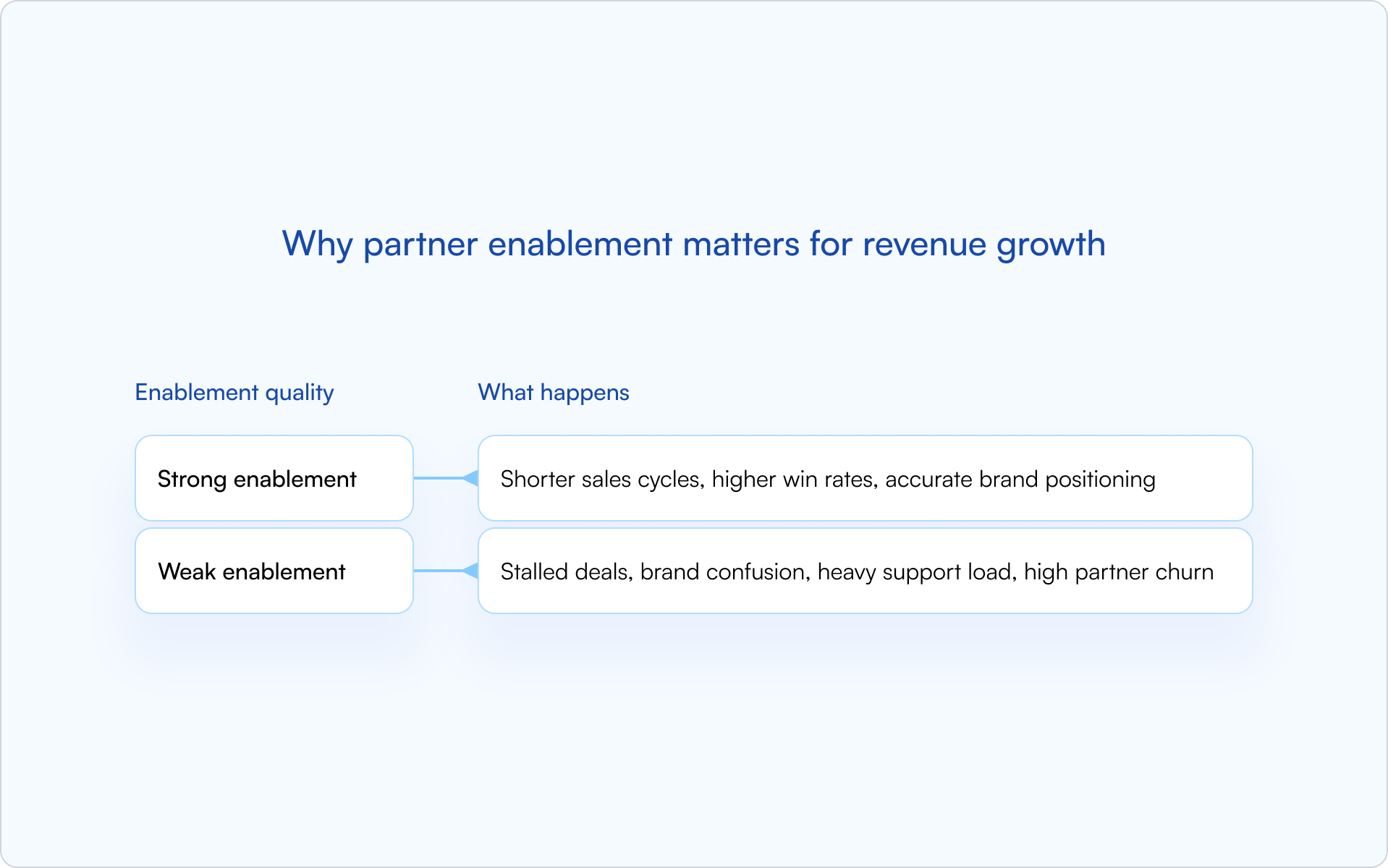
Why partner enablement matters for revenue growth
Enabled partners drive revenue because they can execute without friction. They close deals faster, represent your brand accurately, and generate pipeline you can actually attribute.
Weak enablement is expensive in quieter ways: partners misposition the product, opportunities stall, your team becomes the bottleneck, and high-potential partners churn because “it’s too hard to work with you.”
What a partner enablement program includes
A complete channel partner enablement program isn’t a portal full of PDFs. It’s a structured system that helps partners learn, launch, and improve — with clear ownership and measurable outcomes.
Partner training and certification
Training forms the foundation: product knowledge, competitive positioning, and your sales methodology. Certification acts as a gate, ensuring partners meet a minimum quality bar before they’re authorized to sell on your behalf.
Partner sales enablement
Partner sales enablement means giving partners the same caliber of sales tools your direct team uses, adapted to their role. Think: battle cards, demo scripts, objection-handling guides, and pricing documentation.
Marketing support and co-marketing
Effective enablement helps partners generate demand, not just close it. Co-branded assets, “campaign-in-a-box” kits, and structured lead-sharing programs all increase partner-sourced pipeline.
Partner portals (and why login friction kills adoption)
A partner portal should be a self-service hub for training, collateral, deal registration, and updates. But there’s a common failure mode: partners avoid portals that require a separate, inconvenient login.
CRM-first portals reduce that friction by connecting directly to HubSpot or Salesforce, so partners can work inside the flow of real deals instead of “checking another system.”
Performance tracking and ongoing communication
Enablement is ongoing, not a one-time launch. A strong program includes visibility into partner activity, a consistent communication cadence, and mechanisms for gathering feedback and improving the experience.
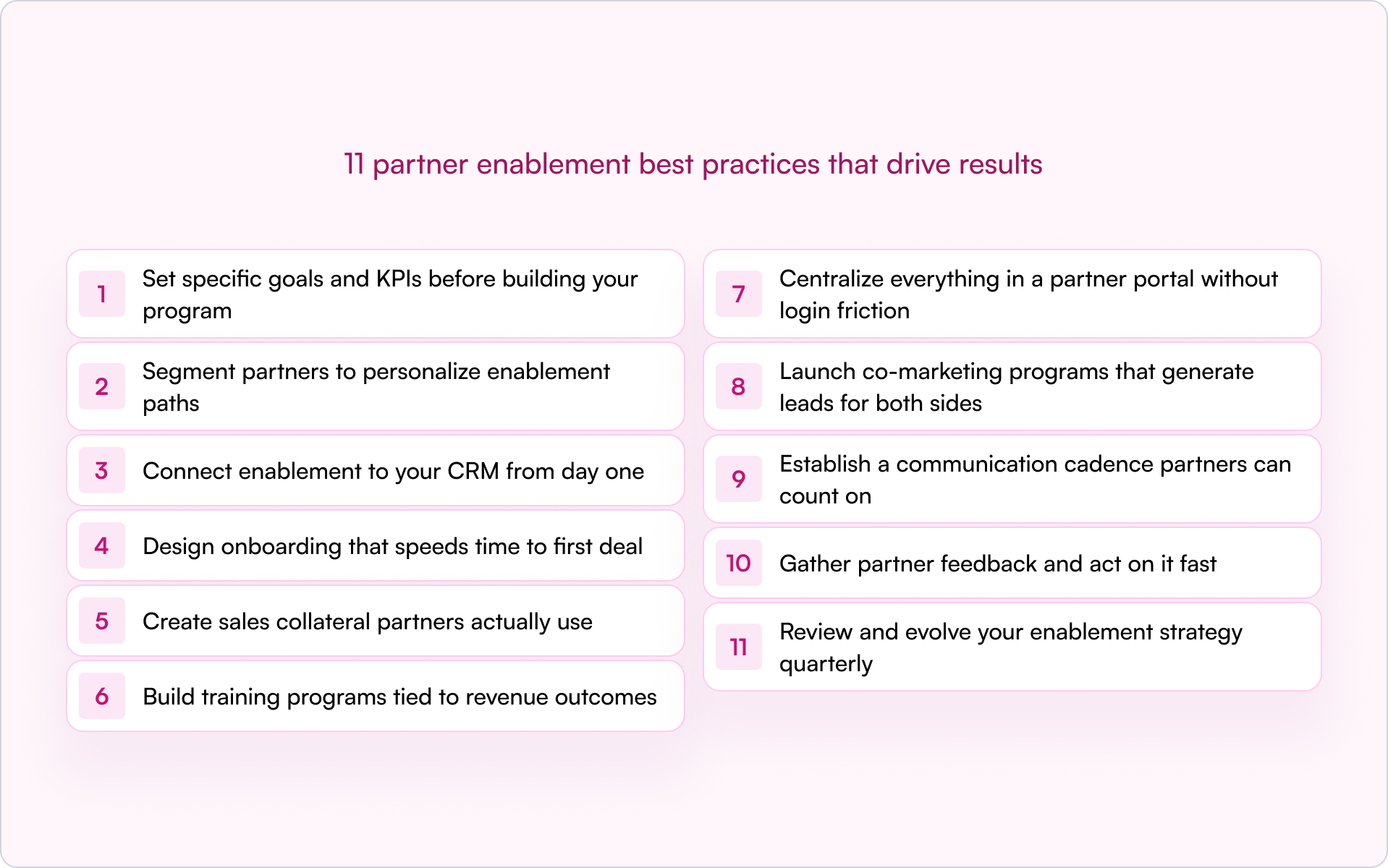
11 partner enablement best practices that drive results
If you’re building a partner program inside a startup, your constraint is almost never “ideas.” It’s focus and execution. These partner enablement best practices move from strategy through rollout and iteration — with an emphasis on what actually shows up in pipeline.
1. Set specific goals and KPIs before building your program
Before you create a single asset, define what success looks like. Start with outcomes — partner-sourced revenue targets, certification completion rates, and a target time-to-first-deal — then work backward into the program.
- Partner-sourced pipeline value
- Certification completion rate
- Average time from onboarding to first registered deal
- Content engagement (downloads, video views)
2. Segment partners to personalize enablement paths
Not all partners need the same materials. Segment by partner type (reseller, referral, systems integrator), vertical focus, or performance tier, then tailor training and content accordingly.
3. Connect enablement to your CRM from day one
For true visibility and attribution, all your enablement data — certifications, content consumption, deal registrations — lives best in your CRM, not in a disconnected system.
A CRM-first approach provides a single source of truth. When partner activity syncs directly to HubSpot or Salesforce, your sales team and RevOps see the same reality. No more chasing updates or reconciling spreadsheets. (If deal attribution is a pain point today, it’s worth tightening up your workflow around partner deal registration specifically.)
4. Design onboarding that speeds time to first deal
Partner onboarding works best as a structured, time-bound journey — not a massive content dump. The goal is to get partners to their first real opportunity quickly, then reinforce with deeper training once momentum is real.
A strong onboarding checklist includes:
- Welcome and program overview
- Product and Ideal Customer Profile (ICP) training
- Competitive positioning
- Deal registration process walkthrough
- First co-sell or shadow opportunity
5. Create sales collateral partners actually use
Don’t reinvent the wheel. Audit the sales collateral your direct team uses most effectively and adapt it for your partners. Prioritize assets that accelerate live deals: one-pagers, battle cards, ROI calculators, and customer stories.
The fastest way to avoid producing content no one opens is simple: ask partners what they need to win the deals they already have, then build for that.
6. Build training programs tied to revenue outcomes
Training works best when it’s modular, role-based, and tied to certification. Use certification as a gate — for example, require a partner to complete key modules before they can register deals or request MDF.
On-demand training offers flexibility; live sessions drive engagement for complex topics. Most teams land on a hybrid model.
7. Centralize everything in a partner portal without login friction
A partner portal should be the single place to find enablement content, register deals, and get program updates. But portals fail when they add friction — especially separate logins, stale content, and unclear navigation.
If you want adoption, reduce steps. Portals built directly on the CRM (with SSO or no-login options) make access feel seamless, which is often the difference between “partners love it” and “partners ignore it.”
8. Launch co-marketing programs that generate leads for both sides
Co-marketing goes beyond providing partners with your logo. Joint webinars, co-branded content like eBooks or case studies, and Market Development Funds (MDF) programs actively help partners generate demand.
If you’re a founder, this is one of the highest-leverage shifts you can make: partners often need help creating pipeline, not just closing it.
9. Establish a communication cadence partners can count on
Define a predictable rhythm. Partners shouldn’t have to guess where to find updates or whether deal registration is working. Use channels like email and Slack to reach partners where they already operate — don’t rely solely on them logging into a portal.
10. Gather partner feedback and act on it fast
Enablement is a two-way street. Collect feedback through surveys, QBR conversations, and portal analytics — then close the loop by making changes and telling partners what you changed.
Partners keep investing when they feel momentum. Small, fast improvements create that signal.
11. Review and evolve your enablement strategy quarterly
Partner enablement isn’t set-and-forget. Quarterly, review what’s working and what isn’t by analyzing content engagement, certification rates, and revenue impact. Then adjust your program like you’d adjust product — based on usage and outcomes.
Partner enablement training metrics to track
To understand if your partner enablement process is working, track metrics that connect enablement activities directly to revenue outcomes — not just vanity activities.
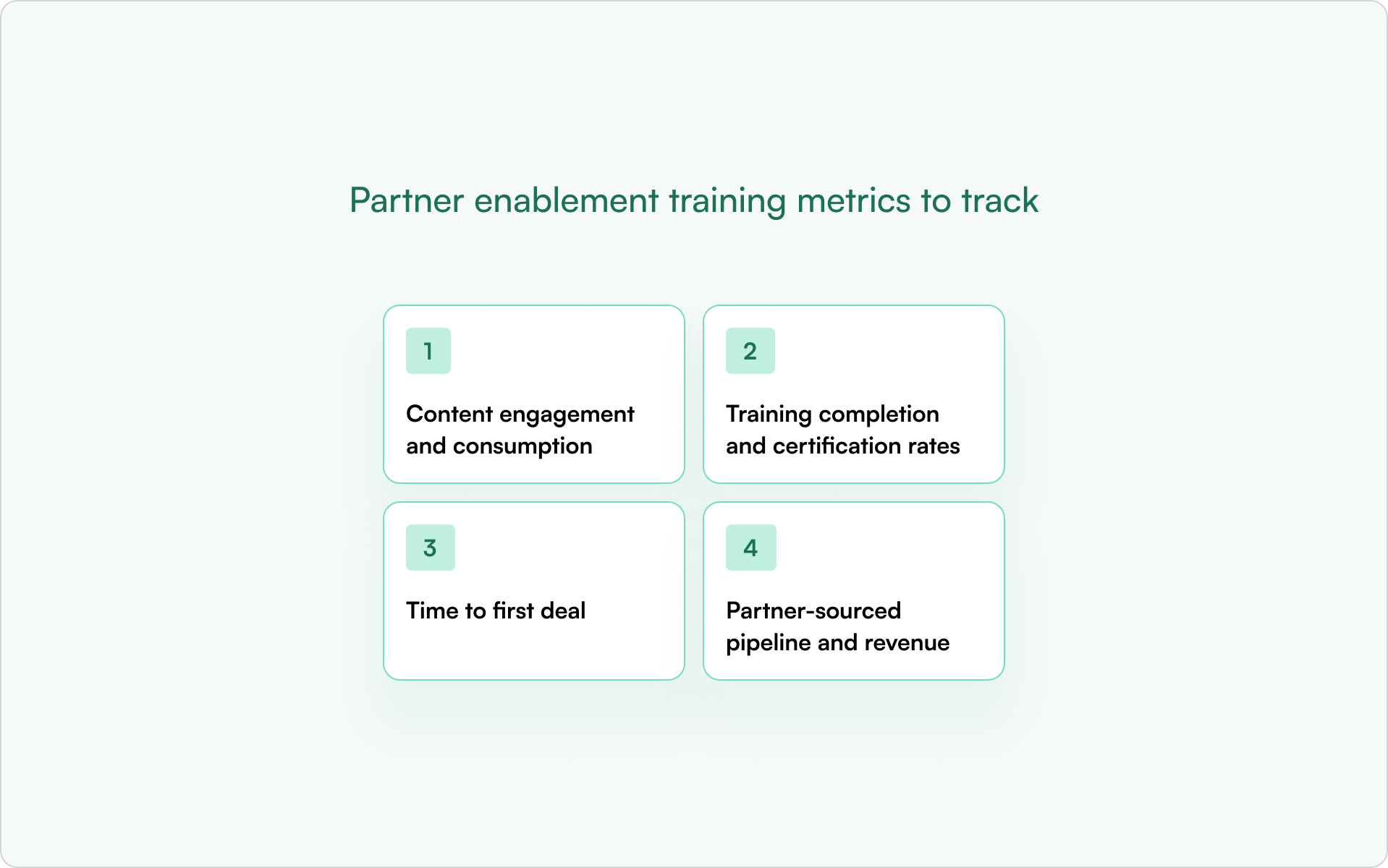
Content engagement and consumption
Track which resources partners actually use: downloads, video completion rates, and page views. Low engagement can signal the content isn’t relevant, is hard to find, or doesn’t match what partners need in active deals.
Training completion and certification rates
Measure how many partners complete onboarding and earn certifications. Completion rates help you pinpoint drop-off points so you can shorten, reorder, or redesign modules.
Time to first deal
Track the time between partner activation and their first registered deal. This is one of the cleanest indicators that onboarding is working — or that partners are stuck.
Partner-sourced pipeline and revenue
This is the ultimate scoreboard. Track pipeline and closed-won revenue generated by partners. To do it well, you need tight CRM attribution so enablement activity can be tied to financial results without manual cleanup.
How to automate your partner enablement process
Automation lets you scale partner enablement without scaling headcount. The goal isn’t to make the experience robotic — it’s to make it consistent, timely, and measurable.
CRM-based automation is ideal because it keeps data and workflows in one system. That’s how you avoid the “portal says one thing, CRM says another” problem.
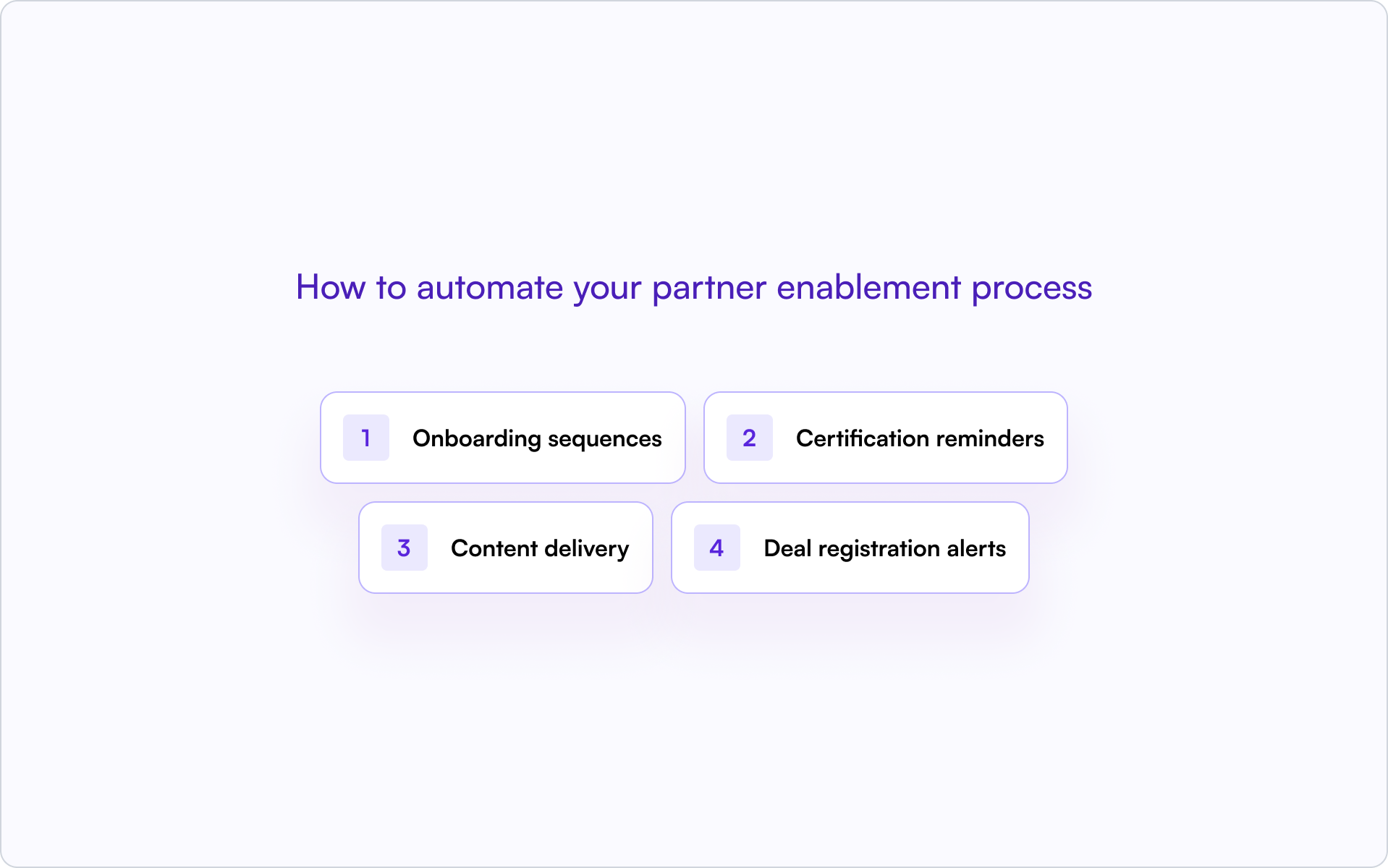
- Onboarding sequences: Automatically enroll new partners in training modules and send welcome materials as soon as they sign up.
- Certification reminders: Trigger automated alerts to partners and partner managers before certifications expire.
- Content delivery: Push relevant collateral to partners based on their segment, tier, or deal stage.
- Deal registration alerts: Automatically notify partners of the status of their registered deals.
Turn partner enablement into a revenue engine with Introw
Introw is the CRM-first PRM that makes best-practice partner enablement practical and scalable. Because it’s built on HubSpot and Salesforce, Introw centralizes your entire partner program where you already work.
It includes a partner portal for centralizing enablement content without login friction, deal registration with real-time visibility, and off-portal collaboration so partners can reply via email while data syncs automatically to your CRM.
If you’re trying to get out of spreadsheet chaos and into measurable partner-sourced revenue, get a demo.
Conclusion
The best partner enablement programs aren’t built on more content — they’re built on clarity. Clear goals, segmented paths, CRM-connected workflows, and a focus on speed-to-first-deal turn “partners we signed” into “partners who ship revenue.”
Use these partner enablement best practices as a blueprint, then iterate quarterly based on what your data (and your partners) tell you.
12 Channeltivity Competitors to Choose From in 2026
What is Channeltivity (and why teams look for competitors)
Channeltivity is a partner relationship management platform that covers the basics well: deal registration, partner marketing, MDF, content management, and reporting.
But many teams now want AI, deeper CRM workflows, and more flexibility across the partner ecosystem. That’s why buyers evaluating Channeltivity alternatives are looking elsewhere.
.png)
1. No AI capabilities
Channeltivity does not offer AI-powered workflows for onboarding, training, support, or deals.
Many newer platforms now provide AI deal coaching, AI-generated content, AI training creation, and conversational support through an AI agent.
2. No off-portal collaboration
Channeltivity relies heavily on its portal experience. Partners typically need to log in to access content, submit leads, or track progress.
Many newer platforms focus on partner engagement through email workflows, embedded forms, notifications, and automated updates outside the portal.
3. No native Slack integration
Slack is now a common workspace for many channel teams.
Channeltivity does not provide native Slack workflows for notifications, collaboration, support, or deal updates. Teams that use Slack heavily often look for alternatives that bring partnership activity into the channels they already use.
4. Limited CRM depth
Channeltivity supports Salesforce and HubSpot, but it is not a CRM-native platform.
Organizations that run revenue operations inside the CRM often prefer custom objects, workflow triggers, and deeper integrations such as a native Salesforce integration or HubSpot integration.
5. Product innovation has slowed
Channeltivity still covers the core feature set expected from partner management software. But many newer solutions now include account mapping, partner LMS capabilities, AI-powered training, and advanced automation.
For many teams, the question is not whether Channeltivity works. It’s whether it still offers the capabilities they need to grow.
To find the best Channeltivity alternative available, what should you be looking for?
What to look for in a Channeltivity competitor
Not every Channeltivity PRM alternative solves the same problems. Focus on these six areas before you switch.
.png)
1. AI that does more than answer questions
Many tools now offer AI, but not all AI is useful. Look for AI that can automate workflows, generate content, build training, assist with support, and help move deals forward without manual effort.
2. Off-portal engagement
Your users shouldn’t have to log in every time they need an update. The best platforms let channel partners collaborate through email, notifications, and other channels while keeping data synced automatically.
3. Deep CRM integration
A CRM should remain your system of record. Look for bi-directional sync, custom object support, workflow triggers, and the ability to work directly inside Salesforce. Our guide to how to choose a PRM covers the key evaluation criteria.
4. A modern partner portal
The portal should be easy to configure without developers. Look for white-label branding, segmented experiences for different partner types, and enough flexibility to support your organization as it grows. A modern partner portal should adapt to your program, not the other way around.
5. Full lifecycle coverage
Many tools handle onboarding and deal registration but stop there. Stronger solutions also include partner marketing, referral programs, incentives, account mapping, training, performance tracking, and revenue visibility across the entire partner lifecycle.
6. Fast time to value
Some enterprise platforms take months to deploy. Others can integrate with existing systems and start delivering results in days. Faster implementation means less disruption and a quicker path to value.
With those criteria in mind, let’s compare the best Channeltivity alternatives available today.
Channeltivity competitors at a glance
Use this table to compare the best Channeltivity alternatives before you review each tool in detail.
This quick view shows where each platform fits. Next, let’s look at the tools in more detail.
12 Best Channeltivity Competitors in 2026
If you’ve decided Channeltivity is no longer the right fit, these are the platforms worth evaluating next.
#1 Introw - Best overall Channeltivity competitor for modern partner management
What it does
Introw is an AI-first platform designed for companies running partner programs in HubSpot or Salesforce.
It combines partner onboarding, deal registration, MDF, partner marketing, training, account mapping, revenue tracking, and partner engagement in a single CRM-native system.
Unlike traditional PRMs, Introw extends beyond the portal. Partners can collaborate through email and Slack while CRM data remains the system of record.
Why someone might choose it over Channeltivity
Introw covers everything Channeltivity offers, then adds agentic AI, off-portal collaboration, deal coaching, CPQ, AI-powered training, and deeper CRM integration.
The biggest difference is architectural. Channeltivity connects to the CRM. Introw operates from within it. That reduces duplicate data, eliminates spreadsheets, and gives teams better visibility across the entire partner ecosystem.
Teams also gain:
- AI-powered deal coaching for channel partners and resellers
- AI-generated training through a built-in partner LMS
- Agentic workflows through the AI agent
- Native deal and lead registration
- White-label portal experiences for different partner types
- Shared Slack and email collaboration without forcing portal logins
Where it stands out
- Agentic AI instead of manual workflows
- Off-portal engagement instead of portal-only collaboration
- AI-powered LMS instead of static training resources
- Built-in deal coaching
- Native CPQ
- Custom-object CRM architecture
- Typical deployment in 2–4 days
CRM integrations
Native, bi-directional Salesforce and HubSpot integrations with custom object support.
Pricing
Custom pricing.
Best for
Mid-market SaaS companies that want a modern partner management platform built around CRM workflows and indirect revenue growth.
For a deeper look at partner management software, see our guide to partner management systems.
Ready to see why teams switch from Channeltivity to Introw? Book a demo.
#2 Impartner - Best for enterprise teams that need broad PRM coverage
What it does
Impartner combines partner portals, partner lifecycle management, TCMA, MDF, training, and ecosystem management in a large enterprise package.
Why someone might choose it over Channeltivity
It offers broader capabilities for large organizations that need extensive governance, customization, and administration controls.
Where it falls short
- Implementation often takes months
- Complex administration
- Heavier CRM architecture
- User experience feels dated in some areas
CRM integrations
Salesforce and other CRM systems through integration layers.
Pricing
Custom pricing.
Best for
Large enterprise organizations with dedicated channel operations teams.
Our guide to Impartner competitors explores additional options.
#3 PartnerStack - Best for affiliate and referral programs
What it does
PartnerStack helps companies manage affiliates, referral programs, payouts, and partner recruitment through a large marketplace.
Why someone might choose it over Channeltivity
Built-in payment infrastructure and partner discovery make it attractive for growth-focused startups and SaaS companies.
Where it falls short
- Limited support for co-selling motions
- Less suitable for distributor programs
- CRM synchronization relies on middleware
- Less flexibility than dedicated PRMs
CRM integrations
Salesforce and HubSpot through Workato.
Pricing
Marketing plans start at $1000/month. Growth plans start at $1520/month. Enterprise pricing is custom.
Best for
Companies focused on affiliates and referral programs.
See our full roundup of PartnerStack alternatives.
#4 Kiflo - Best for small partner programs
What it does
Kiflo is a lightweight PRM designed for simple onboarding, content sharing, and lead management.
Why someone might choose it over Channeltivity
It offers a cleaner interface, faster setup, and lower costs for smaller businesses.
Where it falls short
- No AI capabilities
- No LMS
- No CPQ
- Limited automation
- Limited flexibility as programs grow
CRM integrations
Basic HubSpot and Salesforce integrations.
Pricing
Core starts at $399/month billed annually. Plus pricing is custom.
Best for
Small businesses with fewer than 20 active partners.
Explore more options in our guide to Kiflo alternatives.
#5 Euler - Best for teams that want a modern PRM experience
What it does
Euler provides partner onboarding, pipeline management, advisory AI assistants, and collaboration tools in a modern interface.
Why someone might choose it over Channeltivity
The experience feels newer and more intuitive, with AI assistance and stronger usability.
Where it falls short
- No MDF
- No LMS
- No advanced onboarding paths
- Limited CRM depth
CRM integrations
HubSpot and Salesforce.
Pricing
Custom pricing.
Best for
Early-stage programs looking for modern design and simplicity.
See our comparison of Euler PRM alternatives.
#6 Salesforce Experience Cloud - Best for Salesforce-native control
What it does
Salesforce Experience Cloud lets organizations build highly customized partner portals directly on Salesforce infrastructure.
Why someone might choose it over Channeltivity
Nothing offers deeper Salesforce integration or reporting access.
Where it falls short
- Requires development resources
- Long implementation cycles
- No embedded LMS
- No off-portal collaboration
- Limited out-of-the-box functionality
CRM integrations
Native Salesforce.
Pricing
Partner Community starts at $20/login/month or $50/member/month billed annually.
Best for
Large Salesforce organizations with internal development teams.
If Salesforce is central to your evaluation, review these Salesforce PRM alternatives.
#7 Mindmatrix - Best for through-channel marketing automation
What it does
Mindmatrix combines partner marketing, content distribution, training, onboarding, and PRM functionality.
Why someone might choose it over Channeltivity
It delivers stronger marketing automation and broader enablement capabilities.
Where it falls short
- Steep learning curve
- Complex setup
- Enterprise-focused administration
- Some workflows require vendor assistance
CRM integrations
Salesforce and HubSpot.
Pricing
No pricing available.
Best for
Organizations heavily invested in partner marketing and enablement.
Read our breakdown of Mindmatrix alternatives.
#8 ZINFI - Best for large multi-tier channel programs
What it does
ZINFI offers unified channel management covering onboarding, MDF, marketing, incentives, and partner lifecycle management.
Why someone might choose it over Channeltivity
It supports highly complex multi-tier channel structures and global programs.
Where it falls short
- Heavy implementation effort
- Significant configuration requirements
- Data often sits primarily in the platform
- Less CRM-centric approach
CRM integrations
Salesforce, Microsoft Dynamics, and others.
Pricing
ZINFI does not publish public PRM pricing.
Best for
Large enterprise channel organizations.
You can compare other options in our guide to ZINFI alternatives.
#9 Magentrix - Best for Salesforce-based partner portals
What it does
Magentrix focuses on customer and partner portals built on Salesforce.
Why someone might choose it over Channeltivity
It provides a clean portal experience with stronger Salesforce alignment.
Where it falls short
- Portal-centric approach
- Limited AI
- Limited lifecycle coverage
- No meaningful off-portal engagement
CRM integrations
Native Salesforce.
Pricing
Essential starts at $1500/month. Advanced starts at $3000/month. Unlimited pricing is custom.
Best for
Organizations primarily looking for a Salesforce-powered portal.
Our guide to Magentrix alternatives covers comparable solutions.
#10 ChannelScaler - Best for rebates and incentives
What it does
ChannelScaler combines PRM, MDF, rebate management, incentives, and channel operations functionality.
Why someone might choose it over Channeltivity
It offers stronger rebate and incentive management for mature programs.
Where it falls short
- Admin-heavy workflows
- No AI
- No Slack-based collaboration
- CRM changes often require support involvement
CRM integrations
Salesforce and HubSpot through middleware.
Pricing
Custom pricing.
Best for
Organizations running complex incentive and rebate programs.
See our guide to ChannelScaler alternatives for a deeper comparison.
#11 Partner.io - Best for pipeline collaboration
.png)
What it does
Partner.io focuses on pipeline visibility, co-selling, and deal collaboration.
Why someone might choose it over Channeltivity
It offers a more modern experience for teams centered on shared opportunities and sales collaboration.
Where it falls short
- Narrower feature set
- Smaller ecosystem
- Less mature than larger competitors
CRM integrations
Salesforce and HubSpot.
Pricing
Solo starts at $79/month. Growing starts at $299/month. Enterprise pricing is custom.
Best for
Organizations focused on pipeline collaboration and visibility.
Take a look at our roundup of Partner.io alternatives if you’re comparing pipeline-focused partner platforms. We also have a Partner.io comparison page so you can see how it stacks up against Introw.
#12 Impact - Best for affiliate and influencer partnerships
What it does
Impact helps businesses manage affiliates, creators, influencers, and referral relationships through automated tracking and payments.
Why someone might choose it over Channeltivity
It excels at performance-based partnership programs and attribution.
Where it falls short
- Not a traditional PRM
- No partner onboarding workflows
- No deal registration
- No channel sales management
CRM integrations
Limited CRM support compared to dedicated PRMs.
Pricing
Starter starts at $30/month. Essentials starts at $500/month. Pro starts at $2500/month.
Best for
Companies focused on affiliate, creator, and influencer partnerships.
Now that you’ve seen the options, the best choice comes down to how you want to support your partners, manage deals, and scale your program over the next few years.
The bottom line
Channeltivity covers the fundamentals of partner relationship management, including deal registration, partner onboarding, content management, training, and reporting. If those features meet your company’s needs, it remains a solid option.
But the industry has moved on. Today’s partner management systems help organizations automate more work, support customers more effectively, manage partner services at scale, and create more sales opportunities.
AI, CRM-native workflows, embedded training, and collaboration beyond the portal are quickly becoming standard.
If you’re evaluating partner relationship management software, Introw is a strong Channeltivity alternative. It combines mid-market simplicity with the products, resources, and automation growing partner programs need to drive better revenue results.
Why teams choose Introw when looking for Channeltivity competitors
Teams often start looking at Channeltivity competitors when they need more than a portal and basic partner management. They need a platform that helps partners sell, supports more services, and creates measurable revenue growth.
+70% more partner pipeline
Partners register more deals, faster, with deal flow synced directly into your CRM. Off-portal collaboration increases engagement, while AI helps identify duplicate opportunities before they affect results.
+75% faster partner onboarding
Go live in 2–4 days with no custom development. AI-driven onboarding, training, resources, and content help new partners start selling faster.
+60% more partner-influenced revenue
Track every partner-sourced and partner-influenced opportunity inside your CRM. Deal coaching, automation, and ongoing support help partners stay active and generate more revenue over time.
Ready to see how Introw compares to Channeltivity? Book a demo.
What Are Marketing Development Funds (MDF)? A Complete Guide for Partner Teams
What are marketing development funds?
Marketing development funds (MDF) are budgets vendors allocate to channel partners to run approved marketing activities that promote the vendor’s products and generate pipeline.
A simple marketing development funds definition: MDF is vendor-funded support that helps partners execute campaigns like events, webinars, digital ads, and localized marketing programs that drive demand and expand market reach.
Here’s how MDF programs typically work:
- The vendor sets aside development funds for partners
- Partners submit requests for MDF-funded marketing efforts
- The vendor approves the activity and releases marketing dollars
- Both teams track results such as leads, pipeline, and revenue impact
You’ll also see MDF called market development funds, which refers to the same concept in most channel marketing programs.
It’s important not to confuse MDF with co-op funds. MDF is discretionary and approved in advance, while co-op programs are usually earned after past sales performance and reimbursed later.
Why MDF matters for partner programs
Most channel partners don’t have extra marketing dollars to promote your product. Marketing development funds close that gap so partners can run campaigns that create pipeline instead of waiting for inbound demand.
When partners get MDF support, they can:
- Launch localized marketing campaigns faster
- Generate leads in their own regions
- Increase brand visibility with potential customers
- Expand your market presence without adding headcount
That’s why strong MDF programs are a core part of a modern channel partner marketing strategy. They help both the vendor and the partner invest in shared growth instead of working in silos.
MDF also creates accountability. You fund the activity. Partners execute the marketing initiatives. Both teams track progress and measure sales opportunities together.
Yet many teams still struggle to use the budget they already have. Up to 60% of development funds go unused because the approval process is slow and results aren’t visible across systems.
When the MDF process works, the impact is real. It’s common to see about $8K in MDF-funded activity influence more than $130K in pipeline. That kind of return turns MDF from a cost line into a predictable lever inside your broader partnership marketing strategy.
8 common MDF-eligible activities
Marketing development funds help channel partners run targeted marketing activities that generate pipeline and expand market reach. Most MDF programs support digital campaigns, events, and co-branded assets that increase brand visibility and help generate leads.
Here are the most common MDF-funded activities across SaaS partner ecosystems.
1. Co-branded webinars and virtual events
Partners often use development funds MDF budgets for hosting webinars that introduce your vendor’s products to new audiences. These sessions support lead generation programs and strengthen partner engagement through structured co-marketing initiatives.
2. Digital advertising campaigns
Paid LinkedIn campaigns, search engine marketing, and digital ads help local partners reach potential customers faster. These MDF-funded marketing efforts are a reliable way to drive demand generation and generate leads.
3. Trade show and conference sponsorships
Trade shows increase brand awareness and create sales opportunities in new markets. Many MDF programs allocate MDF for booth presence, speaking slots, or regional sponsorships alongside broader channel partner incentive programs.
4. Co-branded content creation
Partners often invest MDF support into case studies, whitepapers, and promotional materials that highlight joint solutions. These assets strengthen brand recognition and support marketing goals, especially when teams enable partners with content that’s ready to deploy.
5. Email marketing campaigns
Email marketing campaigns help partners nurture sales leads and stay visible with existing accounts. They’re a simple way to support marketing and improve partner performance.
6. Local demand generation campaigns
Geo-targeted outreach helps increase local awareness and expand market reach in priority regions. These localized marketing campaigns are especially valuable for smaller partners building market presence.
7. Partner-hosted workshops and roundtables
Workshops and executive roundtables help educate potential customers and improve sales performance through direct engagement. They also support the work of a modern partner marketing manager running joint marketing activities across channel partners.
8. Product demo environments and trial programs
Some MDF activities support hands-on demo environments that help partners showcase real use cases and drive sales through practical product experiences.
Eligible MDF activities vary by vendor, but strong MDF programs make eligibility clear upfront. That clarity speeds the approval process and helps partners move faster on marketing initiatives that support market development.
How MDF programs typically work (the MDF lifecycle)
What MDF is in marketing becomes easier when you start looking at the lifecycle. Most MDF programs follow a predictable structure from fund allocation to ROI tracking. The difference between average programs and high-performing ones is how well teams manage each step.
Here’s how the MDF process usually works.
Step 1: Fund allocation
The vendor sets aside development funds budgets by partner tier, region, or strategic priority. Many teams allocate MDF based on partner performance, planned market development goals, or expected pipeline contribution.
Step 2: Partner request submission
The partner apply step starts when channel partners submit a proposal describing the MDF-funded activity, expected outcomes, target audience, and marketing initiatives they plan to run. This stage often answers questions like what does MDF mean in marketing for new partners entering the program.
Step 3: Review and approval
Your team evaluates the request based on marketing goals, eligibility rules, and available marketing dollars. This approval process is where many MDF programs slow down due to email chains and limited visibility into fund management.
Step 4: Campaign execution
Once approved, partners launch marketing campaigns such as digital ads, trade shows, or lead generation programs designed to support marketing and expand market reach.
Step 5: Proof of performance
Partners submit results from the MDF-funded activity, including receipts, campaign metrics, and sales leads. This helps both the vendor and partner track progress and confirm expected outcomes.
Step 6: ROI measurement
The final step connects spend to pipeline and revenue growth. Strong teams link market development funds (MDF) activity directly to sales opportunities and partner performance. Weak programs rely on spreadsheets and guesswork instead of real attribution.
Most breakdowns happen during request approvals and ROI measurement. Without structured workflows and CRM visibility, teams struggle to allocate MDF efficiently or prove impact.
This gap explains why the MDF meaning in marketing (and the broader meaning of MDF in channel marketing) often gets reduced to spend tracking instead of driving growth.
MDF allocation models: how to decide who gets what
Your allocation model determines how fairly and effectively you distribute development funds across channel partners. If partners don’t understand how budgets are assigned - or can’t see what’s available - MDF programs quickly lose momentum.
Here are the three most common approaches.
Flat allocation
Every partner receives the same amount of development funds support.
This model is simple to manage and easy to explain, especially for newer programs where teams are still clarifying the MDF definition marketing teams use internally. The downside: it ignores partner performance and strategic impact.
Tier-based allocation
Partners receive budgets based on program level. Gold partners get more. Silver partners get less. Bronze partners receive the smallest share.
This structure aligns MDF usage with partner capabilities and expected contribution. It also reinforces program incentives and improves partner engagement across your ecosystem.
Performance-based allocation
Partners earn market development funds based on past revenue, deal volume, or pipeline contribution.
This is the most efficient model for driving growth because it ties marketing dollars directly to results. It also helps reinforce the MDF meaning marketing leaders care about most – measurable pipeline influence and increased sales.
Hybrid allocation models
Many teams combine approaches. For example:
- A base allocation for all partners
- A bonus pool tied to partner performance
This balances fairness with accountability and reflects the practical MDF marketing meaning inside mature partner programs.
Whatever model you choose, partners should always see their available budget in real time. If they have to ask a channel manager over email, the MDF in marketing meaning shifts from a growth lever to an administrative bottleneck.
Why most MDF programs fail (and how to fix it)
Many teams understand the MDF meaning marketing leaders expect: pipeline growth, stronger partner engagement, and measurable revenue impact. But execution often breaks down long before those results appear.
Here’s where most MDF programs fail and how to fix each issue.
When these gaps are removed, MDF programs shift from reactive fund tracking to structured demand generation engines that support marketing goals, improve partner engagement, and drive measurable revenue growth.
How modern PRM tools manage MDF
Modern PRM tools turn MDF from a tracking exercise into a system your team can actually use to support marketing initiatives and prove impact.
Instead of chasing approvals, reconciling spreadsheets, or guessing which MDF-funded campaigns influenced pipeline, your team gets a clear structure for managing development funds across partners and programs.
A strong MDF setup should include:
- Fund creation with budget caps and partner-level allocation
- No-code request forms that auto-map to CRM objects
- Approval workflows with status tracking and audit trails
- Partner-facing budget visibility across available, consumed, and pending funds
- Campaign-to-deal linking for revenue attribution
- Automated ROI calculation tied to pipeline and more sales opportunities
The best PRM platforms keep development funds MDF activity synced with Salesforce or HubSpot, so finance, RevOps, and partnership teams trust the same numbers. That makes it easier to track progress, justify future budget decisions, and improve partner performance over time.
When this structure is in place, the MDF meaning marketing teams care about becomes practical: clearer attribution, faster approvals, better partner engagement, and more predictable revenue growth.
Curious how this works in practice? Learn how modern teams like yours manage marketing development funds.
MDF vs. co-op funds vs. SPIFF: what is the difference?
Partner programs often combine multiple incentive types. Understanding the difference helps your team choose the right structure for supporting marketing activities, improving sales performance, and driving revenue growth across channel partners.
Most mature partner programs use all three together. MDF supports planned demand generation, co-op programs reward past results, and SPIFs accelerate short-term pipeline activity. If you’re designing a broader incentive structure across your ecosystem, this overview of channel partner incentive programs shows how these models work together.
Where Introw comes in
Most MDF programs don’t fail because the budget is too small. They fail because the process around market development funds is fragmented across spreadsheets, inboxes, and disconnected systems.
That friction shows up in daily work quickly. Channel managers chase approvals. Partners ask about balances. RevOps can’t connect spend to pipeline. Leadership sees the cost but not the outcomes. Over time, MDF usage drops and marketing initiatives lose momentum.
Introw brings the entire MDF lifecycle into one CRM-connected workflow so your team can manage development funds with clear structure and visibility.
What changes for your team in practice
Channel managers stop tracking requests manually and instead see budgets, approvals, and campaign activity in one place. Partner marketing managers move faster because requests follow structured workflows instead of email threads. RevOps gains reliable attribution by linking MDF-funded activity directly to deals in HubSpot or Salesforce. Leadership gets a clearer view of how marketing dollars support pipeline and revenue growth.
Instead of treating MDF as a quarterly coordination task, your team can track progress continuously across partners, campaigns, and sales opportunities.
If you want to know where to go next, here’s where to start:
- Review how your team currently allocates and tracks marketing development funds
- Identify where approvals slow down campaign execution or reduce MDF usage
- Explore how structured workflows improve attribution inside modern marketing development funds programs
When your MDF process becomes measurable and easy to manage, it becomes easier to support partners, improve partner performance, and plan future budget decisions with confidence.
Request a demo today to chat with us about how to turn your marketing development funds into a measurable source of partner-driven pipeline.
13 Mindmatrix PRM Alternatives for Growing Partner Teams in 2026
What Is Mindmatrix (And Why Teams Look for Alternatives)
Mindmatrix is an established partner management and sales enablement platform combining PRM, marketing automation, partner training, and TCMA in one platform. For large channel sales teams, that breadth can be useful.
But many teams now want faster onboarding, simpler admin controls, and deeper CRM execution.
.png)
1. Steep learning curve
Mindmatrix has no separate admin experience. Partnership managers work inside the same interface as partners, which increases complexity and slows onboarding.
2. LMS updates require support
Mindmatrix includes partner training and LMS features, but many updates require support involvement.
Tools like Introw’s partner LMS give your team direct control instead.
3. Long implementation timelines
Mindmatrix covers a wide range of features, but setup can take months.
Teams wanting faster rollout often move toward tools built natively for HubSpot or Salesforce.
4. Limited role-based access
Granular visibility controls are limited.
That becomes difficult when different partner tiers need different dashboards, deals, content, or onboarding paths.
5. Portal-heavy workflows
Mindmatrix is still largely portal-centric.
There’s no native CPQ, no Slack-based collaboration, and no off-portal workflows tied directly into tools like deal and lead registration.
6. AI focused more on content than execution
BridgeAI is strong for content generation, email marketing, and social selling.
But it does not execute actions across live deals through tools like the AI agent.
If you want faster onboarding, simpler admin, and CRM-native execution, a Mindmatrix alternative may be a better fit.
Mindmatrix alternatives at a glance
Here’s a quick comparison of the top Mindmatrix alternatives before we break each platform down in more depth.
While it might be tempting to focus on a tool with all the features, the right fit depends on how your teams engage partners, manage opportunities, and scale channel sales over time.
13 Best Mindmatrix Alternatives in 2026
#1 Introw - Best overall Mindmatrix alternative for CRM-native partner management
.png)
What it does
Introw is an AI-first partner management platform for teams running on HubSpot or Salesforce. It combines onboarding, deal registration, sales enablement, CPQ, MDF, dashboards, training, and partner engagement in one platform.
Unlike Mindmatrix PRM, Introw is built directly around the CRM. Partner data, opportunities, onboarding, and reporting sync bi-directionally with Salesforce and HubSpot.
Partners can collaborate through Slack and email without relying on portal logins. The partner portal is fully white-labeled, no-code, and supports granular role-based access.
Why teams choose Introw over Mindmatrix
Most teams leaving Mindmatrix want:
- Faster onboarding
- Less admin overhead
- Better CRM execution
Introw gives partnership managers direct control over training, LMS updates, onboarding, access, automations, and partner programs without support tickets or developer work.
It also goes much deeper on execution AI. While Mindmatrix focuses heavily on content generation and marketing automation, Introw’s AI acts across live partner workflows and deals instead.

Examples include:
- Deal registration from Slack or email
- AI deal coaching tied to live CRM opportunities
- CRM-triggered partner engagement
- AI-generated QBR insights
- AI-built onboarding and training flows
If your team wants faster onboarding, simpler workflows, and AI that reduces manual work, Introw is one of the strongest top Mindmatrix alternatives available today.
Where Introw stands out
- Native Salesforce and HubSpot integrations
- Full custom object support
- Agentic AI workflows
- Self-service LMS with AI course creation
- Granular role-based access
- Native CPQ
- Off-portal collaboration
- Native Claude MCP integration
- 2–4 day onboarding
- No-code admin experience
CRM integrations
Native Salesforce and HubSpot integrations with deep bi-directional sync.
Pricing
Custom pricing. Request a free demo for current pricing and onboarding details.
Best for
SaaS teams with multiple partner managers that want a modern PRM they can run themselves.
If you’re still comparing tools, our guides on partner relationship management software and partner management systems are also useful starting points.
#2 Impartner - Best for enterprise-scale PRM with broad module coverage
What it does
Impartner is an enterprise PRM platform covering partner portals, lifecycle management, marketplaces, and marketing automation.
Why someone might choose it
It offers broad enterprise functionality and strong marketplace capabilities for large channel sales programs.
Where it falls short
- 3–12 month onboarding timelines
- Middleware CRM architecture
- Dated admin experience
- Heavy operational overhead
Teams moving from Mindmatrix may still face similar complexity.
CRM integrations
Salesforce integrations through middleware.
Pricing
Custom enterprise pricing.
Best for
Large enterprises committed to broad PRM deployments.
Our guide to the best Impartner competitors covers additional options.
#3 Zinfi - Best for large-scale unified channel management
.png)
What it does
Zinfi combines partner management, marketing automation, onboarding, analytics, and partner marketing in one platform.
Why someone might choose it
It works well for large multi-tier partnerships and complex global channel sales structures.
Where it falls short
- Complex setup
- Dated interface
- Heavy configuration needs
- High admin overhead
CRM integrations
Salesforce and Microsoft Dynamics.
Pricing
Custom enterprise pricing.
Best for
Large enterprises managing complex partner ecosystems.
See how it compares in our guide to the best Zinfi alternatives.
#4 PartnerStack - Best for affiliate and referral program automation
.png)
What it does
PartnerStack focuses on affiliate, referral, and payout automation with a built-in marketplace.
Why someone might choose it
It’s easier to start, easy to use, and built for referral-driven growth.
Where it falls short
- Workato middleware sync
- Transaction fees
- Rigid portal experience
- Limited co-sell support
- No two-tier workflows
CRM integrations
HubSpot and Salesforce through Workato.
Pricing
Plans start at $1000/month for marketing programs and $1250/month for co-sell programs. Enterprise pricing is custom.
Best for
Businesses focused mainly on affiliate and referral programs.
Explore our guide to the best PartnerStack alternatives.
#5 Salesforce Experience Cloud (Partner Cloud) - Best for Salesforce-first businesses
What it does
Salesforce Experience Cloud is Salesforce’s portal framework for building partner experiences directly inside Salesforce.
Why someone might choose it
It keeps customer data, reporting, security, and workflows entirely inside Salesforce.
Where it falls short
- Heavy developer dependency
- No self-service admin layer
- Long implementation time
- No built-in LMS
- No AI partner workflows
CRM integrations
Native Salesforce integration.
Pricing
Partner Community pricing starts at $20/login/month or $50/member/month billed annually.
Best for
Large Salesforce businesses with internal development resources.
If Salesforce depth matters most, review these best Salesforce PRM alternatives.
#6 ChannelScaler - Best for incentive and rebate management
.png)
What it does
ChannelScaler combines PRM, MDF, rebates, incentives, and partner workflows after the Allbound and Channel Mechanics merger.
Why someone might choose it
It offers stronger rebate and incentive management than many competitors.
Where it falls short
- Admin-heavy workflows
- No AI capabilities
- No Slack workflows
- CRM maintenance overhead
- Limited automated partner engagement
CRM integrations
Salesforce and HubSpot through middleware.
Pricing
Custom pricing.
Best for
Teams focused heavily on rebates, incentives, and MDF workflows.
Our guide to the best ChannelScaler alternatives will give you more context.
#7 Kiflo - Best for SMBs launching a first partner program
.png)
What it does
Kiflo is lightweight partner management software designed for smaller teams starting their first PRM.
Why someone might choose it
It’s simpler, faster, and easier to manage than Mindmatrix.
Where it falls short
- No AI
- No LMS
- No CPQ
- No two-tier support
- Limited CRM depth
CRM integrations
Basic Salesforce and HubSpot integrations.
Pricing
Core plans start at $399/month billed annually. Plus plans are custom priced.
Best for
Small teams with straightforward partner programs.
Explore our roundup of top Kiflo alternatives.
#8 Euler - Best for modern PRM with advisory AI
What it does
Euler is a newer PRM platform focused on onboarding, partner engagement, and advisory AI assistants.
Why someone might choose it
It offers a cleaner experience and lighter setup than traditional enterprise platforms.
Where it falls short
- No LMS
- No MDF
- No custom object support
- Limited onboarding depth
- No white-label portal
CRM integrations
Basic Salesforce and HubSpot integrations.
Pricing
Custom pricing.
Best for
Early-stage teams wanting a modern interface without enterprise complexity.
Our guide on the best Euler PRM alternatives compares more options.
#9 Magentrix - Best for Salesforce-native portal management
What it does
Magentrix is a Salesforce-native portal platform for partner and customer collaboration.
Why someone might choose it
It offers a more focused portal experience without the broader TCMA depth of Mindmatrix.
Where it falls short
- Salesforce-only
- Portal-centric workflows
- Limited AI features
- Less automation depth
CRM integrations
Native Salesforce integration.
Pricing
Custom pricing.
Best for
Salesforce-only businesses focused on partner portals.
See how it compares in our guide to the best Magentrix alternatives.
#10 Channeltivity - Best for mid-market partner programs
.png)
What it does
Channeltivity is mid-market PRM software covering deal registration, onboarding, MDF, and reporting dashboards.
Why someone might choose it
It’s easier to deploy and easier to manage than larger enterprise platforms.
Where it falls short
- Limited AI
- No off-portal collaboration
- Limited CRM depth
- Less flexible workflows
CRM integrations
Salesforce integration.
Pricing
Custom mid-market pricing.
Best for
Mid-market teams wanting straightforward partner management.
Our guide on the best Channeltivity competitors covers similar tools.
#11 Partner.io - Best for pipeline-focused partner collaboration
What it does
Partner.io focuses on partner collaboration, pipeline visibility, and co-selling workflows.
Why someone might choose it
It offers a lighter and more modern approach to shared sales workflows.
Where it falls short
- Smaller customer base
- Narrower feature depth
- Less mature ecosystem
CRM integrations
Salesforce and HubSpot integrations.
Pricing
Custom pricing.
Best for
Teams prioritizing pipeline visibility and co-sell collaboration.
Take a closer look at our guide to Partner.io alternatives for another overview or our Introw vs. Partner.io page to see a direct comparison.
#12 Impact - Best for affiliate and influencer partnerships
What it does
Impact focuses on affiliate, influencer, and referral partnerships with automated payouts and tracking.
Why someone might choose it
It’s much stronger than Mindmatrix for influencer and performance marketing workflows.
Where it falls short
- Not traditional PRM software
- Limited reseller support
- Limited co-sell workflows
- Limited CRM depth
CRM integrations
Basic CRM integrations with limited depth.
Pricing
Custom pricing with transaction fees.
Best for
Marketing teams focused on affiliate and influencer partnerships.
#13 Everflow - Best for high-volume affiliate tracking
What it does
Everflow is performance marketing software focused on affiliate, referral, and influencer tracking.
Why someone might choose it
It delivers strong analytics, fraud prevention, and real-time tracking for high-volume programs.
Where it falls short
- No PRM workflows
- No LMS
- No onboarding
- No deal registration
- No partner portal
CRM integrations
Limited CRM integrations.
Pricing
Starts around $750/month.
Best for
Teams focused on affiliate tracking rather than full partner management.
If you still need help comparing categories, this 2025 guide to choosing your next PRM can help you narrow down the right fit.
The bottom line
Mindmatrix PRM still works well for large enterprise marketing and channel sales programs.
But many teams now want faster onboarding, simpler admin, deeper CRM integration, and AI that helps move deals forward instead of just generating content.
That’s where newer alternatives stand out.
Introw combines CRM depth, agentic AI, CPQ, partner portals, dashboards, and partner engagement in one platform without long implementation projects.
Its AI helps teams route leads, surface opportunities, automate approvals, and engage partners across the full lifecycle.
You also get:
- Self-service admin controls
- Granular security and partner access
- Native Salesforce and HubSpot integrations
- AI-powered dashboards and reporting
- Faster onboarding and time to value
- Easy ways to integrate sales and marketing data
- Flexible solutions for co-sell, reseller, referral, and affiliate partnerships
If your business wants a modern PRM platform your team can actually run themselves, Introw is one of the top alternatives to compare.
Why teams choose Introw when looking for Mindmatrix alternatives
Here’s what happens when businesses move from Mindmatrix to Introw.
+70% more partner pipeline
Introw helps partners register more leads and opportunities without adding admin work.
Deal registration syncs directly into your CRM, AI conflict detection improves channel sales visibility, and partners can engage through Slack or email instead of relying on portal logins. That creates a more efficient experience for both sales and marketing teams.
+75% faster partner onboarding
Go live in days, not months.
Introw gives you one platform for onboarding, sales enablement, training, dashboards, certifications, partner engagement, and partner communication. No custom coding. No support dependency. No waiting to update products, courses, or onboarding flows.
+60% more partner-influenced revenue
Get clear partner attribution tied directly to CRM data.
AI deal coaching helps partners move deals forward at the right time, while automated engagement and email marketing help keep customers, resellers, referral partners, and co-sell partnerships active long term.
You also get the flexibility to integrate your existing sales and marketing software, leverage live customer data, and create scalable partner programs without rebuilding your entire service model.
Interested to see how Mindmatrix compares to Introw?
Book a demo and get started on a faster, easier partner management experience.
15 Zinfi PRM Alternatives to Manage and Grow Your Partner Channel in 2026
What Is Zinfi (And Why Teams Look for Alternatives)
Many teams evaluating Zinfi PRM want one platform for partner management, onboarding, MDF, analytics, deal registration, and partner portals. Zinfi positions itself as a Unified Channel Management platform built for large partner ecosystems with distributors, resellers, MSPs, and referral partners.
If your business needs deep customization and broad module coverage, Zinfi can fit well. But many teams start evaluating other partner relationship management software once implementation speed, CRM alignment, and partner adoption become concerns.
.png)
1. Complex and lengthy implementations
Zinfi’s broad module set requires significant setup before your team can fully use the platform. Many businesses spend weeks or months configuring workflows, branding, forms, automations, and integrations.
For teams that need to move quickly, long implementation timelines slow onboarding and revenue generation.
2. Partner data lives in Zinfi, not the CRM
Zinfi operates as its data layer instead of a deeply CRM-native platform.
Partner data, leads, deals, and engagement activity often need ongoing syncing between Zinfi and Salesforce, HubSpot, or Dynamics. That creates extra admin work and weaker real-time visibility for sales teams.
For CRM-first organizations, this can become a major limitation.
3. Dated UI and steep admin learning curve
Verified reviews regularly mention a dated interface and complex admin experience.
Partners may struggle with navigation, while internal teams typically require extensive training before managing workflows confidently. An intuitive interface matters because low adoption hurts partner performance.
4. Heavy configuration and ongoing maintenance
Zinfi offers extensive customization across workflows, automations, portal pages, and partner program structures.
The tradeoff is ongoing maintenance. Simple changes may require support involvement, dedicated admin users, or additional setup work.
This is one reason many buyers start comparing modern partner management systems with simpler admin experiences.
5. No off-portal collaboration or agentic AI
Zinfi remains heavily portal-centric.
Your partners typically need to log in to manage deals, collaboration, training, and updates. Native Slack collaboration, email-based co-selling, and agentic AI workflows are limited compared to newer tools built around automation and real time engagement.
6. Enterprise pricing for enterprise complexity
Zinfi’s pricing reflects its enterprise positioning.
If your team only uses part of the platform, the cost-to-value ratio can feel difficult to justify. This is especially true for growing programs that want faster setup and lower operational overhead.
You should review our guide on choosing the right PRM before committing to a long-term platform.
Zinfi alternatives at a glance
Use this table to compare the main categories before you review each tool in detail.
The right Zinfi alternative depends on how much complexity your team actually needs and how quickly you need your partner program live.
15 Best Zinfi Alternatives in 2026
If your team is frustrated by slow implementations, heavy admin work, or partner data living outside your CRM, these are the Zinfi alternatives worth looking at first.
#1 Introw - Best overall Zinfi alternative for CRM-native partner management
What it does: Introw is an AI-first PRM built directly on HubSpot and Salesforce. It includes AI-powered partner management, MDF workflows, CPQ, account mapping, role-based permissions, and a no-code partner portal builder.
Why someone might choose it over Zinfi: Partner data stays inside your CRM instead of a separate platform. Your sales and partner teams work from the same source of truth with deep native integrations for Salesforce and HubSpot. Setup typically takes 2 to 4 days.
Introw also includes AI-powered deal registration, Slack collaboration, email-based co-selling, and real-time pipeline visibility without forcing partners into the portal for every workflow.
The platform’s AI agent can automate onboarding, QBR preparation, announcements, coaching, and partner support.
Introw also includes a native Claude integration for AI-powered partner workflows and deal guidance.
For onboarding and enablement, Introw includes a self-service partner LMS with AI-generated courses, certifications, training, and partner documents tied directly to CRM data.
Where it falls short:
- Built primarily for Salesforce and HubSpot users
- Less TCMA depth than some enterprise suites
- Best fit for SaaS and modern revenue teams
CRM integrations: Native bi-directional integrations for Salesforce and HubSpot.
Pricing: Custom pricing.
Best for: SaaS teams with 2+ channel managers that want CRM-native partner relationship management without enterprise complexity.
If your team is tired of waiting months for implementation or relying on support for simple workflow changes, compare Introw directly against Zinfi or request a demo to see the workflows live.
#2 Partner.io - Best for pipeline-focused partner collaboration
.png)
What it does: Partner.io focuses on co-selling, shared pipeline visibility, partner collaboration, and partner engagement for revenue teams.
Why someone might choose it over Zinfi: Faster setup, lighter onboarding, and a more modern approach to partner collaboration and deals.
Where it falls short:
- Smaller feature set
- Limited TCMA
- Limited LMS functionality
- Smaller customer base
CRM integrations: Salesforce and HubSpot.
Pricing: Solo starts at $79/month, Growing at $299/month, with custom enterprise pricing.
Best for: Teams prioritizing co-sell workflows and pipeline collaboration.
You can compare additional Partner.io alternatives before making a final decision. We also have a comparison page so you can evaluate Partner.io against Introw.
#3 Salesforce Experience Cloud - Best for Salesforce-only organizations wanting full native control
What it does: Salesforce Experience Cloud is Salesforce’s native portal framework for customers, partners, onboarding, support, and collaboration.
Why someone might choose it over Zinfi: All partner data stays fully inside Salesforce with maximum security, customization, and control.
Where it falls short:
- Requires developer resources
- Long implementation cycles
- No built-in LMS
- No off-portal collaboration
- No agentic AI
- Difficult for non-technical users to manage
CRM integrations: Salesforce native.
Pricing: $20/login/month or $50/member/month billed annually
Best for: Large Salesforce organizations with dedicated development teams.
Before committing to a custom build, review other Salesforce PRM alternatives.
#4 Impartner - Best for broad enterprise PRM with marketplace capabilities
What it does: Impartner is an enterprise partner relationship management platform covering portals, TCMA, onboarding, marketplaces, partner engagement, and channel automation.
Why someone might choose it over Zinfi: Strong marketplace functionality, broader PRM lifecycle coverage, and enterprise-scale partner management features.
Where it falls short:
- Long implementation timelines
- Middleware CRM synchronization
- Dated UI
- Heavy admin overhead
- Config-heavy setup
CRM integrations: Salesforce and HubSpot via middleware.
Pricing: By request.
Best for: Enterprise teams wanting broad PRM coverage with marketplace capabilities.
Our guide to Impartner competitors compares additional enterprise tools.
#5 PartnerStack - Best for affiliate and referral automation with payouts
What it does: PartnerStack focuses on affiliate management, referral automation, payouts, and partner recruitment through a built in marketplace.
Why someone might choose it over Zinfi: Simpler onboarding, automated payouts, lower operational overhead, and easier affiliate management.
Where it falls short:
- Limited co-sell workflows
- No distributor support
- Rigid portal experience
- Middleware CRM sync
- Limited support for complex partner ecosystems
CRM integrations: Salesforce and HubSpot via Workato.
Pricing: Marketing plans start at $1000/month billed annually, with enterprise pricing available.
Best for: Teams running affiliate programs and referral partnerships.
See how it compares in our guide to PartnerStack alternatives.
#6 Kiflo - Best for SMBs launching their first partner program
.png)
What it does: Kiflo is a lightweight PRM focused on onboarding, partner portals, deal registration, and partner management for SMBs.
Why someone might choose it over Zinfi: Faster setup, lower cost, intuitive interface, and much simpler onboarding for new partners.
Where it falls short:
- Limited automation
- No AI capabilities
- No LMS
- Limited scalability
- No white-label flexibility
CRM integrations: Basic HubSpot and Salesforce integrations.
Pricing: Core starts at $399/month billed annually, with custom Plus plans.
Best for: SMBs with smaller partner ecosystems and simple workflows.
Take a look at our in-depth guide to Kiflo alternatives.
#7 Euler - Best for newer programs wanting a modern PRM
What it does: Euler is a newer PRM focused on onboarding, partner management, automation, and advisory AI assistants.
Why someone might choose it over Zinfi: Modern UI, lighter setup, and simpler workflows for growing partner programs.
Where it falls short:
- No LMS
- No MDF
- Limited CRM depth
- Limited white-label customization
- Limited enterprise functionality
CRM integrations: Basic Salesforce and HubSpot integrations.
Pricing: Contact for pricing.
Best for: Early-stage teams wanting modern partner management without enterprise overhead.
Explore more in our guide to Euler PRM alternatives.
#8 Mindmatrix - Best for through-channel marketing automation at enterprise scale
What it does: Mindmatrix combines PRM, TCMA, onboarding, LMS functionality, content automation, and partner recruitment tools inside one enterprise platform.
Why someone might choose it over Zinfi: Stronger TCMA workflows, AI-assisted content generation, and broader tools for recruiting and enabling new partners.
Where it falls short:
- Complex implementation
- Heavy admin experience
- Ongoing support dependency
- Slower onboarding
- Difficult to maintain consistent workflows across modules
CRM integrations: Salesforce and HubSpot.
Pricing: No pricing information available from Mindmatrix directly.
Best for: Enterprise organizations focused heavily on through-channel marketing automation.
Our roundup of Mindmatrix alternatives compares simpler options.
#9 Magentrix - Best for Salesforce-native portal-first partner management
What it does: Magentrix is a Salesforce-native portal platform for partner management, onboarding, collaboration, support, and content sharing.
Why someone might choose it over Zinfi: Partner data stays inside Salesforce with simpler portal management and less enterprise complexity.
Where it falls short:
- Salesforce-only
- Portal-centric workflows
- Limited AI
- No off-portal collaboration
- Limited automation
CRM integrations: Salesforce native.
Pricing: Essential starts at $1500/month, Advanced at $3000/month, with custom enterprise pricing.
Best for: Salesforce organizations wanting focused partner portals without broader TCMA overhead.
Our review of Magentrix alternatives compares newer tools.
#10 Channeltivity - Best for mid-market teams wanting straightforward channel management
.png)
What it does: Channeltivity provides PRM functionality for deal registration, onboarding, partner portals, analytics, and MDF management.
Why someone might choose it over Zinfi: Simpler onboarding, lower operational overhead, and more straightforward partner management for mid-market businesses.
Where it falls short:
- Limited AI
- Limited CRM flexibility
- No off-portal collaboration
- Fewer advanced automation workflows
CRM integrations: Salesforce.
Pricing: Standard starts at $1899/month annually, with CRM Edition at $2199/month.
Best for: Mid-market teams wanting proven PRM software without enterprise complexity.
Our breakdown of Channeltivity competitors covers similar tools.
#11 ChannelScaler - Best for incentive, rebate, and MDF management
What it does: ChannelScaler combines PRM, rebates, incentives, MDF, analytics, onboarding, and automation after the Allbound and Channel Mechanics merger.
Why someone might choose it over Zinfi: Stronger rebate management, incentive automation, and MDF workflows.
Where it falls short:
- Admin-heavy setup
- Support-dependent CRM sync
- Limited AI
- No Slack collaboration
- Steeper learning curve
CRM integrations: Salesforce and HubSpot via middleware.
Pricing: Custom pricing.
Best for: Teams with complex rebate and incentive workflows.
Our comparison of ChannelScaler alternatives explores simpler options.
#12 Unifyr (previously ZiftSolutions) - Best for enterprise channel marketing programs
.png)
What it does: Unifyr combines PRM, TCMA, onboarding, partner marketing automation, and content syndication for enterprise channel programs.
Why someone might choose it over Zinfi: Strong content syndication, campaign automation, and partner marketing support for large organizations.
Where it falls short:
- Heavy implementation requirements
- Support-dependent workflows
- Dated admin experience
- Slower setup
CRM integrations: Salesforce and Microsoft Dynamics.
Pricing: No pricing available
Best for: Large enterprise channel marketing organizations with complex campaign requirements.
#13 Crossbeam - Best for account mapping and ecosystem intelligence
What it does: Crossbeam helps teams identify account overlap, shared customers, ecosystem opportunities, and partner insights across CRM data.
Why someone might choose it over Zinfi: Stronger ecosystem intelligence, account mapping, and partner overlap analysis.
Where it falls short:
- Not a PRM
- No onboarding
- No deal registration
- No partner portals
- No LMS
CRM integrations: Salesforce and HubSpot.
Pricing: Free plan available, with Starter at $4800/year and custom Supernode pricing for larger GTM teams.
Best for: Teams that need ecosystem intelligence alongside a PRM.
#14 PartnerPortal.io - Best for simple portal deployment
.png)
What it does: PartnerPortal.io focuses on lightweight partner portals, onboarding, content sharing, and communication.
Why someone might choose it over Zinfi: Faster setup, lower cost, and simpler portal deployment for smaller teams.
Where it falls short:
- Limited automation
- No AI
- No TCMA
- Limited CRM depth
- Limited scalability
CRM integrations: Limited.
Pricing: Free plan available, with Professional starting at $249/month and custom enterprise pricing.
Best for: Smaller businesses wanting simple partner portals without enterprise functionality.
#15 360insights - Best for enterprise rebate and incentive management
.png)
What it does: 360insights focuses on rebates, channel incentives, claims processing, and channel revenue management for enterprise partner ecosystems.
Why someone might choose it over Zinfi: Strong rebate workflows, channel claims automation, and incentive management at enterprise scale.
Where it falls short:
- Complex implementation
- Heavy enterprise focus
- Limited partner engagement functionality
- Limited portal flexibility
CRM integrations: Salesforce and enterprise ERP integrations.
Pricing: Contact for pricing
Best for: Enterprise organizations focused heavily on rebates, claims, and incentive programs.
If your team is tired of waiting months for implementation or relying on support for simple workflow changes, focus on tools that keep partner data inside your CRM and reduce admin overhead instead of adding more of it
The bottom line
Zinfi PRM still makes sense for large enterprise organizations running complex partner ecosystems with heavy TCMA, onboarding, MDF, and distributor management requirements.
But many teams evaluating Zinfi competitors now want something very different:
- CRM-native partner relationship management
- Faster setup and implementation
- Better partner engagement
- Real-time collaboration outside the portal
- AI that helps manage deals and onboarding
- Less admin overhead for channel managers
That shift is why newer Zinfi alternatives like Introw are gaining traction.
Instead of moving partner data into another platform, Introw keeps everything inside Salesforce or HubSpot while helping your teams automate onboarding, deal registration, training, announcements, and partner management workflows with far less operational complexity.
Choosing a platform is really about reducing daily friction for your team and your partners.
Why teams choose Introw when looking for Zinfi alternatives
+70% more partner pipeline
Introw helps teams turn inactive partner ecosystems into real revenue growth. Partners register more deals directly inside the CRM, while real-time conflict detection helps protect data quality and reduce duplicate leads.
Because partners can collaborate through Slack, email, embedded forms, and partner portals, your teams spend less time waiting for users to log in just to track progress or manage deals.
+75% faster partner onboarding
Most Zinfi competitors still require long implementation cycles, admin training, and heavy setup before new partners can start selling.
Introw goes live in 2 to 4 days with AI-powered onboarding, certifications, training, automation, and partner documents built directly into the platform. Your channel managers can manage workflows themselves without technical support or enterprise consulting overhead.
+60% more partner-influenced revenue
Introw keeps partner management, onboarding, attribution, and partner engagement tied directly to Salesforce or HubSpot instead of a separate data layer.
That gives your organizations the ability to automate partner workflows, compare partner performance, recruit new partners faster, and maintain more consistent sales execution across your partner program.
If your team is evaluating Zinfi PRM because the operational cost, setup time, or admin overhead has become too high, Introw is one of the strongest CRM-native alternatives available today.
Ready to compare Introw against Zinfi? Book a demo and see how quickly your team can go live.
The 13 Best AI Sales Coaching Software Tools for Partner and Channel Sales in 2026
What is AI sales coaching software?
AI sales coaching software helps your team improve how they handle deals, sales calls, and buyer conversations by providing guidance while work is happening, not just after the fact. It uses sales coaching AI to surface next steps, suggest responses to objections, and highlight what’s most likely to move a deal forward.
The category has expanded quickly since 2024, and today, an AI sales coach isn't just one type of tool. It covers several different approaches to coaching sales reps across the full sales cycle.
Here are the five main categories you need to know before choosing a solution:
Most “best sales coaching software” lists only compare conversation intelligence and roleplay tools. But teams working in indirect revenue models or partner sales need visibility into partner and channel deal coaching as well. Understanding all five categories makes it easier to choose the right sales coaching platform for your business.
AI sales coaching software comparison table
This table compares leading tools across the five coaching categories so you can quickly see where each one fits and whether it supports internal reps, external partners, or both.
Most tools support internal sales teams only, so if your partners help close deals, you’ll need software built to coach them inside real pipeline activity, not just review calls after the fact.
The 13 best AI sales coaching software tools in 2026
Here’s how the leading AI sales coaching tools compare across the five main categories buyers should evaluate today.
Category 1: partner and channel deal coaching
This is the newest and fastest-growing category of AI-powered sales coaching. These tools guide external partners on live opportunities inside the environments they already use, including partner portals, Slack, and email, so coaching happens while deals are moving instead of after they stall. They’re best for companies that sell through resellers, referral partners, distributors, or ecosystem programs and want to improve partner close rates without adding more partner managers.
#1 Introw – Best for AI deal coaching in partner and channel sales

What it does:
Introw is the only PRM with built-in AI deal coaching that creates a dedicated AI sales coach for each pipeline, such as reseller, referral, or co-sell. That means every partner deal gets stage guidance, objection handling, asset recommendations, and rules of engagement automatically inside the deal itself through deal coaching.
Who it’s best for:
B2B companies that rely on partners, resellers, or ecosystem motions and want partner-sourced pipeline to close more like direct pipeline without hiring more partner managers.
Key features:
- Dedicated AI coach per partner segment with templates for reseller, co-sell, and referral motions
- Stage guidance that tells partners what to do next at each deal step
- Context-aware objection handling based on deal stage and engagement signals
- Asset recommendations surfaced inside the opportunity when partners need them
- Rules of engagement that clarify when to involve your internal team
CRM integrations:
Works with HubSpot and Salesforce.
Pricing:
Custom pricing from Starter to Enterprise based on the number of seats and configuration, and you can start for free.
Category 2: conversation intelligence and call coaching
These sales coaching tools record and analyze sales calls, then turn those conversations into coaching insights your sales managers can use to coach sales reps more consistently. They’re best for internal sales teams that want better visibility into sales conversations, rep performance, and patterns across customer interactions.
#2 Gong – Best for revenue intelligence and call pattern analysis

What it does:
Gong records and analyzes customer calls, meetings, and emails to surface patterns that affect deal outcomes. It helps sales leaders understand what top performers do differently and uses conversation intelligence to highlight risks, competitor mentions, and coaching opportunities across the sales cycle.
Who it’s best for:
Mid-market and enterprise sales teams that run high volumes of sales calls and want data-driven insights to improve team performance.
Key features:
- Call recordings with speech and sentiment analysis
- Pipeline risk alerts and deal insights based on conversation patterns
- Manager dashboards that support structured coaching feedback
CRM integrations:
Works with Salesforce, HubSpot, and other major sales cloud environments.
Pricing:
Custom pricing, typically reported between $100 and $150 per user per month depending on contract size and feature access.
Partner/channel gap:
Gong is designed for internal sales professionals using company-managed meeting tools. Partners usually sell independently, which limits how often they appear in recorded workflows that support channel partner sales enablement or structured co-selling.
#3 Chorus by ZoomInfo – Best for call coaching inside the ZoomInfo ecosystem

What it does:
Chorus by ZoomInfo captures sales conversations and turns them into coaching cues using artificial intelligence. It highlights talk ratios, objection-handling moments, and deal risks so sales managers can deliver more consistent coaching across customer calls.
Who it’s best for:
Sales teams already using ZoomInfo that want AI coaching tools connected to prospecting intelligence and enrichment data.
Key features:
- Call recording with AI-generated summaries and coaching cues
- Conversation analytics tied to ZoomInfo contact and company data
- Performance analytics that help identify skill gaps across teams
CRM integrations:
Integrates with Salesforce and HubSpot for pipeline visibility and activity capture.
Pricing:
Bundled within ZoomInfo platform subscriptions with custom pricing based on package level.
Partner/channel gap:
Like most AI sales coaching tools in this category, Chorus depends on recorded meetings inside your stack. That makes it harder to support distributed partner ecosystems where deals often happen outside internal call tracking environments.
#4 Clari – Best for pipeline forecasting with coaching signals
.png)
What it does:
Clari is a revenue platform that combines forecasting, pipeline inspection, and activity capture to generate coaching signals from sales data rather than only analyzing call recordings. It helps sales leaders identify deal risks earlier and supports more accurate planning across enterprise sales teams.
Who it’s best for:
Revenue leaders and sales managers focused on forecast accuracy, pipeline health, and predictable revenue growth.
Key features:
- Forecast modeling based on pipeline movement and activity capture
- Deal inspection workflows that highlight performance improvement opportunities
- AI-driven insights connected to pipeline coverage and execution
CRM integrations:
Primarily integrates with Salesforce and related revenue infrastructure tools.
Pricing:
Custom enterprise pricing based on deployment scope and forecasting modules.
Partner/channel gap:
Clari focuses on internal pipeline visibility rather than external partner execution. It doesn’t provide coaching inside partner workflows such as shared deal registration processes supported by deal registration or distributed partner deal collaboration.
Category 3: AI roleplay and practice
These AI coaching tools simulate sales conversations so reps can practice objection handling, discovery calls, and positioning in a safe environment. They’re best for onboarding new reps and reinforcing consistent messaging before live customer interactions.
#5 Second Nature – Best for AI-powered sales roleplay simulations
.png)
What it does:
Second Nature creates AI-powered sales roleplay simulations where reps practice conversations with a virtual buyer that responds in real time. The platform scores performance and highlights areas for improvement so teams can run targeted training at scale.
Who it’s best for:
Sales enablement teams running onboarding programs, product launches, or messaging rollouts that require consistent training across distributed teams.
Key features:
- AI conversational roleplay simulations with adaptive buyer responses
- Performance scoring tied to predefined sales coaching techniques
- Custom scenario builder for product positioning and objection handling
CRM integrations:
Limited CRM integrations. Primarily used as a standalone sales training platform.
Pricing:
Custom enterprise pricing based on deployment scope and team size.
Partner/channel gap:
Can support partner training if partners log into the system, but it isn’t embedded in the deal flow or partner portal environments typically used for channel partner sales enablement.
#6 Hyperbound – Best for AI cold call and discovery practice
.png)
What it does:
Hyperbound simulates realistic cold call and discovery conversations using AI buyer personas that react dynamically during practice sessions. Reps receive instant feedback and scoring to help refine talk tracks and improve early-stage pipeline conversations.
Who it’s best for:
SDR and BDR teams focused on improving outbound performance and discovery call execution.
Key features:
- AI buyer personas designed for cold call and discovery practice
- Instant feedback with scoring across coaching moments
- Leaderboards that help managers track rep performance improvement
CRM integrations:
Minimal CRM connectivity. Designed primarily as a standalone AI sales training environment.
Pricing:
Typically starts around $40 to $60 per user per month depending on configuration.
Partner/channel gap:
Built for internal outbound teams rather than partner programs. It doesn’t support ongoing deal review workflows or structured partner enablement.
#7 Quantified – Best for AI avatar-based sales simulations
.png)
What it does:
Quantified uses AI-generated video avatars to simulate realistic buyer presentations so reps can practice delivery, positioning, and messaging before live meetings. The platform evaluates performance using AI feedback and benchmarking across teams.
Who it’s best for:
Enterprise sales teams focused on presentation readiness and improving messaging consistency across complex sales cycles.
Key features:
- AI video avatars that simulate live buyer presentation scenarios
- Messaging analysis aligned with your sales methodology
- Benchmarking dashboards that compare results across teams
CRM integrations:
Limited CRM integrations. Primarily deployed as a structured sales training software layer.
Pricing:
Custom enterprise pricing based on rollout scope.
Partner/channel gap:
Designed for structured training rather than live pipeline execution. It doesn’t support deal-level coaching or workflows connected to partner ecosystems such as those covered in this partner enablement guide.
Category 4: sales enablement with coaching features
These platforms manage sales content such as decks, battle cards, and playbooks, then add guided selling and coaching layers on top. They’re best for teams that want content control and contextual support in one system instead of separate sales coaching solutions.
#8 Highspot – Best for content management with guided selling
.png)
What it does:
Highspot is a sales enablement platform that manages content, training, and buyer engagement while adding AI-powered sales coaching tools like guided selling and content recommendations that support reps during live opportunities.
Who it’s best for:
Enterprise sales and enablement teams managing large content libraries that need structured guidance on what to send and when.
Key features:
- Centralized content management with usage tracking
- Guided selling plays aligned to a specific sales methodology
- AI content recommendations based on deal context
CRM integrations:
Integrates with Salesforce and Microsoft Dynamics.
Pricing:
Custom enterprise pricing based on deployment scope and content volume.
Partner/channel gap:
Includes some partner content sharing workflows, but coaching is primarily designed for internal sales teams rather than embedded channel sales enablement across partner-managed deals.
#9 Showpad – Best for sales content and coaching in one platform
.png)
What it does:
Showpad combines sales content management with interactive training and coaching layers so teams can align messaging, improve onboarding, and support consistent execution across the sales cycle.
Who it’s best for:
Mid-market sales teams that want sales training software and content management in a single platform.
Key features:
- Content management with version control and engagement tracking
- Interactive training modules that support targeted training programs
- Coaching dashboards that highlight skill gaps across teams
CRM integrations:
Integrates with Salesforce, HubSpot, and Microsoft Dynamics.
Pricing:
Custom pricing based on team size and feature configuration.
Partner/channel gap:
Supports partner content distribution, but coaching features are designed mainly for internal rep workflows rather than structured channel partner sales enablement.
#10 Seismic – Best for enterprise-scale sales enablement and coaching
.png)
What it does:
Seismic is an enterprise sales enablement platform that combines content automation, training, coaching scorecards, and analytics with AI-powered sales guidance to help organizations improve execution consistency at scale.
Who it’s best for:
Large enterprise sales organizations managing complex content ecosystems and structured training programs.
Key features:
- Content automation with governance controls
- AI content recommendations aligned to buyer stage
- Seismic Learning for structured training and coaching programs
CRM integrations:
Integrates with Salesforce and Microsoft Dynamics.
Pricing:
Custom enterprise pricing based on rollout scope.
Partner/channel gap:
Includes partner-facing capabilities, but coaching layers are designed primarily for internal seller workflows rather than ongoing partner deal execution.
Category 5: sales training and LMS with coaching layers
These platforms focus on structured learning paths, certifications, and readiness tracking, then add coaching layers like scorecards and manager feedback. They’re best for teams that want consistent training tied to performance improvement across sales teams.
#11 Mindtickle – Best for sales readiness and coaching scorecards
.png)
What it does:
Mindtickle is a sales readiness platform that combines structured learning paths, call analysis, and AI-powered coaching scorecards so enablement teams can track how training affects rep performance over time.
Who it’s best for:
Sales enablement leaders who want to measure readiness across teams and connect training programs to coaching outcomes.
Key features:
- Role-based learning paths with certification tracking
- AI coaching scorecards tied to readiness indexes
- Call recordings analysis connected to sales training progress
CRM integrations:
Integrates with Salesforce and HubSpot.
Pricing:
Custom enterprise pricing based on deployment scope and enablement modules.
Partner/channel gap:
Primarily designed for internal sales professionals. Partners typically require separate onboarding to access training environments.
#12 Allego – Best for video coaching and peer-to-peer learning
.png)
What it does:
Allego is a sales learning platform centered on video-based practice, peer-to-peer coaching, and conversation intelligence so teams can reinforce messaging through recorded examples and feedback loops.
Who it’s best for:
Organizations that want collaborative coaching environments where reps learn from shared recordings and structured video practice.
Key features:
- Video-based coaching workflows with manager feedback
- Conversation intelligence tied to recorded customer calls
- Peer-to-peer learning supported by shared practice libraries
CRM integrations:
Integrates with Salesforce.
Pricing:
Custom pricing based on rollout scope and learning configuration.
Partner/channel gap:
Built for internal rep coaching and structured learning rather than ongoing partner deal execution.
#13 Brainshark by Bigtincan – Best for sales readiness and onboarding
.png)
What it does:
Brainshark by Bigtincan delivers structured onboarding, certification paths, and readiness scorecards with video coaching features that help teams standardize early-stage training and onboarding outcomes.
Who it’s best for:
Sales teams focused on onboarding consistency and certification-driven readiness programs.
Key features:
- Training content authoring with certification tracking
- Video coaching workflows tied to readiness scorecards
- Mobile learning access for distributed sales representatives
CRM integrations:
Integrates with Salesforce.
Pricing:
Custom enterprise pricing based on deployment scope and certification needs.
Partner/channel gap:
Focused on structured training rather than deal-level coaching. It does not support partner pipeline execution or external partner coaching workflows.
There are many strong tools in this space, and they solve very different problems. That can make the decision feel harder than it should be.
The key is to match the type of coaching to how your team actually sells, especially if partners are part of your pipeline.
How to evaluate AI sales coaching software (buyer checklist)
Use this checklist to compare AI sales coaching software capabilities across vendors before you decide.
Teams that sell through partners should also confirm whether the platform supports partner workflows alongside internal sales processes.
Which type of AI sales coaching software do you need?
Start with where coaching needs to happen in your workflow.
- If partners, resellers, or referral teams help close deals, you’ll get the most impact from tools that guide external sellers inside active opportunities. That matters even more once you see how partner-sourced opportunities typically perform compared to direct deals. You can evaluate that difference using these partner deal stats.
- If most revenue comes from direct sellers, conversation intelligence platforms help improve call quality and pipeline visibility.
- If your priority is onboarding or messaging consistency, roleplay tools help new reps practice before speaking with customers.
- If your challenge is keeping partner training aligned with how deals actually move, a structured partner LMS helps reinforce learning inside your partner motion.
When both direct and partner pipeline matter, coaching works best when guidance appears automatically at the right moment inside each deal.
That’s where support from an embedded AI agent helps teams deliver consistent next steps without adding manual coaching overhead.
Why Introw is the best choice for partner teams
By now, you’ve probably noticed most AI sales coaching tools are built for internal reps. That works if your pipeline lives inside your team. It’s harder when partners are responsible for part of your revenue and you don’t always see what’s happening inside their deals.
Introw supports execution inside the deal itself. Partners see what to do next at each stage, which reduces stalled opportunities and removes the need for constant partner manager involvement.
As partner programs scale, execution naturally becomes less consistent across resellers, referral partners, and co-selling motions. Introw helps standardize how deals move forward by adapting guidance to deal stage, partner role, and engagement signals.
What you'll see:
- Fewer deals going quiet
- Clearer collaboration between partners and internal teams
- More predictable partner pipeline.
This is especially valuable in organizations where partner-led and direct pipeline often run side by side.
If partner deals are already part of your revenue motion, you can Request a demo to see what deal-level coaching looks like inside an active partner workflow.
AI Sales Coaching for Partner Teams: The Missing Layer in Partner Revenue
The real reason partner deals stall (and it is not your partners)
Partner-sourced opportunities are often your most valuable pipeline.
They tend to be larger, more strategic, and more likely to convert when they move forward. Introw’s own research shows partner deal stats that partner-sourced opportunities consistently outperform average direct deals when they reach the finish line.
So, the issue is the difference between how your partners vs. your sales teams are coached.
Think about how partners actually work:
- They juggle multiple vendors at once
- They do not live inside your product every day
- They have not gone through your internal sales training
- They rarely get real-time feedback during customer interactions
When partners hit objections they have not seen before or reach stages they do not fully understand, they usually do not escalate. They guess. They pause. Or they quietly move on.
Nearly 60% of forecasted deals never close. For partner deals, the number is worse because partners are operating without the same level of sales coaching as your internal sales reps.
Inside your business, your sales reps get deal reviews and support from sales managers across your revenue teams. Your partners typically get a content library, a quarterly QBR, and generic partner enablement that sits outside the deal instead of helping them move it forward.
Most AI sales coaching tools still focus on internal sales calls and call analysis. But partners do not work inside those environments. Without an AI sales coach built for partner teams, they do not get the targeted feedback needed to close more deals consistently.
Why traditional AI sales coaching does not work for partner teams
Most AI sales coaching tools were built to coach sales reps inside your organization.
They rely on call recordings, conversation intelligence, and deal review workflows that assume partners are part of your internal sales process. They are not.
This is where channel partner sales enablement breaks down.
Partners typically:
- Do not join your coaching sessions
- Do not receive real-time coaching during customer interactions
- Do not get support when deals begin to stall
The result is predictable: slower deal progression, weaker sales performance, and fewer partner-sourced wins across your broader partner sales motion.
Instead of reviewing deals after they slip, an AI deal coach delivers personalized coaching during the sales cycle, helping partners respond to objections, take the right next step, and keep opportunities moving.
Modern deal coaching makes this possible by embedding AI assistance in deal coaching directly into partner workflows, so guidance appears where partners already collaborate.
Why traditional partner enablement does not fix this
Most teams see the coaching gap and try to solve it with traditional enablement.
They invest in content hubs, LMS programs, quarterly reviews, and more partner-manager time. All useful. None designed for coaching partners inside live deals.
Here is the pattern most partner teams run into:
Each of these gaps shows up differently across your partner motion.
Content libraries go unread
Content libraries solve access, not timing.
You built a strong asset hub with pitch decks, battle cards, and case studies. But partners do not stop mid–sales cycle to search for the right file. They need the right asset surfaced inside the deal.
This is the gap between documentation and real sales coaching solutions built around AI in deal coaching.
Structured partner content enablement improves access. It does not create coaching in the moment.
Training gets forgotten
Training builds a foundation. It does not support execution months later.
LMS programs help partners understand your product and process. But when a partner faces a difficult objection four months later, that knowledge is gone. Traditional sales training cannot provide personalized feedback during active opportunities.
Even with a strong partner LMS, partners still need guidance inside the deal itself.
QBRs review the past, not the present
Quarterly business reviews improve alignment. They do not improve deal movement.
By the time a stalled opportunity appears in a QBR deck, the coaching window has already closed. Traditional coaching works retrospectively. AI powered sales coaching works inside the deal while it is still active.
Partner managers cannot be in every deal
This is where most programs hit a scaling limit.
Even strong partner managers cannot coach every opportunity across dozens or hundreds of partners. They cannot review every deal, respond to every Slack question, or support every objection in time.
This is not a hiring problem. It is a structural constraint.
That is why teams are turning to AI sales coaching software and sales coaching AI approaches that support partners directly inside the sales cycle instead of relying only on humans to coach sales reps manually.
The use cases: where AI deal coaching lifts partner win rates, deal sizes, and sales cycles
AI deal coaching is not just a feature. It is the layer that lifts win rates, expands deal sizes, and shortens sales cycles across your partner pipeline. Not by replacing partner managers, and not by adding another training partners will forget. By coaching partners inside live deals, the moment they need it.
Stage guidance: Coaching partners through unfamiliar deal stages
Partners don't always know how to best sell in all these different scenarios. They hit stages they have only navigated a few times, prospects with unfamiliar buying patterns, deal types they rarely run. Without clear guidance in the moment, they default to what worked last time. Sometimes that translates. Often it does not.
AI deal coaching surfaces stage-specific guidance inside the deal: what needs to be true to advance, the actions to take, and ready-to-send email templates for that exact stage. Partners get clarity on how your sales process works, without sitting through another training they will forget by next Friday.
The result: shorter sales cycles, because partners stop stalling at stages they have not mastered.
Handling objections partners have not seen before
A partner gets "we already use a competitor" or a pricing pushback they have not encountered. They send a generic reply, the deal goes quiet, and three weeks later it is gone.
AI deal coaching pulls the right objection-handling response based on the objection itself, the deal stage, and the deal context. The partner gets the framework, the proof points, and the talk track inside the deal, before they reply. Newer partners get the institutional knowledge of your top sellers without scheduling a call.
The result: higher partner win rates, because partners stop losing deals to objections your top AEs would have closed.
Surfacing the right asset at the right stage
Content libraries fail because partners do not stop mid-deal to search a folder for the right battle card. They send what they remember, which is usually the wrong asset for the stage they are in.
AI deal coaching attaches an asset library to the coach itself: pitch decks, one-pagers, battle cards, case studies. The AI surfaces the right one at the right stage automatically. The partner does not search. The right asset just appears.
The result: larger deal sizes, because the right case study or ROI document shows up before the prospect asks for budget justification.
Keeping partners and your internal team aligned on escalations
Partners hesitate to escalate when they are unsure. They sit on pricing questions, hold off on involving an AE, or loop in technical support too late. By the time you find out, the deal has slipped.
AI deal coaching embeds rules of engagement directly into the coach: when pricing needs approval, when to bring in an AE, when to involve technical support, when a deal needs your team's attention. Partners know exactly what is in and out of bounds, and stop hesitating.
The result: faster deals and higher partner confidence, because partners stop sitting on questions and start moving.
Onboarding new partner reps without a multi-week ramp
A new rep starts at one of your partners. In the old model, you send them to a partner LMS, walk them through a deck, hand off a content folder, and hope it sticks. By the time they hit a real deal three weeks later, most of it is gone.
AI deal coaching collapses that timeline. The new rep gets dropped straight into a real opportunity, with stage guidance, objection responses, the right assets, and clear escalation rules surfaced inside the deal itself. They learn your sales process by running it, with an expert coach in the deal alongside them. No three-week ramp. No lengthy training they will forget. The first deal becomes the training.
The result: faster partner ramp, lower training overhead, and new reps contributing pipeline from week one instead of month three.
Catching stalled deals before the coaching window closes
The biggest gap in partner programs is timing. Coaching that arrives in next quarter's QBR is too late. Coaching that arrives when a deal stops moving is on time.
Because AI deal coaching reads stage, vertical, engagement signals, and full deal history, it surfaces guidance proactively the moment the deal needs it. Partners get the next best action while the opportunity is still active, not after it has been written off.
The result: fewer deals lost to silence, and a measurable lift in partner-sourced win rate.
Where AI coaching actually shows up for partners
Most AI sales coaching tools assume partners will log into a platform, review insights, and adjust how they run deals.
That rarely happens.
For AI coaching to improve real partner execution, it has to appear inside the places partners already work. Not in dashboards. Not in transcripts. Not in separate sales coaching platforms.
Here is where effective AI sales coaching actually shows up.
In the CRM
Most partners already live inside HubSpot or Salesforce. It is where they log activity, manage pipeline, and review what is happening across deals.
A modern AI sales coaching platform meets them there first. Guidance appears directly on the deal record, surfaced alongside the data partners are already looking at:
- The next best action for that specific opportunity
- Risk signals based on stage, activity, and recent changes
- Suggested talk tracks for the next conversation
- Context pulled from related deals and past interactions
Because the coaching lives inside the CRM, partners do not have to switch tools, learn a new workflow, or remember to check anything extra. The guidance shows up in the same view where they are already working the deal.
This is the most natural surface for AI coaching, and the one with the highest adoption, because it requires zero behavior change.
In the partner portal
Inside a modern AI sales coaching platform, guidance appears directly in the deal detail view.
Every time a partner opens an opportunity, they see:
- The next best action
- Relevant objection handling
- Suggested assets
- Stage-specific deal guidance
This creates real-time coaching tied to the exact opportunity they are working on. It improves sales conversations without requiring partners to search for help or revisit traditional sales training materials.
Over time, this kind of embedded AI coaching increases sales velocity because partners always know what to do next inside the sales cycle.
In Slack deal notifications
Partners already rely on notifications to track deal movement.
When a stage changes, AI coaching tools can surface guidance alongside the alert itself:
- What changed in the deal
- What action to take next
- What risk signals to watch
- When to involve your team
This turns activity alerts into coaching moments and gives partners instant feedback while deals are still moving.
Instead of waiting for a human sales manager to step in, partners get direction exactly when they need it.
In email deal updates
Some partners never log into portals consistently. That is normal.
AI-powered sales coaching solves this by embedding guidance directly into deal update emails. Even if a partner never opens your PRM, coaching still reaches them inside their inbox.
That means:
- No new tools to learn
- No passwords to remember
- No extra workflows to adopt
Guidance simply follows the deal.
This is why AI sales coaching works differently from static enablement or content libraries. It delivers support inside active customer interactions, where partners actually make decisions that affect outcomes and sales velocity.
When coaching meets partners where they already work, adoption stops being the problem and execution starts improving.
What changes when every partner deal is coached
When AI sales coaching runs inside every opportunity, partner execution stops depending on memory, timing, or partner-manager availability. Coaching becomes consistent across your ecosystem and visible where deals actually move forward.
Here is what changes in practice.
Partner-sourced pipeline starts closing like direct pipeline
Your internal sales reps already benefit from structured sales coaching across every stage. Partners usually do not.
AI sales coaching closes that gap by delivering:
- Stage-specific next steps
- Objection handling guidance
- Asset recommendations inside the deal
- Real-time coaching during active sales conversations
This is where AI sales coaching solutions begin improving sales performance across partner pipeline without changing your existing sales strategy.
You improve execution without adding headcount
Traditional coaching depends on access to a human sales manager. That model does not scale.
With AI-powered sales coaching embedded directly into partner workflows:
- Every deal receives consistent support
- Guidance appears automatically
- No manual coaching sessions are required
- No additional partner-manager coverage is needed
Unlike most sales tools, this type of coaching runs continuously once configured.
Partners get guidance before deals stall
Most traditional coaching happens after something slips. AI coaching changes the timing.
Partners receive:
- Instant feedback when deal stages change
- Targeted feedback during customer interactions
- Conversation insights before risks grow
- Actionable insights while opportunities are still active
That shift from reactive support to proactive coaching is where artificial intelligence starts to boost performance across partner-led sales conversations.
Enablement finally gets used because it lives inside the deal
Enablement fails when partners have to go looking for it. It works when guidance appears exactly when it matters.
Instead of digging through folders or repeating old sales training, partners see:
- The right battle card
- The right objection response
- The right next step
- The right supporting asset
All surfaced inside the opportunity itself through a structured partner content enablement guide.
When coaching follows the deal instead of waiting in a library, adoption increases naturally, and partners close more deals with less friction.
How Introw brings coaching into every partner deal
If you manage partner pipeline, you’ve probably had this happen more than once.
A deal looks strong. The partner is engaged. The customer is interested. Then things slow down. No clear next step. No question from the partner. And by the time you notice, the deal is already stuck.
Not because the partner did something wrong. They just didn’t have the same support your internal team gets.
Introw changes that by adding coaching directly to the deal itself, so partners always know what to do next while the opportunity is still moving.
Here’s what that looks like in practice.
Stage guidance that shows partners what “good” looks like
At each deal stage, partners see what needs to happen before moving forward.
That might include:
- What to confirm with the customer
- What risks to check for early
- What signals mean the deal is healthy
- When to involve your team
Instead of guessing their way through your process, partners follow the same structure your internal sales reps already use.
Objection handling when partners actually need it
Partners do not remember every positioning detail from training.
So when a customer raises a pricing concern, mentions a competitor, or asks a technical question, Introw surfaces the response right inside the deal.
That keeps sales conversations moving instead of going quiet while partners wait for help.
The right assets appear at the right moment
Most content libraries fail because partners have to go looking for them.
Introw surfaces the exact case study, battle card, or message they need based on the deal stage they are in. The guidance shows up automatically instead of sitting in a folder somewhere else.
Clear rules about when to loop your team in
Partners often hesitate because they are unsure when to escalate.
Introw makes that visible. Partners know:
- When pricing needs approval
- When to bring in an AE
- When to involve technical support
- When a deal needs extra attention
That removes hesitation and keeps opportunities moving forward.
For your team, this usually means fewer deals drifting off track, fewer last-minute surprises in pipeline reviews, and more partner deals progressing with the same structure as your direct deals.
If that’s the kind of change you’re trying to make this year, you can request a demo and see how it would work with your partner deals.