
Partner pipeline is the collection of active sales opportunities your channel partners are working — from the moment they register a deal through close. It’s distinct from your direct sales pipeline and represents the revenue potential flowing through your partner ecosystem.
In a lot of startups, partner teams track this inconsistently (or not at all). Deals end up scattered across spreadsheets, portals, and email threads, which means forecasts are incomplete and attribution becomes a guessing game.
This guide breaks down what partner pipeline actually means, how it differs from partner-sourced and partner-influenced pipeline, and how to track it in your CRM without adding friction for partners or your RevOps team.
What is partner pipeline?
Partner pipeline is the set of active sales opportunities that your channel partners are working through your sales process. It tracks deals from the moment a partner registers an opportunity through close — whether that’s a referral partner submitting a lead, a reseller quoting a prospect, or an SI co-selling alongside your team.
This is different from your direct sales pipeline. Partner pipeline represents revenue potential flowing through your partner ecosystem, not deals your internal team is working alone.
Depending on your go-to-market, you might hear related terms:
- Channel partner pipeline: partner pipeline in organizations with formal channel programs.
- Co-sell pipeline: opportunities where partners and your team work the deal together.
The key distinction: partner pipeline isn’t just “deals partners touched.” It’s the full set of opportunities where partners have active involvement and some level of ownership or contribution.
Why partner pipeline matters for revenue growth
Founders and revenue leaders care about partner programs for one reason: growth. But you can’t manage what you can’t see. Tracking partner pipeline separately changes how leadership forecasts, plans, and measures partner program ROI.
Accurate revenue forecasting
If partner deals live in spreadsheets or disconnected portals, your forecast is incomplete. You either miss pipeline that could close this quarter or double-count deals that show up in both partner and direct reports.
Tracking partner opportunities alongside direct deals gives leadership a complete picture — especially in co-sell motions across regions and segments, where the same account can involve both partner and direct participation.
Clear partner attribution
Attribution answers a simple question: which partner brought or influenced this deal?
- Partner-sourced: The partner originated the opportunity (they found the prospect and brought them to you).
- Partner-influenced: The partner contributed to a deal your team (or another source) originated, through technical expertise, relationships, or implementation support.
Getting attribution right matters for commission accuracy, partner tiering, and understanding which partnerships actually drive results. Without clean attribution, you’re guessing.
Reduced channel conflict
Channel conflict happens when multiple partners, or your direct team and a partner, pursue the same account without clear ownership. It’s frustrating for everyone and often surfaces late — when a deal is already in motion.
Visible partner pipeline plus consistent deal registration reduces duplicate efforts and disputed deals. When ownership is clear from day one, conflicts are far less likely to escalate.
Measurable partner program ROI
Tracking pipeline lets you measure whether your partner program investment pays off. You can see deal flow, conversion rates, and revenue tied to partners — not just anecdotes about “good relationships.”
This is what makes partner programs defensible in budget conversations. If you can’t show pipeline and revenue, you can’t prove value.
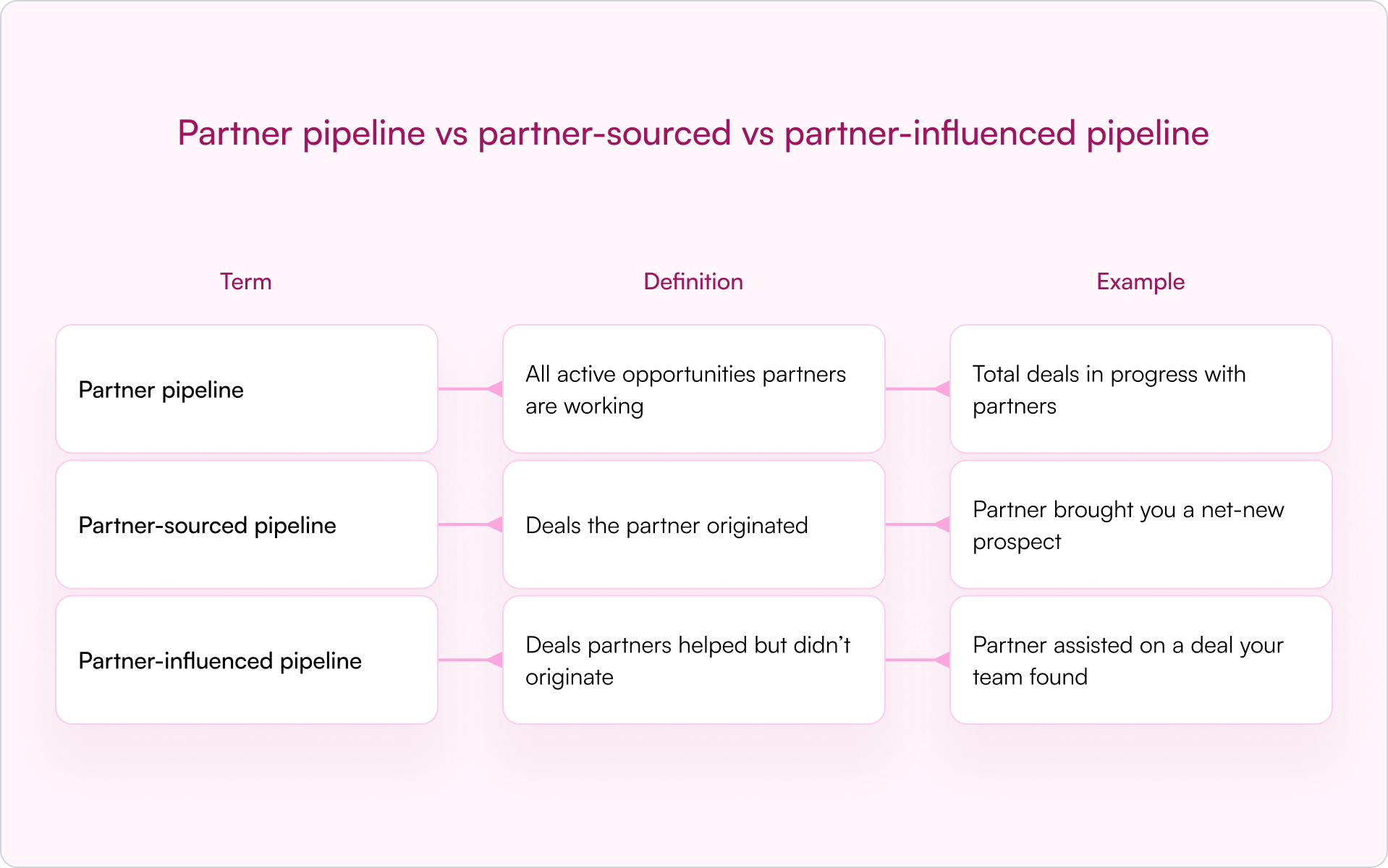
Partner pipeline vs partner-sourced vs partner-influenced pipeline
These terms get used interchangeably in board decks and QBRs, but they mean different things. Here’s the clean way to keep them straight.
Partner pipeline defined
Partner pipeline is the full set of opportunities in your partner channel, regardless of who found them first. It includes deals partners sourced, deals they’re influencing, and co-sell motions where both teams are actively involved.
Partner-sourced pipeline defined
Partner-sourced deals are opportunities where the partner identified and referred the prospect. They’re net-new to your business, meaning the partner created the demand. This is often the cleanest input into attribution and the easiest to credit.
Partner-influenced pipeline defined
Partner-influenced deals are opportunities where a partner contributed — through technical expertise, customer relationships, or implementation support — but your direct team (or another source) originated the lead.
Influenced deals still matter for forecasting and fair attribution. Many teams split credit between sourced and influenced to reflect the actual contribution.
How partner pipeline management works
Partner pipeline management is the operational workflow that moves deals from registration through close. It’s not a concept — it’s a set of repeatable steps you can instrument and improve.
Deal registration and lead intake
Deal registration is the process where partners formally submit opportunities for approval and protection. This is the entry point for pipeline.
When a partner registers a deal, they’re claiming ownership and requesting protection from competition, whether from other partners or your direct team. Modern approaches allow registration via forms, email, or portal without forcing partner logins.
Opportunity tracking and stage updates
Once registered, deals move through stages. Partners (or partner managers) update status as opportunities progress — from qualified to proposal to negotiation to close.
The common failure mode is predictable: you end up chasing partners for updates, partners don’t respond, and the partner pipeline becomes stale. Low-friction update methods (for example, email replies that sync back to your CRM) improve compliance without nagging.
CRM sync and data flow
Partner pipeline data belongs in your CRM (Salesforce, HubSpot) — not a separate spreadsheet or a disconnected portal. This is where a CRM-first approach matters.
When partner data lives in your CRM, everyone sees the same reality: Sales, Partnerships, RevOps, and leadership. Clean CRM data enables accurate reporting, forecasting, and attribution.
Pipeline reporting and dashboards
Once data flows into your CRM, you can build reports showing partner pipeline by stage, partner, region, product, and sourced vs. influenced contribution.
This is what makes a partner program measurable. Without reporting, you’re relying on memory and anecdotes — which doesn’t scale past a handful of deals.
Common partner pipeline stages
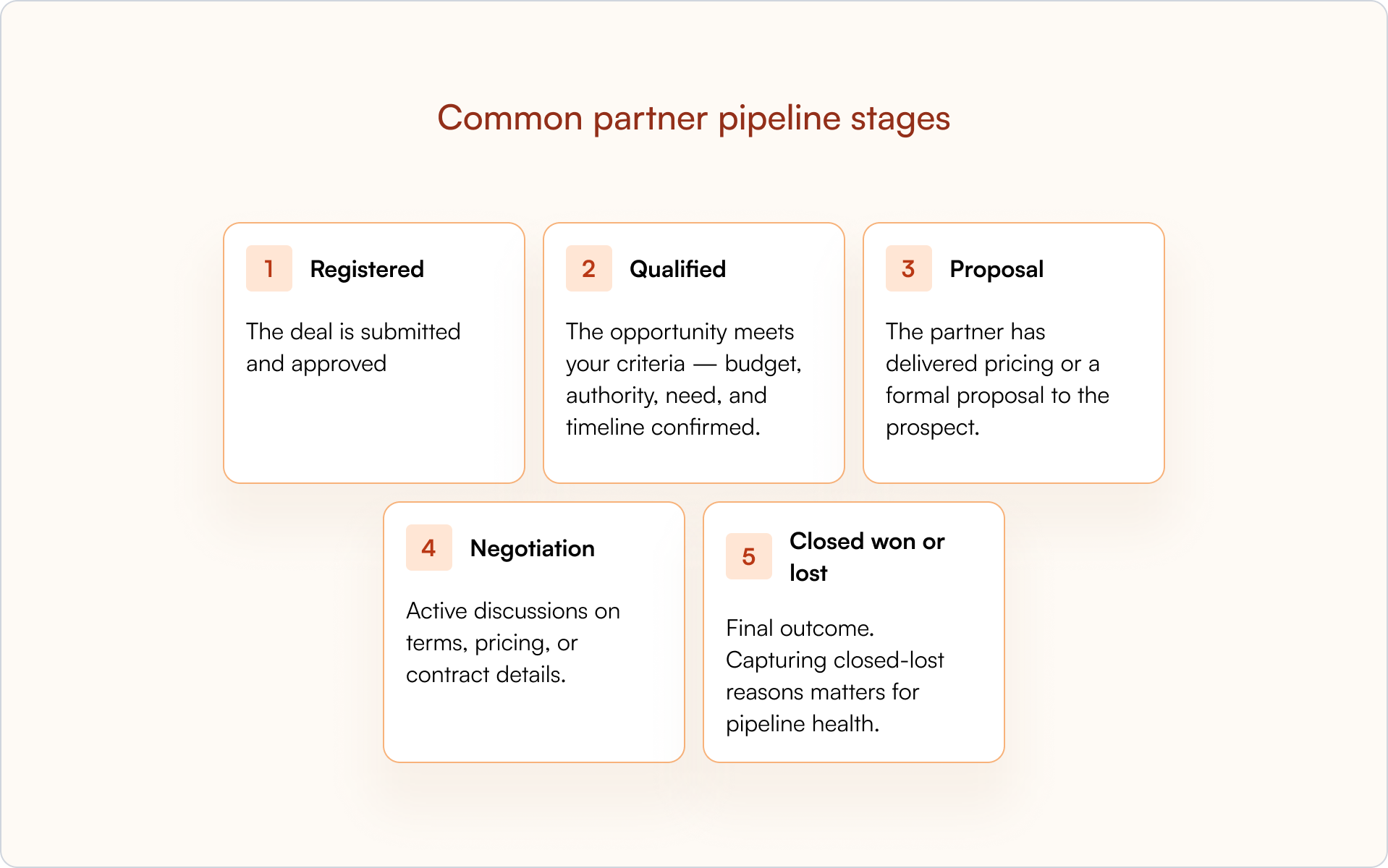
Partner pipeline stages typically mirror your direct sales stages, though some teams simplify them for partners. A common structure looks like this:
Registered
The deal is submitted and approved. The protection period begins, typically 60–90 days where the partner has exclusive ownership.
Qualified
The opportunity meets your criteria — budget, authority, need, and timeline confirmed. This is where you know the deal is real.
Proposal
The partner has delivered pricing or a formal proposal to the prospect. The deal is actively being worked.
Negotiation
Active discussions on terms, pricing, or contract details. The deal is close to a decision.
Closed won or lost
Final outcome. Capturing closed-lost reasons matters for pipeline health: it tells you where deals are falling apart and whether partners need enablement, better positioning, or faster internal support.
Key partner pipeline metrics to track
Here are the metrics partner managers and revenue leaders typically monitor:
- Partner pipeline coverage: Ratio of partner pipeline to partner revenue target. Indicates whether you have enough deals in motion to hit goals.
- Partner pipeline velocity: How quickly deals move through stages. Slower velocity can signal enablement gaps or stuck deals.
- Partner win rate: Percentage of partner deals that close successfully. Compare to direct sales to understand partner effectiveness.
- Partner-sourced revenue: Total closed revenue from partner-originated deals. Often the clearest output metric.
- Average deal size by partner: Reveals which partners bring larger opportunities and informs where to invest (enablement, MDF, co-sell support).
How to track partner pipeline in your CRM
Setting up partner pipeline tracking in Salesforce or HubSpot is where “CRM-first” becomes real. The goal is simple: partner-submitted data should land in the same system your revenue team actually uses to run the business.
Essential fields for partner opportunities
Add the following fields to your opportunity (or deal) records:
- Partner name: which partner is working the deal
- Partner type: referral, reseller, SI, etc.
- Deal registration ID: link to the registration record
- Sourced vs. influenced: how the partner contributed
- Registration expiration date: when protection ends
Without partner fields, you can’t report on partner pipeline accurately — and you’ll struggle to resolve conflicts when they inevitably show up mid-quarter.
Partner pipeline tracking in Salesforce
In Salesforce, partner pipeline tracking typically means custom fields on the Opportunity object, partner account relationships, and reports filtered by partner. Stage-change validations can enforce that partner fields are populated before deals advance.
Introw’s Salesforce integration syncs partner-submitted data automatically, so you don’t rely on manual entry.
Partner pipeline tracking in HubSpot
In HubSpot, you’ll use deal properties, partner company associations, and dashboards. The same principle applies: partner data flows into your CRM without manual work.
Introw’s HubSpot integration keeps partner data clean and visible to everyone who needs it.
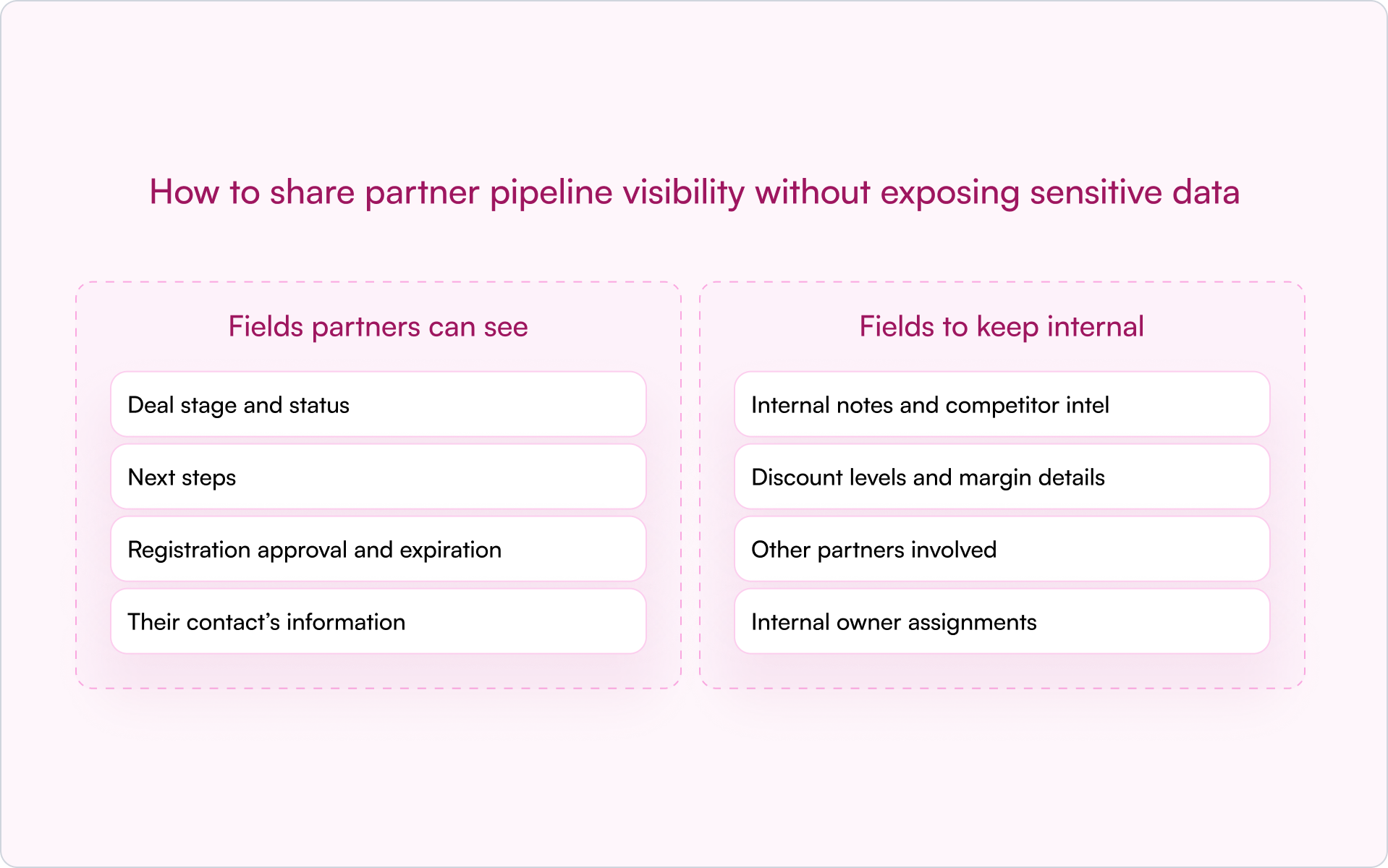
How to share partner pipeline visibility without exposing sensitive data
Partners want to see their deal status. That’s reasonable — it helps them sell. But you typically can’t (and shouldn’t) expose everything you track internally, like pricing strategy, discount levels, margin, or internal deal notes.
Fields partners can see
- Deal stage and status
- Next steps
- Registration approval and expiration
- Their contact’s information
Fields to keep internal
- Internal notes and competitor intel
- Discount levels and margin details
- Other partners involved
- Internal owner assignments
Permission controls and role-based access
CRM-first tools let you define exactly which fields partners can view. SSO and role-based access ensure the right people see the right data — and only that data.
Introw’s shared pipeline feature handles this without building custom portals. Partners see their deals; you control what’s visible.
When to start tracking partner pipeline
Not every company needs formal partner pipeline tracking from day one. But there are clear signals you’ve outgrown informal processes.
- You have more than a handful of active partners
- Deals are being disputed or duplicated
- You can’t forecast partner revenue accurately
- Partners complain about lack of visibility into their deals
If any of that sounds familiar, the “spreadsheet + email thread + memory” system is already costing you deals and trust. The fix isn’t more admin work — it’s better plumbing.
How to build a CRM-first partner pipeline
A CRM-first approach means partner pipeline tracking is built on top of your existing CRM, not in a separate system that hides partner activity and forces your team to reconcile data at the end of every month.
The benefits are practical:
- Single source of truth: Sales, Partnerships, and RevOps see the same data.
- No partner login friction: Partners can register deals and get updates without logging into another portal.
- Real-time visibility: Pipeline stays current instead of waiting on manual syncs.
- Clean attribution: Partner-sourced and partner-influenced revenue becomes trackable and forecastable.
This is what modern partner relationship management software is designed to support: not a second system, but an extension of the CRM you already use.
Conclusion: make partner pipeline a first-class revenue input
If you’re serious about partnerships as a growth lever, your partner pipeline can’t live in the shadows. Once you track it inside your CRM, you get better forecasting, cleaner attribution, and fewer surprises — which is exactly what you want as you scale.
If you want to see how this works in practice, book a demo and walk through how Introw tracks partner pipeline inside your CRM.
Still curious? Here are some quick answers to help clear things up
Sales pipeline typically refers to your direct team’s opportunities. Partner pipeline tracks deals where a channel partner is actively involved — often with different ownership rules (deal protection), different update workflows, and different reporting requirements for sourced vs. influenced credit.
Think of partner pipeline as the umbrella: all active opportunities that include a partner. Partner-sourced pipeline is the subset where the partner originated demand. Partner-influenced pipeline is the subset where the partner helped advance a deal that originated elsewhere.
Divide your total partner pipeline value by your partner revenue target for a given period. For example, if your partner revenue target is $500k and your active partner pipeline is $1.5M, you have 3× coverage. The “right” coverage depends on your win rate and cycle length.
No. Partners should see only their own deals and only the fields required to execute (status, next steps, registration approval/expiration). Keep sensitive fields internal — pricing strategy, margins, internal notes, and other partner involvement — using role-based access controls.
Most programs expect updates when deal stages change or at minimum weekly for active opportunities. If you want higher compliance, reduce friction: automate reminders, allow updates via email, and avoid requiring partners to log into a portal just to change one field.




See AI-Native PRM in Action
Book a demo with one of our partner program experts, or explore Introw on your own time.